Community
    • Login

    New version of HTML Tag

    Scheduled Pinned Locked Moved Notepad++ & Plugin Development
    html plugins
    39 Posts 6 Posters 22.7k Views 3 Watching
    Loading More Posts
    • Oldest to Newest
    • Newest to Oldest
    • Most Votes
    Reply
    • Reply as topic
    Log in to reply
    This topic has been deleted. Only users with topic management privileges can see it.
    • arel3A Offline
      arel3
      last edited by

      Please update the 'readme.textfile`. It does not include activating the plugin through the Plugins Admin menu. I figured that out but not everyone is guaranteed to know that step is required.

      After copying the .dll to the plugins folder:

      1. Open the the Plugins menu and then open ‘Plugins Admin…’

      2. Searching for HTML if there’s a long list (as there is for me)

      3. Check the checkbox to the left of the plugin name in the list.

      4. Click the “Install” button in the upper left.
        notepad++ will restart and your plugin will then be activated and ready to be used.

      rdipardoR 1 Reply Last reply Reply Quote 0
      • rdipardoR Offline
        rdipardo @arel3
        last edited by

        @arel3 said in New version of HTML Tag:

        Please update the 'readme.textfile` . . .

        Done.

        1 Reply Last reply Reply Quote 2
        • rdipardoR Offline
          rdipardo
          last edited by

          Notes

          • Since v1.2, 64-bit versions of HTMLTag require Notepad++ 8.3 or newer.
          • Notepad++ 8.4 is not compatible with HTMLTag 1.2.1 or 1.2.2

          HTMLTag is now free (as in Free Pascal)

          1.3 will be the first version linked against Free Pascal’s open source runtime libraries.

          The transition from Delphi’s proprietary runtime took longer than expected; I don’t recommend doing the same with other Object Pascal plugins, especially if they depend on Delphi’s Visual Component Library. That HTMLTag had no GUI was a lucky exception. Potential contributors will find that a command line and GDB are all that’s needed to get started.

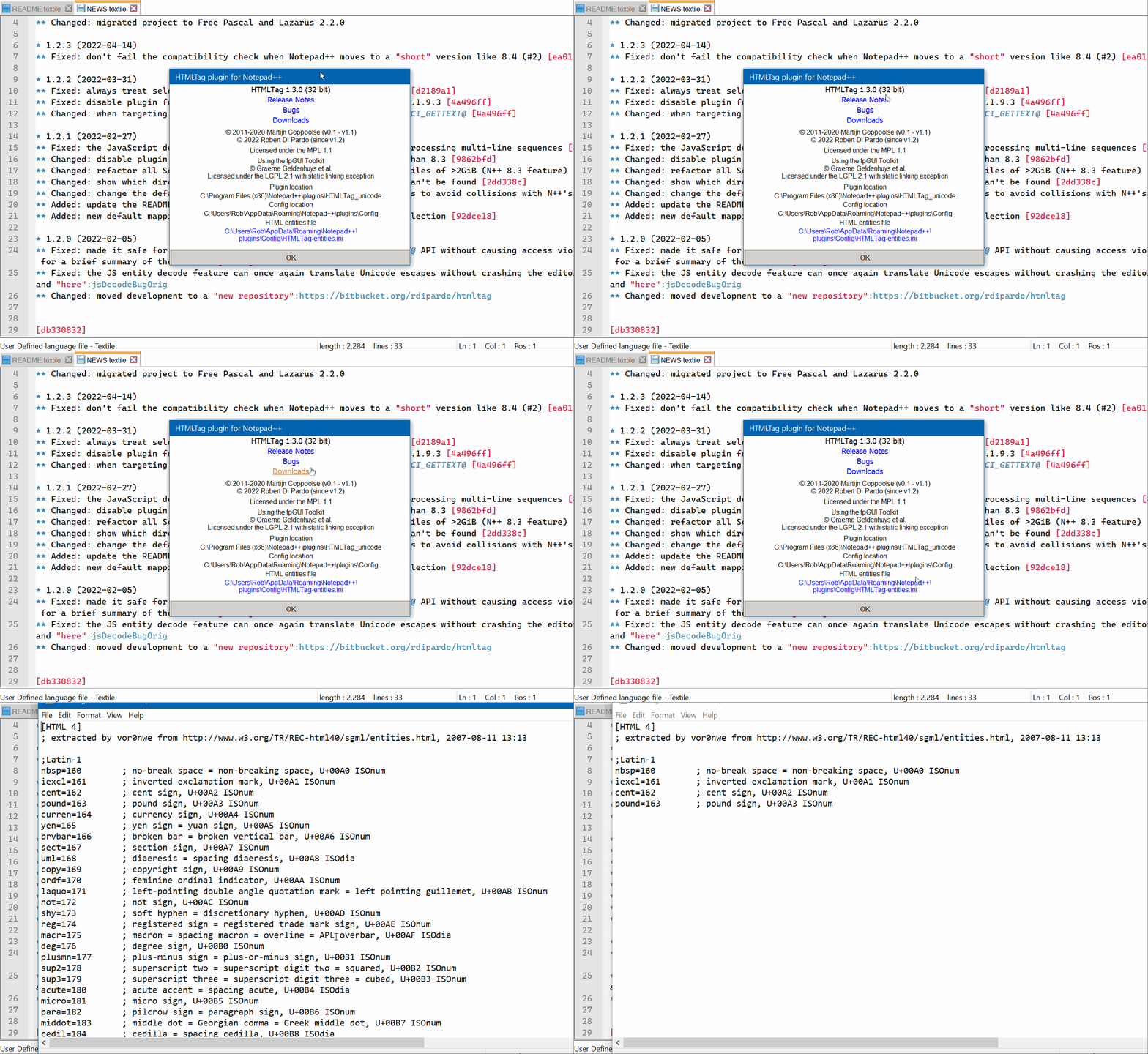
          To mark the milestone, the About dialog has been refreshed with clickable URLs and dynamic text revealing the path to the HTML entities configuration file. A missing file will be indicated by a red error message; when found, clicking will open it (in notepad.exe, unless you’ve hacked the Registry to make N++ the system’s default text editor):
          htmltagv130_002.gif

          No more load failures in 64-bit Notepad++

          As confirmed here, all 64-bit versions of HTMLTag will load without fail in N++ 8.4.1 and later.

          YaronY 1 Reply Last reply Reply Quote 6
          • YaronY Offline
            Yaron @rdipardo
            last edited by

            @rdipardo,

            I was not notified of your last post. Just happened to see it.

            v1.3.0 crashes NPP on going to the opening tag and on error.
            Could you please have a look?

            Thank you for you work.

            rdipardoR 1 Reply Last reply Reply Quote 1
            • rdipardoR Offline
              rdipardo @Yaron
              last edited by

              @yaron,
              Was it a source build that crashed? I know the proposed upgrade to Scintilla 5.2.3 involves a scary-looking change to the builtin tag matcher, but it’s not been merged yet.

              For me, the x64 release DLL runs fine in the latest N++.

              Notepad++ v8.4.2   (64-bit)
              Build time : May 29 2022 - 16:47:30
              Path : C:\bin\npp_8.4.2_x64\notepad++.exe
              Command Line : $COMMAND_LINE_PLACEHOLDER$
              Admin mode : OFF
              Local Conf mode : ON
              Cloud Config : OFF
              OS Name : Windows 11 (64-bit) 
              OS Version : 21H2
              OS Build : 22000.708
              Current ANSI codepage : 1252
              Plugins : 
                  HTMLTag (1.3)
                  mimeTools (2.8)
                  NppConverter (4.4)
                  NppExport (0.4)
              
              rdipardoR 1 Reply Last reply Reply Quote 0
              • rdipardoR Offline
                rdipardo @rdipardo
                last edited by

                [Edit] I think what you’re seeing is an infinite loop that freezes up the editor when you search for a non-existent closing tag. The application window fades with the “Not responding” message, correct?

                It’s a regression from my attempt to fix a memory leak in the Unicode escape decoder. I’ll release a new version when it’s fixed.

                YaronY 1 Reply Last reply Reply Quote 4
                • YaronY Offline
                  Yaron @rdipardo
                  last edited by

                  @rdipardo said in New version of HTML Tag:

                  I think what you’re seeing is an infinite loop that freezes up the editor when you search for a non-existent closing tag. The application window fades with the “Not responding” message, correct?

                  Correct. That’s “on error”.
                  And the second case is: place the caret on a closing tag and “Find a matching tag”.

                  I’ll release a new version when it’s fixed.

                  Great.
                  Many thanks.

                  rdipardoR 1 Reply Last reply Reply Quote 2
                  • rdipardoR Offline
                    rdipardo @Yaron
                    last edited by rdipardo

                    The latest build should be more stable.

                    YaronY 1 Reply Last reply Reply Quote 2
                    • YaronY Offline
                      Yaron @rdipardo
                      last edited by

                      @rdipardo,

                      Fixed.
                      Thank you.

                      1 Reply Last reply Reply Quote 1
                      • rdipardoR Offline
                        rdipardo
                        last edited by

                        Note

                        Since v1.2, 64-bit versions of HTMLTag require Notepad++ 8.3 or newer.


                        1.3.6 is the first version that will survive the deprecation of Scintilla’s non-*FULL APIs. This comes with no loss of backward-compatibility with N++ versions older than 8.4.3.

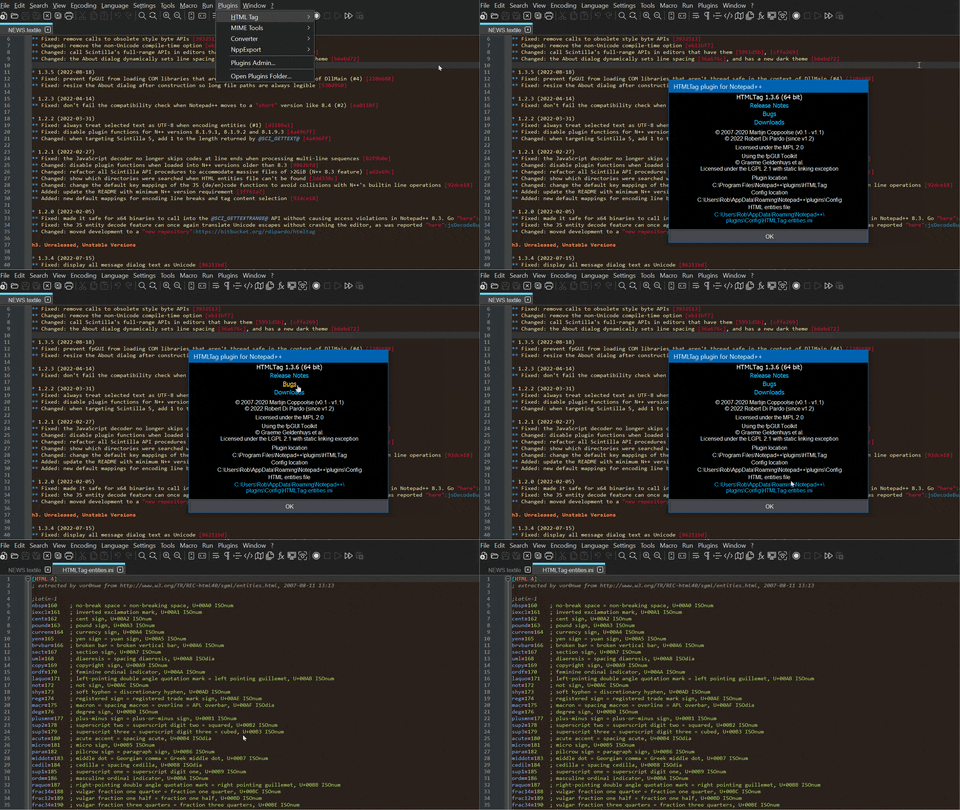
                        Using N++ 8.4.1 and newer in dark mode will dynamically change the style of About dialog:
                        htmltag_v136_x64.gif

                        Now that 7-zip has begun preserving the Zone.Identifier file attribute (as the builtin Windows utility has always done), the README has been updated with a guide to unblocking manually downloaded DLLs. Zipballs will no longer contain the (useless) HTMLTag.ini file.

                        Magyar EgyM 1 Reply Last reply Reply Quote 4
                        • Magyar EgyM Offline
                          Magyar Egy @rdipardo
                          last edited by

                          @rdipardo Hi, the site (https://bitbucket.org/rdipardo/htmltag/) unavailable. Can you send me the plugin or upload to other host, like Github?

                          Thanks.

                          Alan KilbornA rdipardoR 2 Replies Last reply Reply Quote 0
                          • Alan KilbornA Offline
                            Alan Kilborn @Magyar Egy
                            last edited by

                            @Magyar-Egy said in New version of HTML Tag:

                            the site (https://bitbucket.org/rdipardo/htmltag/) unavailable.

                            It is available when I try it.

                            Magyar EgyM 1 Reply Last reply Reply Quote 1
                            • Magyar EgyM Offline
                              Magyar Egy @Alan Kilborn
                              last edited by

                              @Alan-Kilborn Possible that non available from Hungary? All pages from https://bitbucket.org domain crash, but Atlassian other pages, like Trello works fine.

                              Can you upload a zip and send me a link?

                              Thanks.

                              rdipardoR 2 Replies Last reply Reply Quote 0
                              • rdipardoR Offline
                                rdipardo @Magyar Egy
                                last edited by

                                @Magyar-Egy,

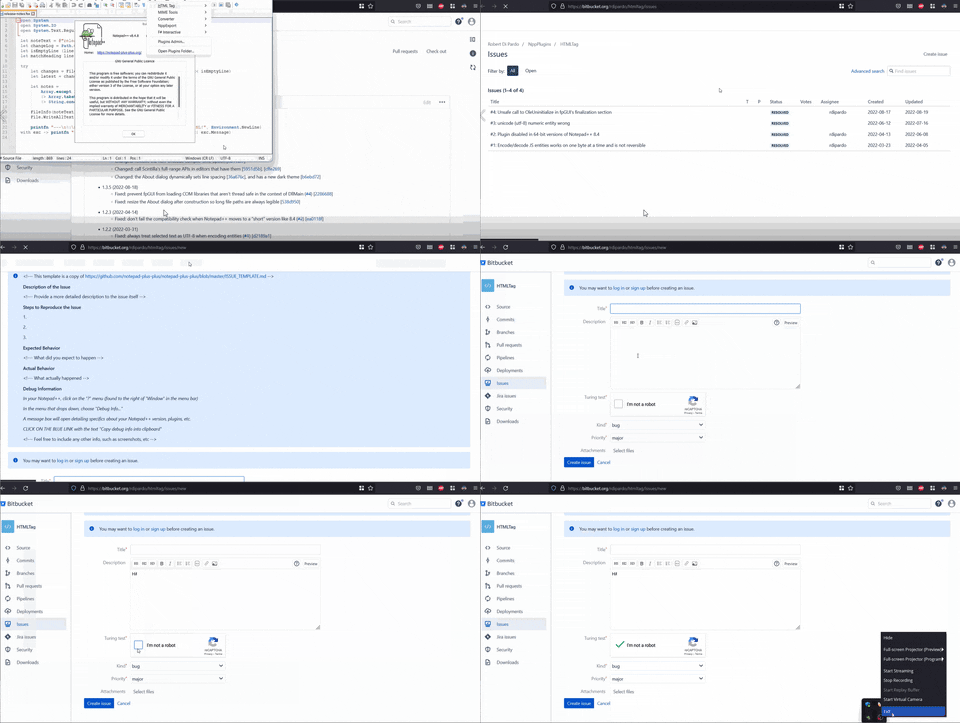
                                • Are you in a geographic area that blocks access to certain domains? (If so, are you sure that — Microsoft’s — GitHub is on the whitelist?)

                                • Have you tried installing the plugin with the Plugins Admin utility that comes with Notepad++?
                                bb-issue-creation

                                1 Reply Last reply Reply Quote 0
                                • rdipardoR Offline
                                  rdipardo @Magyar Egy
                                  last edited by

                                  @Magyar-Egy,

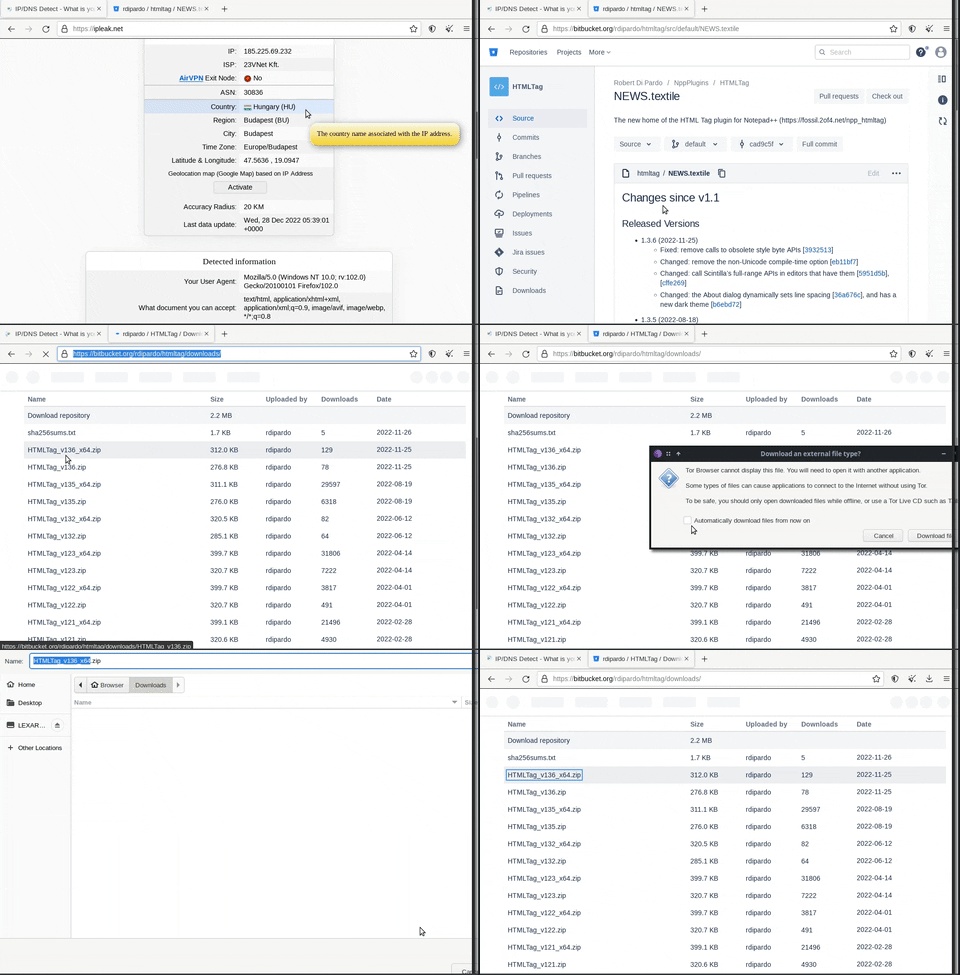
                                  Possible that non available from Hungary?

                                  For what it’s worth, I can reach it without a problem from the Tor Browser while behind a Hungarian IP address.
                                  tor-exit-node-hu

                                  Magyar EgyM 1 Reply Last reply Reply Quote 0
                                  • Magyar EgyM Offline
                                    Magyar Egy @rdipardo
                                    last edited by

                                    @rdipardo Thanks, i reached it from mobile network. i do not understand why, but wired internet connection can not reach Bitbucket. WTF? :S Maybe our firewall blocked this domain (i no use user configured firewall, only that has in ASUS router)? I’ve never seen like this before.

                                    1 Reply Last reply Reply Quote 0
                                    • rdipardoR Offline
                                      rdipardo
                                      last edited by

                                      Note to users — versions 1.3.5 - 1.3.6 are affected by a recent breaking change to N++'s graphics rendering subsystem. See my bug report for details and a temporary workaround.

                                      1 Reply Last reply Reply Quote 2
                                      • rdipardoR Offline
                                        rdipardo @Magyar Egy
                                        last edited by

                                        @Magyar-Egy said in New version of HTML Tag:

                                        Can you send me the plugin or upload to other host, like Github?

                                        A GitHub mirror is now online at https://github.com/rdipardo/nppHTMLTag

                                        rdipardoR 1 Reply Last reply Reply Quote 2
                                        • rdipardoR Offline
                                          rdipardo @rdipardo
                                          last edited by rdipardo

                                          It seems Bitbucket recently put more of its web UI behind authentication, so anonymous bug reports are no longer possible. As backup, the GitHub mirror now has its own issue tracker.

                                          If you’re using a released version (including the most recent 1.3.7), you’ll still be pointed to Bitbucket by clicking the “Bugs” hyperlink in the About dialog.

                                          1 Reply Last reply Reply Quote 2
                                          • rdipardoR Offline
                                            rdipardo
                                            last edited by

                                            Localizations

                                            A future version of HTMLTag will feature a localized menu, e.g.,
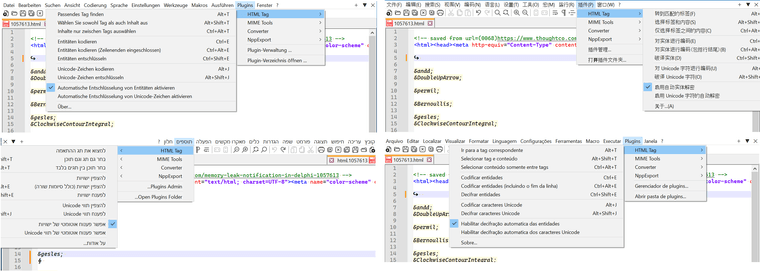
                                            htmltag-localizedx900.png

                                            The implementation is ad hoc since there are no plugin APIs exposing the user’s native language preferences. I may try pitching some new APIs upstream before an implementation is finalized.

                                            In the meantime, there are some boilerplate translations in version control that could benefit from proofreading by native speakers; PRs adding missing languages are also welcome.


                                            New Release

                                            The latest version adds emoji (en/de)coding and options to decode as you type.
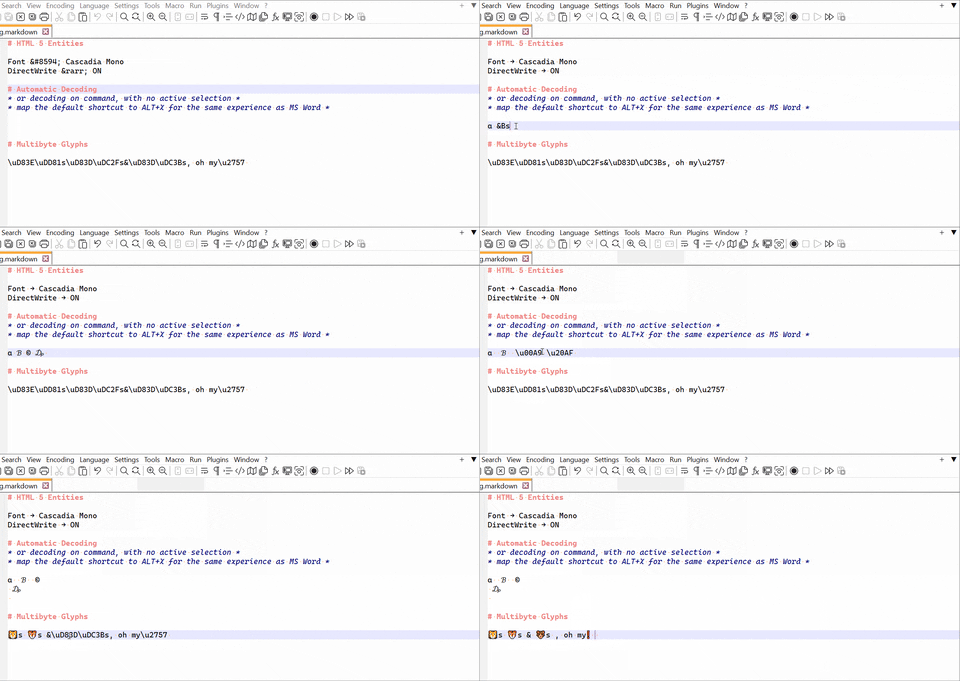
                                            htmltag-v140-preview

                                            Breaking Changes

                                            • The shortcuts Ctrl+T and Ctrl+Shift+T have changed to Alt+T and Alt+Shift+T, respectively

                                            • The default file path of the entities character mappings is now <NPP_Install_Dir>\plugins\Config\HTMLTag\entities.ini.

                                            If you want to keep using an older entities file, rename it to match the above path, and change 4 to 5 in the HTML section:

                                            [HTML 5]
                                            ;[HTML 4]
                                            

                                            Note: the HTMLTag subfolder is the same for all target CPUs; there is no _unicode suffix for 32-bit versions

                                            1 Reply Last reply Reply Quote 4

                                            Hello! It looks like you're interested in this conversation, but you don't have an account yet.

                                            Getting fed up of having to scroll through the same posts each visit? When you register for an account, you'll always come back to exactly where you were before, and choose to be notified of new replies (either via email, or push notification). You'll also be able to save bookmarks and upvote posts to show your appreciation to other community members.

                                            With your input, this post could be even better 💗

                                            Register Login
                                            • First post
                                              Last post
                                            The Community of users of the Notepad++ text editor.
                                            Powered by NodeBB | Contributors

