Default Find button
-
When CTRL-F is pressed for bringing up “Find” window, the default search button is “Find Next”. Everytime the search is conducted, I have to manually hit “Find All in Current Document”, because that is my preference instead of “Find Next”. How can I make this “Find All in Current Document” button the default ‘Find’ button instead of “Find Next”? Thanks.
-
@Amazon-Books ,
CTRL-F brings up “Find” Window. You type in your find text, and then you hit tab or click the button that saysFind All In Current Document, or you can hit the accelerator key character in that boxDordto jump to it.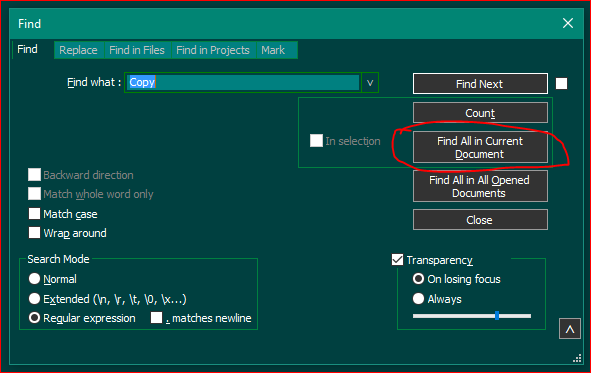
-
@Amazon-Books said in Default Find button:
How can I make this “Find All in Current Document” button the default ‘Find’ button instead of “Find Next”?
You can’t, at least not easily.
I suppose what you want is to simply press Enter to have FACD happen.
Suggest take @Lycan-Thrope 's suggestion and retrain yourself to hit Alt+d instead of Enter in this circumstance.



Hello! It looks like you're interested in this conversation, but you don't have an account yet.
Getting fed up of having to scroll through the same posts each visit? When you register for an account, you'll always come back to exactly where you were before, and choose to be notified of new replies (either via email, or push notification). You'll also be able to save bookmarks and upvote posts to show your appreciation to other community members.
With your input, this post could be even better 💗
Register Login