How to see .htaccess file in directory tree
-
Hello Forum;
Question: How do I get the .htaccess file to show or display in the directory tree at the right in Notepad++?
The directory tree for Notepad++ does not show the .htaccess file. I am using Version 8.5.4 of Notepad++.
I am able to see the .htaccess file in FileZilla but not in Notepad++
Here’s what the directory tree looks like in Notepad++:
/home/mysite/public_html/ (no .htaccess file)
folder_one
folder_two
folder_three
index.phpHere’s what the directory tree looks like in FileZilla:
/home/mysite/public_html/ (displays .htaccess file)
folder_one
folder_two
folder_three
.htaccess
index.phpThank you in advance.
-
@Pete-Norris-0 said in How to see .htaccess file in directory tree:
directory tree at the right in Notepad++?
Wild guess: You are talking about the file/directory listing area of the NppFTP plugin? (posting screenshots would have helped clear up this situation)
-
@Pete-Norris-0 ,
If @Alan-Kilborn was right about …
file/directory listing area of the NppFTP plugin
Just so you know, I have no problem seeing .htaccess
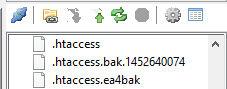
I think it’s a function of the server (not the client) whether or not a normal FTP
lswill show hidden files or not. Perhaps FileZilla is adding-alto thelscommand, and your server wants that.If so, NppFTP has the option to add command-line switches to the FTP
lscommand. In the profile settings for the profile that connects to a given server, go to the FTP Misc. tab of the settings:

Notice the “Hint: try “-al” to show hidden files”. So my suggestion to you is to add
-alto the LIST parameters box, and see if that will have your NppFTP listing also show the hidden files. -
Mr. Kilborn, Mr. Jones;
Thank you for responding.
I added the -al to the “LIST Parameters:” box under the FTP Misc. tab and it now works fine.
Thanks again for the information.
PN



Hello! It looks like you're interested in this conversation, but you don't have an account yet.
Getting fed up of having to scroll through the same posts each visit? When you register for an account, you'll always come back to exactly where you were before, and choose to be notified of new replies (either via email, or push notification). You'll also be able to save bookmarks and upvote posts to show your appreciation to other community members.
With your input, this post could be even better 💗
Register Login