Community
    • Login

    Toolbar icons are missing

    Scheduled Pinned Locked Moved Help wanted · · · – – – · · ·
    10 Posts 5 Posters 5.9k Views 2 Watching
    Loading More Posts
    • Oldest to Newest
    • Newest to Oldest
    • Most Votes
    Reply
    • Reply as topic
    Log in to reply
    This topic has been deleted. Only users with topic management privileges can see it.
    • P Offline
      palur76
      last edited by

      Hi,

      after updating to 8.6.9, all my toolbar icons are disappeared. Tried to reinstall Notepad++, but the icons are still gone.

      Any ideas?

      Alan KilbornA Stephan MelocheS 2 Replies Last reply Reply Quote 0
      • Alan KilbornA Offline
        Alan Kilborn @palur76
        last edited by

        @palur76

        Maybe THIS helps you?

        P 1 Reply Last reply Reply Quote 1
        • P Offline
          palur76 @Alan Kilborn
          last edited by

          @Alan-Kilborn nope, and I don’t use this plugin.

          Alan KilbornA 1 Reply Last reply Reply Quote 0
          • Alan KilbornA Offline
            Alan Kilborn @palur76
            last edited by

            @palur76

            Hmm, okay, well there’s a Preference setting to hide the toolbar; maybe somehow that got turned on?

            P 1 Reply Last reply Reply Quote 0
            • E Offline
              ez009
              last edited by

              Same thing here. Toolbar is enabled. Just no icons are visible.
              I tried resetting ‘customize toolbar’ prefs to default and changed the type and size settings. but nothing.

              1 Reply Last reply Reply Quote 0
              • P Offline
                palur76 @Alan Kilborn
                last edited by

                @Alan-Kilborn nope, sorry. The place for the toolbar is there (and I can turn it on / off in the settings).
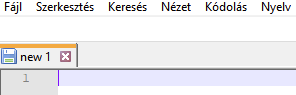
                a4a05bc8-5e2b-4ea2-b54e-4d39e823eb66-kép.png

                PeterJonesP 1 Reply Last reply Reply Quote 0
                • PeterJonesP Offline
                  PeterJones @palur76
                  last edited by

                  @palur76 ,

                  Though you said you don’t use the Customized Toolbar Plugin, maybe you have some other plugin that’s messing up the Toolbar.

                  When weird, unexplainable things are happening in Notepad++, I like to point users to this FAQ, especially the Possible Culprit: Plugins section, which gives instructions on how to narrow down where the root cause is.

                  And, as always, when asking for help about weird things going on with Notepad++, it’s best to include the ?-menu’s Debug Info because that includes information that is useful to help people debug your problem.

                  1 Reply Last reply Reply Quote 3
                  • Stephan MelocheS Offline
                    Stephan Meloche @palur76
                    last edited by

                    @palur76

                    Hi there, Go to;
                    1 - Plugins / Open Plugins Folder
                    2 - Rename _CustomizeToolbar to CustomizeToolbar
                    3 - Restart Notepad++ and icons should be there
                    4 - Reinstall the Customize Toolbar plugin and you should be good to go

                    P 1 Reply Last reply Reply Quote 0
                    • P Offline
                      palur76 @Stephan Meloche
                      last edited by

                      @Stephan-Meloche Thanks a lot, it helped.

                      PeterJonesP 1 Reply Last reply Reply Quote 0
                      • PeterJonesP Offline
                        PeterJones @palur76
                        last edited by

                        @palur76 ,

                        If that helped, then you were using CustomizeToolbar plugin. Why did you say you weren’t?

                        1 Reply Last reply Reply Quote 0

                        Hello! It looks like you're interested in this conversation, but you don't have an account yet.

                        Getting fed up of having to scroll through the same posts each visit? When you register for an account, you'll always come back to exactly where you were before, and choose to be notified of new replies (either via email, or push notification). You'll also be able to save bookmarks and upvote posts to show your appreciation to other community members.

                        With your input, this post could be even better 💗

                        Register Login
                        • First post
                          Last post
                        The Community of users of the Notepad++ text editor.
                        Powered by NodeBB | Contributors