C# Plugin - Characters missing in message box
-
Hello Plugin Community,
im starting fresh with the C# Plugin from: https://github.com/molsonkiko/NppCSharpPluginPack
I want to read the marked characters in the editor, here “Notepad”, and use it later for searching text in a XML file. For testing i used a message box for displaying the string, but every second character is missing. Before that i didnt use the UTF8 conversion and directly passed the result of Win32.SendMessage(PluginBase.GetCurrentScintilla(), SciMsg.SCI_GETSELTEXT, 0, strSearchVariable); to the message box, which than showed some chinese looking like characters.
Any ideas what i am missing?
And yes, i need to learn more C# programming ;-)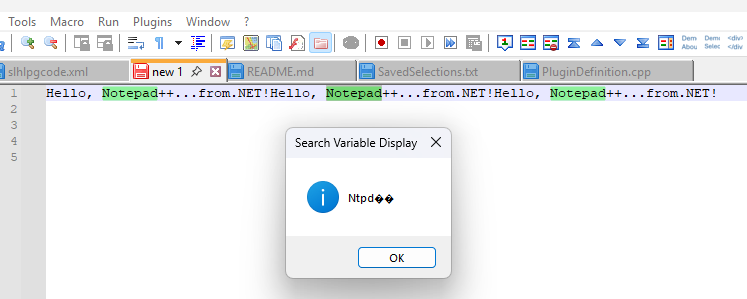
My C# Code:static void HelpMe() { int start = 0, end = 0; int bufferSize = 0; IntPtr intSelectionStart = Win32.SendMessage(PluginBase.GetCurrentScintilla(), SciMsg.SCI_GETSELECTIONSTART, 0, 0); IntPtr intSelectionEnd = Win32.SendMessage(PluginBase.GetCurrentScintilla(), SciMsg.SCI_GETSELECTIONEND, 0, 0); start = intSelectionStart.ToInt32(); end = intSelectionEnd.ToInt32(); bufferSize = start < end ? end - start : start - end; if (bufferSize > 0) { var strSearchVariable = new StringBuilder(bufferSize + 1); Win32.SendMessage(PluginBase.GetCurrentScintilla(), SciMsg.SCI_GETSELTEXT, 0, strSearchVariable); byte[] utf8_Bytes = new byte[strSearchVariable.Length]; for (int i = 0; i < strSearchVariable.Length; ++i) { utf8_Bytes[i] = (byte)strSearchVariable[i]; } string strTest = Encoding.UTF8.GetString(utf8_Bytes, 0, utf8_Bytes.Length); MessageBox.Show(strTest, "Search Variable Display", MessageBoxButtons.OK, MessageBoxIcon.Information); } else { MessageBox.Show("No Characters selected!", "Search Variable Display", MessageBoxButtons.OK, MessageBoxIcon.Warning); } } -
@superfestung said in C# Plugin - Characters missing in message box:
Any ideas what i am missing?
I don’t know C#, but until someone comes along who does, I can at least point out that somewhere along the line, you are reading UTF-8 into something that expects UTF-16.
I suspect that is happening when you use StringBuilder; it looks like that creates a UTF-16 buffer. You’re then sending a message to Scintilla, which returns UTF-8. Then you’re reading the characters (UTF-16, two bytes each) from StringBuilder into the bytes of UTF-8.
My guess is that there is probably a sensible wrapper for Scintilla included somewhere in the C# plugin pack, so you don’t have to do everything with bare SendMessage calls, but I don’t follow how to read the source.
If not, I think you need to pass the address of the utf8_Bytes buffer to SendMessage, rather than using StringBuilder; but I don’t know how that’s done in C#.
Edit to add:
While this isn’t your immediate problem, you’ll also need to consider that the data returned by Scintilla isn’t necessarily UTF-8; it could also be in the active system codepage. You will need to use SCI_GETCODEPAGE to know that. In C++, I use MultiByteToWideChar to convert between Scintilla’s representation and Windows’ wide characters.
-
@superfestung
I’m the maintainer of the plugin pack, but I’m out of town and can’t reach my computer until tomorrow evening. If you think this is a bug, consider opening an issue in the GH repo and I’ll look into it. -
@superfestung
To convert aStringBuilderto astring, use itsToStringmethod. And don’t cast acharto abyte. This is all basic C#, so read the docs. -
Thank you all for the answers!
I found a working solution for me, much simpler than i thought, when you know it.
@Coises You were right, i do not need the message calls.static void HelpMe() { int start = Npp.editor.GetSelectionStart(); int end = Npp.editor.GetSelectionEnd(); int bufferSize = start < end ? end - start : start - end; if (bufferSize > 0) { string strTest = Npp.editor.GetSelText(); MessageBox.Show(strTest, "Search Variable Display", MessageBoxButtons.OK, MessageBoxIcon.Information); } else { MessageBox.Show("No Characters selected!", "Search Variable Display", MessageBoxButtons.OK, MessageBoxIcon.Warning); } } -
I’m not a guru of C#, but I’d think it would be simpler to do:
static void HelpMe() { string strTest = Npp.editor.GetSelText(); if (strTest.Length > 0) { MessageBox.Show(strTest, "Search Variable Display", MessageBoxButtons.OK, MessageBoxIcon.Information); } else { MessageBox.Show("No Characters selected!", "Search Variable Display", MessageBoxButtons.OK, MessageBoxIcon.Warning); } } -
@Alan-Kilborn
Yes! Now its a beauty…



Hello! It looks like you're interested in this conversation, but you don't have an account yet.
Getting fed up of having to scroll through the same posts each visit? When you register for an account, you'll always come back to exactly where you were before, and choose to be notified of new replies (either via email, or push notification). You'll also be able to save bookmarks and upvote posts to show your appreciation to other community members.
With your input, this post could be even better 💗
Register Login