Community
    • Login

    How to insert blank line in between every line

    Scheduled Pinned Locked Moved Help wanted · · · – – – · · ·
    16 Posts 7 Posters 15.7k Views 1 Watching
    Loading More Posts
    • Oldest to Newest
    • Newest to Oldest
    • Most Votes
    Reply
    • Reply as topic
    Log in to reply
    This topic has been deleted. Only users with topic management privileges can see it.
    • Alan KilbornA Offline
      Alan Kilborn
      last edited by

      Alternatively, a well-placed ? in the original would have made it okay, even without the (?-s) and without caring about the checkbox setting:

      Find: ^.+?(\R)

      And no, Peter, repeated postings by me here is not a veiled attempt for more upvotes. :)

      EkopalypseE 1 Reply Last reply Reply Quote 2
      • EkopalypseE Offline
        Ekopalypse @Alan Kilborn
        last edited by

        @Alan-Kilborn

        hmm - what about
        find: \R
        replace: $0$0
        ?
        ;-)

        Alan KilbornA 1 Reply Last reply Reply Quote 2
        • Alan KilbornA Offline
          Alan Kilborn @Ekopalypse
          last edited by Alan Kilborn

          @Ekopalypse

          For me, that puts too much “blankness” in certain spots (say, between “paragraphs”). But since we have no idea really what the OP wants for this circumstance…

          1 Reply Last reply Reply Quote 3
          • Sean ShafferS Offline
            Sean Shaffer
            last edited by PeterJones

            I’m editing a list of trackers for torrenting. For better readability, I want each line to be spaced apart. For example,

            http://redacted1/announce
            http://redacted2/announce
            http://redacted3/announce
            

            would become:

            http://redacted1/announce
            
            http://redacted2/announce
            
            http://redacted3/announce
            

            moderator redacted urls and added code block; we don’t want this topic to become a honeypot for torrent-advertising spam

            A3 W2A 1 Reply Last reply Reply Quote 1
            • Sean ShafferS Offline
              Sean Shaffer
              last edited by

              Alan Kilborn provided the correct Find/Replace solution. Thank you!

              1 Reply Last reply Reply Quote 3
              • A3 W2A Offline
                A3 W2 @Alan Kilborn
                last edited by

                @Alan-Kilborn That worked for me, Thanks.
                Had same problem with separating a list of trackers as OP.

                1 Reply Last reply Reply Quote 0
                • A3 W2A Offline
                  A3 W2 @Sean Shaffer
                  last edited by

                  @Sean-Shaffer It’s not just for readability. It simply doesn’t work other way. I mean when you copy-paste a list of trackers - it has to be line separated like that, otherwise it just doesn’t work (talking uTorrent here).
                  So when i update the list in Notepad++ i hit “remove duplicates” and that also removes empty lines between addresses. So then i need to put them back, which this post helped me do. Nice, thanks everybody.

                  1 Reply Last reply Reply Quote 0
                  • A3 W2A Offline
                    A3 W2 @Alan Kilborn
                    last edited by

                    @Alan-Kilborn said in How to insert blank line in between every line:

                    Find: (?-s)^.+(\R)

                    typing this in Find does nothing and some small windows opens :) trying to use Replace messes up whole document, leaving only 2 lines there.
                    1st suggestion work fine, but that second idk, i wasn’t able to make it work.

                    1 Reply Last reply Reply Quote 0
                    • Slobodan KrstićS Offline
                      Slobodan Krstić
                      last edited by

                      Re: How to insert blank line in between every line
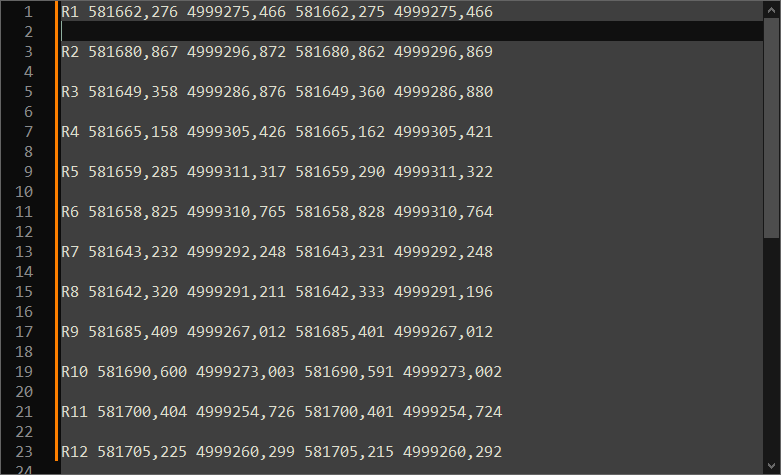
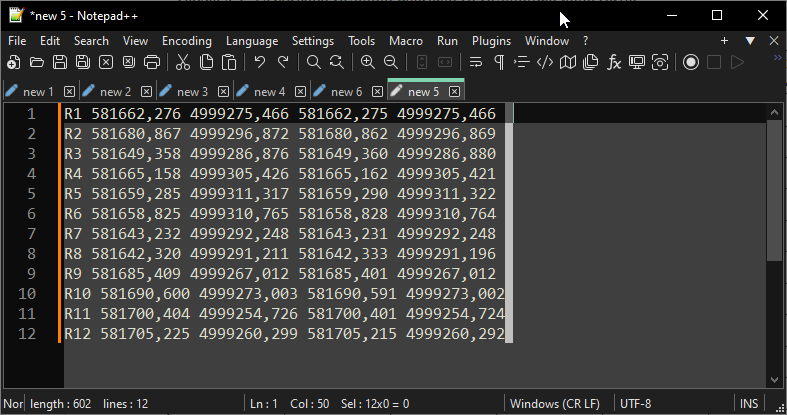
                      Using column selection (alt - left mouse btn)
                      A.png
                      press enter
                      B.png
                      Maybe the fastest way :))

                      1 Reply Last reply Reply Quote 1
                      • Chris StottC Offline
                        Chris Stott
                        last edited by

                        This worked for me on tracker list

                        Find: \n
                        replace: \n\n
                        search mode: extended

                        if you replace with \n\n\n it adds 2 lines inbetween

                        before:

                        after:

                        hope this helps


                        moderator deleted before/after data; don’t want this to become a honeypot for tracker url spamming

                        Alan KilbornA 1 Reply Last reply Reply Quote 0
                        • Alan KilbornA Offline
                          Alan Kilborn @Chris Stott
                          last edited by Alan Kilborn

                          @Chris-Stott said in How to insert blank line in between every line:

                          Find: \n
                          replace: \n\n
                          search mode: extended

                          This is rather dangerous.
                          Nice way to corrupt your files, possibly unknowingly, if your files are Windows and not Linux.

                          A better way might be:
                          Find: (\R)
                          Replace: $1$1
                          Search mode: Regular expression
                          I suppose this is about the same as @Ekopalypse 's post earlier, Jul 17, 2019, 11:01 AM.

                          EkopalypseE 1 Reply Last reply Reply Quote 3
                          • EkopalypseE Offline
                            Ekopalypse @Alan Kilborn
                            last edited by

                            @Alan-Kilborn said in How to insert blank line in between every line:

                            I suppose this is about the same as @Ekopalypse 's post earlie

                            No … I have zero dollars, you have two? No cookies for me :(

                            1 Reply Last reply Reply Quote 2

                            Hello! It looks like you're interested in this conversation, but you don't have an account yet.

                            Getting fed up of having to scroll through the same posts each visit? When you register for an account, you'll always come back to exactly where you were before, and choose to be notified of new replies (either via email, or push notification). You'll also be able to save bookmarks and upvote posts to show your appreciation to other community members.

                            With your input, this post could be even better 💗

                            Register Login
                            • First post
                              Last post
                            The Community of users of the Notepad++ text editor.
                            Powered by NodeBB | Contributors