Help to build PythonScript plugin
-
Someone can help me to build PythonScript from source code ( https://github.com/bruderstein/PythonScript ) ?
I’m trying to do same as Appveyor script (official builder machine):- Using Microsoft visual studio 2017 community
- Using platform toolset v140_xp
- My Visual Studio install contains components “ATL Visual C++” and “MFC Visual C++”
The build fails on the link:
Severity Code Description Project File Line Suppression State
Error RC1015 cannot open include file ‘afxres.h’. PythonScript D:\dev\PythonScript\PythonScript\res\PythonScript.rc 10I need to compile it because I want to contribute for some minor GUI improvement.
Thanks -
I downloaded the repo, changed the PythonSettigns.props file to match
my python directories and compiled it.afxres is found here
...\Microsoft Visual Studio\2017\Community\VC\Tools\MSVC\14.16.27023\atlmfc\include\afxres.hand it looks like it is defined via
$(VC_IncludePath)This stackoverflow post suggests it might be worth repairing the SDK installation.
Adding the directory to the PATH variable might be another way.
-
Thanks @Ekopalypse for your fast answer. I’m still not able to compile despite your informations. I’m digging.
Here is the command that fails (rc.exe)
C:\Program Files (x86)\Microsoft SDKs\Windows\v7.1A\bin\rc.exe /D USING_V110_SDK71 /D _UNICODE /D UNICODE /l"0x0
409" /nologo /fo"Release\PythonScript.res" …\res\PythonScript.rc
…\res\PythonScript.rc(10): fatal error RC1015: cannot open include file ‘afxres.h’. [d:\dev\PythonScript\PythonScri
pt\project\PythonScript2010.vcxproj]doesn’t that speak to you ?
-
-
@cmeriaux
You need to ask the author of the plugin, he generally does not have a manual for assembling the plugin. Perhaps additional components or libraries are needed. -
@Ekopalypse the Windows SDK reinstall didn’t work. However debugging wih proc monitor showned me the paths where RC.exe is looking for the header file.
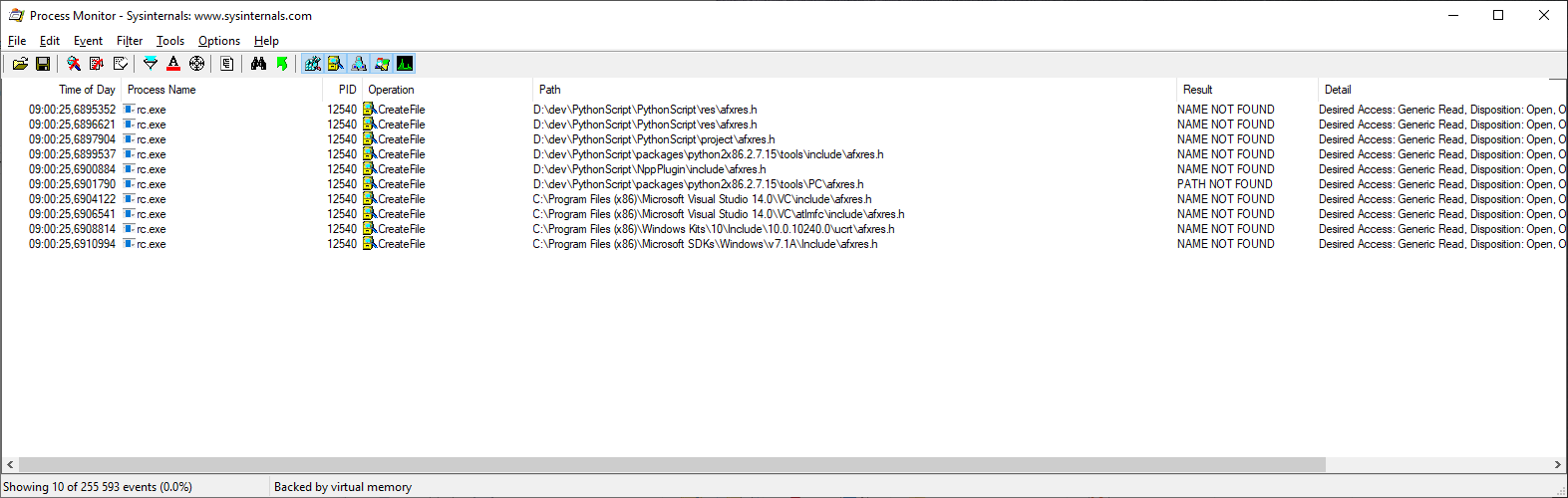
So I did a copy of the necessary afxres.h in a local project folder and it works !!! I’m not proud of it but it makes the build OK.
Thanks for the help
-
it looks that the general environment variables are defined in
Microsoft.Cpp.Common.propsfile which is located at
...\Microsoft Visual Studio\2017\Community\Common7\IDE\VC\VCTargetsand the toolset specific props are read from
...\Microsoft Visual Studio\2017\Community\Common7\IDE\VC\VCTargets\Platforms\x64\PlatformToolsetsSo I assume that one of those props files point to an non-existent atl include path.

Hello! It looks like you're interested in this conversation, but you don't have an account yet.
Getting fed up of having to scroll through the same posts each visit? When you register for an account, you'll always come back to exactly where you were before, and choose to be notified of new replies (either via email, or push notification). You'll also be able to save bookmarks and upvote posts to show your appreciation to other community members.
With your input, this post could be even better 💗
Register Login