SAVE all favorites?
-
@Alan-Kilborn You are an angel, thank you. I gonna go looking for that file once I have replied here :)
-
@PeterJones said in SAVE all favorites?:
Oh lord, no, I would not even imagine you/other users here, would “do the code changes”, no. You misunderstood the intent of my post (meant to be a question) = I asked badly, sorry for that.because the calls would have to be changed from the fixed-list method to the dynamic list method every place this list is used
This and more now made me realize that - programming-wise - we come from different worlds:
Back in A.D. I started with PASCAL, a language that forces “students” (I was 8) to learn to write structured code (a conundrum these days, agreed), and so I would (=did) simply put that in a “REPEAT” loop, no big deal :)And in terms of memory space and performance, as you rightfully point out, it doesn’t need to cause an issue either: We are dealing with simple characters, to be entered in both find and replace, no big deal, the notepad++ plugins alone have 1000sss of times more “code” than what I would program for this.
Only thing is: a) I believe a simple solution exists (is an obvious need), and b) whatever notepad++ was coded in almost certainly is not a “language” I old man would know and now want to learn, lol.Meaning: I go with your and Alan’s lovely workaround of using 30 find/replace at least, better than nothing, you know. Needa sleep now, but will go lookin for that xml file thereafter :)
MUCH THANKS to both of you, you’ve been helpful!
-
@Alan-Kilborn said in SAVE all favorites?:
nbMaxFindHistoryXXX
I looked already, but can’t find it, are you sure it’s called config.xml and is in the notepad++ folders somewhere, Alan?
-
@David-Bennett said in SAVE all favorites?:
@Alan-Kilborn said in SAVE all favorites?:
nbMaxFindHistoryXXX
I looked already, but can’t find it, are you sure it’s called config.xml and is in the notepad++ folders somewhere, Alan?
config.xmlis found in the%AppData%\Notepad++folder for a normal installation (just do File > Open and type in%AppData%\Notepad++\config.xml, and the right file will be opened)If you aren’t using
%AppData%, then either you have a portable/local version (in which caseconfig.xmlis in notepad++.exe’s directory) or you have moved your settings to the cloud, in which case you need to see Settings > Preferences > Cloud to know which folder containsconfig.xml.As always, if you supply us with ? > Debug Info, which contains much of this information, we can help you better.
-
@PeterJones said in SAVE all favorites?:
just do File > Open and type in %AppData%\Notepad++\config.xml, and the right file will be opened)
Yes, but maybe do that in plain old Notepad.exe and not notepad++.exe.
Why? Because notepad++.exe, when exiting, will blow away any changes made to config.xml as it saves its current config. -
@Alan-Kilborn said in SAVE all favorites?:
Yes, but maybe do that in plain old Notepad.exe and not notepad++.exe.
Amend that to:
Yes, but maybe do that in plain old Notepad.exe and not notepad++.exe, and have notepad++.exe not currently running. -
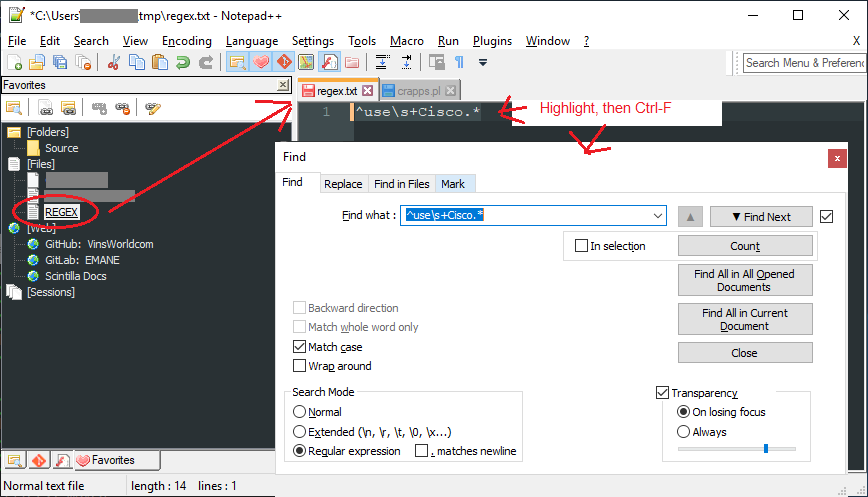
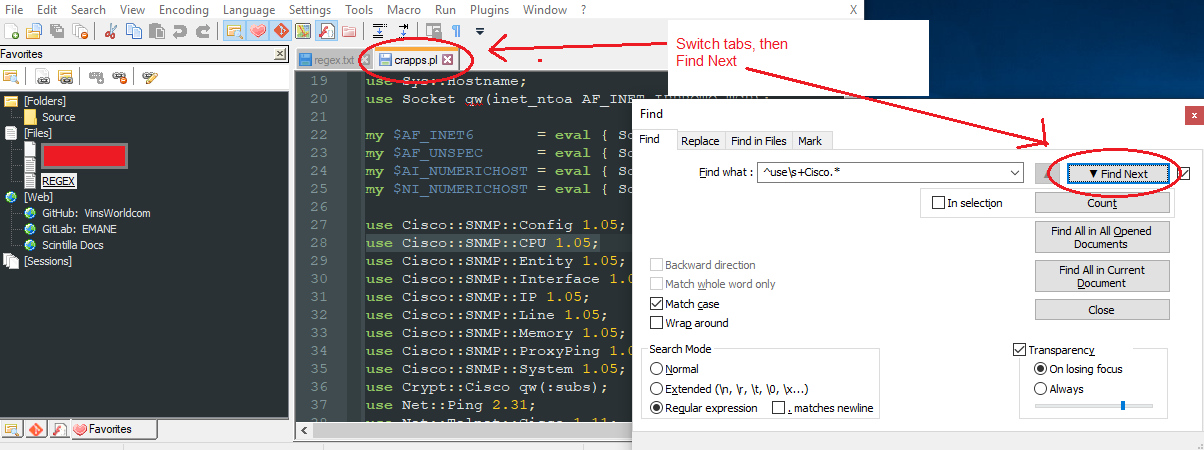
This is a bit of a hack, but could you use the Explorer plugin which has a Favorites dockable? In the Favorites, you have a “Files” section so you could create a file with each regex, one per line, save it somewhere and then add it’s shortcut to the Explorer Favorites “Files” section. Then when you want a regex, just open that file, highlight the regex you want, press Ctrl-F so it autopopulates the regex in the Find dialogue, select the tab you want to search and GO!
I can’t make a screen animation, but maybe the following screenshots illustrate?
Cheers.
-
Your tips are all great, thanks.
While making the changes to nbMaxFindHistoryXXX values, I realized: “that’s not gonna help: N++ deletes the history upon each close (shutdown computer or shutdown N++), so regardless how many you allow, it’s a waste of time that way”.So then I considered Michael’s suggestion too (thanks again): honestly, then I maintain that using multiclipboard is WAY faster and more user friendly.
I won’t put a screenshot here either, how I use it, simply because my sheets in multiclipboard are full of private stuff. But here’s WHY I find it the better solution if a N++ native solution can’t be found:- I ctrl-c the regex search string I devised
- I ctrl-c the regex replace string I devised
- I move both copies within multiclipboard to a place I find them more easily (orga is critical with such empowering tool), give them a color or name if I bother, and that’s it.
Then when I need one combination devised earlier, I click MCB and then click on the saved string that I need, and it autofills in the application used last (N++ in this case).
If you are thinking “but that’s fast anyway”, yes, still, if a N++ native solution exists it’s much better still: I could select both string right there and then. :)
Anyway, you all seem to agree that N++ does not have a native feature for saved historical search/replace strings. Hence why I will for now continue to save important combinations in MCB.
But THANK YOU all so much!
David -
@David-Bennett said in SAVE all favorites?:
While making the changes to nbMaxFindHistoryXXX values, I realized: “that’s not gonna help: N++ deletes the history upon each close (shutdown computer or shutdown N++), so regardless how many you allow, it’s a waste of time that way”.
Not sure what that means.
If true, it would totally make even having a concept of history pointless, wouldn’t it?
Can you explain in more detail what you think you are seeing?
Find history works just fine for me. -
@David-Bennett said in SAVE all favorites?:
a N++ native solution exists it’s much better still
Yes, I don’t think you’ll get anyone disagreeing with that.




Hello! It looks like you're interested in this conversation, but you don't have an account yet.
Getting fed up of having to scroll through the same posts each visit? When you register for an account, you'll always come back to exactly where you were before, and choose to be notified of new replies (either via email, or push notification). You'll also be able to save bookmarks and upvote posts to show your appreciation to other community members.
With your input, this post could be even better 💗
Register Login