Can I replace character with linefeedchracater in Notepad++ ?
-
Using the replace feature in Notepad++, is there a way to replace a character such as: “[” the left bracket say with a combination to effect a “Line-Feed” and then the “[” bracket?
- thanks in advance
-
Yes, you would use Regular expression for the Search mode, and specify a Find what box of
\[and then in the Replace with box you would put\n[ -
Hmmm, upvotes of a bad regex…hmmm… :-)
I swear I was thinking
\[for Find what as I was composing before.[by itself generatesFind: Invalid regular expressionin red at the bottom of the Find window. -
WTF
Did I do it again, or did this site consume my backslash?
I meant
\\[
and so far now I’ve meant it twice!Edit: Apparently the site ate it, and I did it right the earlier times, I just didn’t proof it.
Normally if you put a single backslash inside backticks, this site will keep it.
But if it is the first character after the opening backtick, it will eat it??? -
@Alan-Kilborn
\[vs\\[`\[` vs `\\[`Both look right in preview
…
Edit: but final render doesn’t match preview -
Now that I’m on a computer, rather than my phone, a fuller experiment:
`!` `\!` `"` `\"` `#` `\#` `$` `\$` `%` `\%` `&` `\&` `'` `\'` `(` `\(` `)` `\)` `*` `\*` `+` `\+` `,` `\,` `-` `\-` `.` `\.` `/` `\/` `0` `\0` `1` `\1` `2` `\2` `3` `\3` `4` `\4` `5` `\5` `6` `\6` `7` `\7` `8` `\8` `9` `\9` `:` `\:` `;` `\;` `<` `\<` `=` `\=` `>` `\>` `?` `\?` `@` `\@` `A` `\A` `B` `\B` `C` `\C` `D` `\D` `E` `\E` `F` `\F` `G` `\G` `H` `\H` `I` `\I` `J` `\J` `K` `\K` `L` `\L` `M` `\M` `N` `\N` `O` `\O` `P` `\P` `Q` `\Q` `R` `\R` `S` `\S` `T` `\T` `U` `\U` `V` `\V` `W` `\W` `X` `\X` `Y` `\Y` `Z` `\Z` `[` `\[` `]` `\]` `^` `\^` `_` `\_` `a` `\a` `b` `\b` `c` `\c` `d` `\d` `e` `\e` `f` `\f` `g` `\g` `h` `\h` `i` `\i` `j` `\j` `k` `\k` `l` `\l` `m` `\m` `n` `\n` `o` `\o` `p` `\p` `q` `\q` `r` `\r` `s` `\s` `t` `\t` `u` `\u` `v` `\v` `w` `\w` `x` `\x` `y` `\y` `z` `\z` `{` `\{` `|` `\|` `}` `\}` `~` `\~`!\!
"\"
#\#
$\$
%\%
&\&
'\'
(\(
)\)
*\*
+\+
,\,
-\-
.\.
/\/
0\0
1\1
2\2
3\3
4\4
5\5
6\6
7\7
8\8
9\9
:\:
;\;
<\<
=\=
>\>
?\?
@\@
A\A
B\B
C\C
D\D
E\E
F\F
G\G
H\H
I\I
J\J
K\K
L\L
M\M
N\N
O\O
P\P
Q\Q
R\R
S\S
T\T
U\U
V\V
W\W
X\X
Y\Y
Z\Z
[\[
]\]
^\^
_\_
a\a
b\b
c\c
d\d
e\e
f\f
g\g
h\h
i\i
j\j
k\k
l\l
m\m
n\n
o\o
p\p
q\q
r\r
s\s
t\t
u\u
v\v
w\w
x\x
y\y
z\z
{\{
|\|
}\}
~\~I skipped the backslash-backslash pair, and the backslash backtick pair, because those both add another layer of confusion. The preview shows all of thse as I would expect:
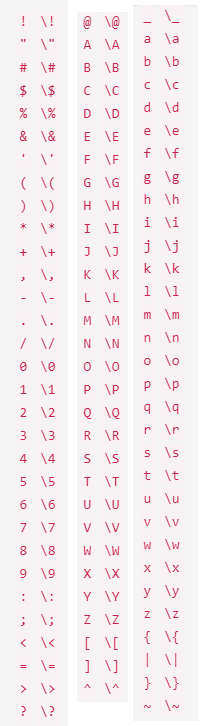 .
.Let’s see how it renders after posting…
-
@PeterJones said in Can I replace character with linefeedchracater in Notepad++ ?:
Let’s see how it renders after posting…
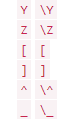
Looks like
\\[and\\]have special meaning in the forum’s markdown’s backtick implementation. Weird.


Hello! It looks like you're interested in this conversation, but you don't have an account yet.
Getting fed up of having to scroll through the same posts each visit? When you register for an account, you'll always come back to exactly where you were before, and choose to be notified of new replies (either via email, or push notification). You'll also be able to save bookmarks and upvote posts to show your appreciation to other community members.
With your input, this post could be even better 💗
Register Login