Notepad++ 7.9.1 RC
-
Please check the following link for 7.9.1 Release Candidate:
http://download.notepad-plus-plus.org/repository/7.x/7.9.1.RC/Notepad++ v7.9.1 new features & bug-fixes:
- Fix NUL file-corruption bug after Windows shutdown brutally (Fix #6133).
- Fix inaccurate URL detection by replacing a new URL parser (Fix #3912, #3353, #4643, #5029, #6155, #7791, #8634)
- Fix RegEx look behind operations and \A and and \b and \z (Fix #713, #1870, #2216, #2360, #9004, #4855).
- Split functionList.xml into multifile in “functionList” Folder (Implement #4896).
- Make tray icon work again in administrator mode (Fix #8528).
- Fix dialogs & floating dockable panels don’t minimize to system tray issue (Fix #9044, #8928).
- Add alternative icon set for tab bar (Implement #8068).
- Add ability to remove any duplicate lines in a document, keeping the first occurrence (Fix #8965).
- Fix incorrect icon for monitoring status in Document list panel and in Document switcher (Fix #8783).
- Add copy marked text & styled text to clipboard commands to menu (Implement #8943, #6095).
- Fix find-all-open-docs not finding all matches in ANSI files (Fix #8901).
- Display long lines better in Find-result panel by increasing its max length to 2048 (Fix #7723).
- Fix double clicking on find result line not working (Fix #9009, #8525).
- Fix Find-result rclick-Copy incomplete data bug (Fix #8801).
- Add case insensitive lines sorting (Implement #4479).
- Add “Open Containing Folder as Workspace” command in main menu and in context menu of tabs (Implement #3028).
- Enhance Sel info of status bar (Fix #8524).
- Add new option for save type of normal text files in Save dialog (Fix #8866).
- Fix file path truncated issue in save confirmation dialog (Fix #8812).
- Fix auto-Indent not working for PowerShell (Fix #9049).
- Allow setting of background color for bookmark margin (Fix #8833).
- Fix smart-highlighting not applying to cloned view (Fix #7910).
- Fix smart highlight issue related to EOF (Fix #8908).
- Fix closing file in 2nd view not removed from Doc Switcher (Fix #8800).
- Add Delete keystroke to remove selected root from Folder as Workspace (Fix #8960).
- Add TAB keystroke in Function List to switch between search field and list (Fix 8665).
- Add ESC keystroke in Function List to switch to edit window (Fix #8886).
- Add ESC keystroke to close Search Results Window (Implement #2946).
- Fix data-prefixed attributes are not recognized in HTML (Fix #6200).
-
Hello, @Don-Ho, and All,
Waouuuu ! What an avalanche of fixes, improvements and new functionalities ! I have not yet downloaded N++
v7.9.1 RCand I don’t know the version number policy but I think this version could have been calledv8.0!Oh, I also noticed the time of your announcement : You’re very early ( around 5:30 am ), aren’t you ? Thanks you for your constant involvement with our beloved text editor !
Best Regards,
guy038
-
I can confirm that the behavior of saving files has been changed
FlushBuffersFile is usedDate & Time Process Name Operation Path 27.10.2020 12:10:11 notepad++.exe CreateFile D:\tests\npp\791\x64\backup\test_flush_buffers.txt@2020-10-27_121011 27.10.2020 12:10:11 notepad++.exe CreateFile D:\tests\npp\791\x64\backup\test_flush_buffers.txt@2020-10-27_121011 27.10.2020 12:10:11 notepad++.exe WriteFile D:\tests\npp\791\x64\backup\test_flush_buffers.txt@2020-10-27_121011 27.10.2020 12:10:11 notepad++.exe FlushBuffersFile D:\tests\npp\791\x64\backup\test_flush_buffers.txt@2020-10-27_121011 27.10.2020 12:10:11 notepad++.exe WriteFile D:\tests\npp\791\x64\backup\test_flush_buffers.txt@2020-10-27_121011 27.10.2020 12:10:11 notepad++.exe CloseFile D:\tests\npp\791\x64\backup\test_flush_buffers.txt@2020-10-27_121011 27.10.2020 12:10:11 notepad++.exe CreateFile D:\tests\npp\791\x64\session.xml 27.10.2020 12:10:11 notepad++.exe WriteFile D:\tests\npp\791\x64\session.xml 27.10.2020 12:10:11 notepad++.exe FlushBuffersFile D:\tests\npp\791\x64\session.xml 27.10.2020 12:10:11 notepad++.exe WriteFile D:\tests\npp\791\x64\session.xml 27.10.2020 12:10:11 notepad++.exe CloseFile D:\tests\npp\791\x64\session.xml 27.10.2020 12:10:18 notepad++.exe CreateFile D:\tests\npp\791\x64\backup\test_flush_buffers.txt@2020-10-27_121011 27.10.2020 12:10:18 notepad++.exe WriteFile D:\tests\npp\791\x64\backup\test_flush_buffers.txt@2020-10-27_121011 27.10.2020 12:10:18 notepad++.exe FlushBuffersFile D:\tests\npp\791\x64\backup\test_flush_buffers.txt@2020-10-27_121011 27.10.2020 12:10:18 notepad++.exe WriteFile D:\tests\npp\791\x64\backup\test_flush_buffers.txt@2020-10-27_121011 27.10.2020 12:10:18 notepad++.exe CloseFile D:\tests\npp\791\x64\backup\test_flush_buffers.txt@2020-10-27_121011 27.10.2020 12:10:25 notepad++.exe CreateFile D:\tests\npp\791\x64\backup\test_flush_buffers.txt@2020-10-27_121011 27.10.2020 12:10:25 notepad++.exe WriteFile D:\tests\npp\791\x64\backup\test_flush_buffers.txt@2020-10-27_121011 27.10.2020 12:10:25 notepad++.exe FlushBuffersFile D:\tests\npp\791\x64\backup\test_flush_buffers.txt@2020-10-27_121011 27.10.2020 12:10:25 notepad++.exe WriteFile D:\tests\npp\791\x64\backup\test_flush_buffers.txt@2020-10-27_121011 27.10.2020 12:10:25 notepad++.exe CloseFile D:\tests\npp\791\x64\backup\test_flush_buffers.txt@2020-10-27_121011 27.10.2020 12:10:34 notepad++.exe CreateFile D:\test_flush_buffers.txt 27.10.2020 12:10:34 notepad++.exe WriteFile D:\test_flush_buffers.txt 27.10.2020 12:10:34 notepad++.exe FlushBuffersFile D:\test_flush_buffers.txt 27.10.2020 12:10:34 notepad++.exe WriteFile D:\test_flush_buffers.txt 27.10.2020 12:10:34 notepad++.exe CloseFile D:\test_flush_buffers.txt 27.10.2020 12:10:34 notepad++.exe CreateFile D:\tests\npp\791\x64\backup\test_flush_buffers.txt@2020-10-27_121011 27.10.2020 12:10:34 notepad++.exe CloseFile D:\tests\npp\791\x64\backup\test_flush_buffers.txt@2020-10-27_121011 -
#8833 seems to break all existing themes
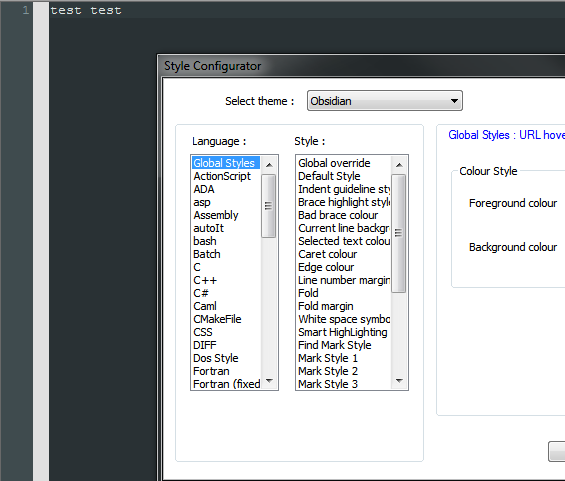
In addition, I cannot see how to set the margin background color from within the dialog.
-
@Ekopalypse said in Notepad++ 7.9.1 RC:
seems to break all existing themes
I guess there needs to be “theme maintainers” like there are “localization” maintainers.
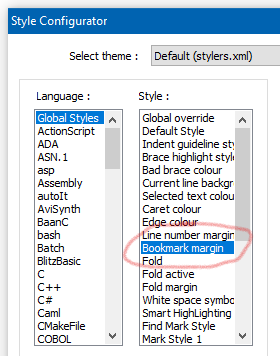
I cannot see how to set the margin background color from within the dialog.
Not a problem for me:
-
-
it is in stylers.xml
<WidgetStyle name="Bookmark margin" styleID="0" bgColor="E0E0E0" />but why isn’t it loaded in the dialog??
-
another one is
<WidgetStyle name="Fold active" styleID="0" fgColor="FF0000" /> -
@Ekopalypse said in Notepad++ 7.9.1 RC:
but why isn’t it loaded in the dialog??
If you’re using Obsidian as your previous picture seemed to indicate, you’ll need to add that Bookmark Margin to the Obsidian.xml them.
I guess there needs to be “theme maintainers” like there are “localization” maintainers.
Yes, I thought that myself too. I’ve made available my Obsidian theme - please note there are some changes to the default “global styles” in my version. I also added languages that were not originally in it and updated all the other languages to match the “WordStyle” changes reflected in the
stylers.model.xml(as of a few months ago).Cheers.
-
@michael-vincent - the first one to demonstrate the issue, yes, obsidian.
But the second pics are with default theme. -
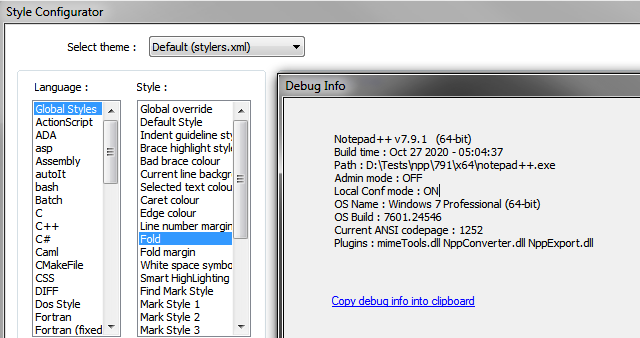
I’ve downloaded a fresh x64 portable and there I did see the two missing entries. Then I compared the previous one with the new one and haven’t
found any differences, so I restarted the old one and now it appears there as well. Hmmm … strange. -
Huge thanks for adding case insensitive lines sorting (Implement #4479). I ran several tests, the results were always as expected. Finally, this allows me to migrate to the 64-bit version of Notepad++ since I do not depend on the 32-bit plugin NppTextFX for case insensitive line sorting anymore.
-
I can confirm that the behavior of saving files has been changed
FlushBuffersFile is used
Thank @pnedev , he found the solution. Not me :)
#8833 seems to break all existing themes
Nice catch.
It’s fixed in 7.9.1 RC2:
https://community.notepad-plus-plus.org/topic/20228/notepad-7-9-1-rc2Huge thanks for adding case insensitive lines sorting (Implement #4479).
Thank @SCOTT SUMNER - it’s his implementation.
You’re very early ( around 5:30 am ), aren’t you ?
Rather very “late” :)






Hello! It looks like you're interested in this conversation, but you don't have an account yet.
Getting fed up of having to scroll through the same posts each visit? When you register for an account, you'll always come back to exactly where you were before, and choose to be notified of new replies (either via email, or push notification). You'll also be able to save bookmarks and upvote posts to show your appreciation to other community members.
With your input, this post could be even better 💗
Register Login