Bug with Language ?
-
Hi. I setup Russian notepad for terminal server( Windows Server 2019 ru )
I have russian language( Administrator who setup notepad ), but all new users has English language. Why? I have only russian.xml in C:\Program Files\Notepad++\localization
-
-
I want default RU for all new users.
I make setup with only Russian language.
Not English. And i have Russian language by default, but i don’t understand why new users has English.
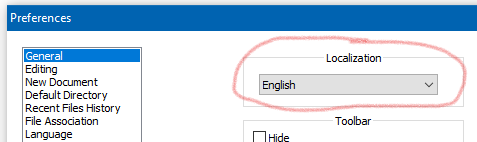
Folder with Localization doesn’t has English. But new users see English, like your photo.
-
No localization is chosen after a fresh install until one is selected in the box I red-circled.
It doesn’t matter if there is only one file in the localization folder area.Side note:
-
Until a localization is chosen, Notepad++ isn’t even using
English.xml, it is using the English that the user interface is designed in (in the resource files of the project), which happens to be English. -
So if you have a fresh install, and you go to the Localization preference setting above (which will already say “English”) and you drop down the box and re-select “English”, you will see slight changes occur in the user interface!
(end Side note)
You may be able to “hack” something together to get your goal achieved, but I don’t think it can be “automatic” like you seem to want.
But maybe some others have some ideas for you?
-
-
I understand you, thanks.
I would like to find a solution …
-
@Andrei ,
When you manually select a Localization in a normal installation of Notepad++, it copies that localization XML file from the Notepad++ executable directory’s
localization\subfolder, and puts it in%AppData%\Notepad++↗ asnativeLang.xml.So if you are installing Notepad++ on many user’s computers, after you follow the normal installation process, you can copy
c:\program files\notepad++\localization\russian.xmlinto%AppData%\Notepad++\nativeLang.xmlbefore they run Notepad++, and the Russian localization should be selected for them already.edit: for more on config file locations, see the official docs: https://npp-user-manual.org/docs/config-files/
-
@PeterJones thank you. I put nativeLang.xml file to %AppData%\Notepad++\ with GPO. My problem solved.



Hello! It looks like you're interested in this conversation, but you don't have an account yet.
Getting fed up of having to scroll through the same posts each visit? When you register for an account, you'll always come back to exactly where you were before, and choose to be notified of new replies (either via email, or push notification). You'll also be able to save bookmarks and upvote posts to show your appreciation to other community members.
With your input, this post could be even better 💗
Register Login