Help switching localization from English to Spanish - It's not working! Please help
-
I found the spanish.xml on github and loaded it here C:\Program Files (x86)\Notepad++\localization
I also loaded it here \AppData\Local\Notepad++
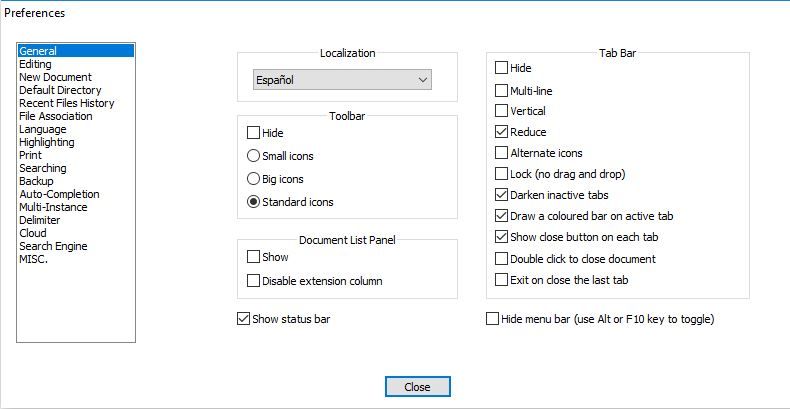
When I go to Settings menu > Preferences > General > Localization … Nothing happens. I change to Espanol and then I click close. Nothing happens. I closed the app and reopened. Everything is still in English
Notepad++ v7.9.1 (32-bit)
Build time : Nov 2 2020 - 01:03:56
Path : C:\Program Files (x86)\Notepad++\notepad++.exe
Admin mode : OFF
Local Conf mode : OFF
OS Name : Windows 10 Enterprise (64-bit)
OS Version : 1803
OS Build : 17134.1845
Current ANSI codepage : 1252
Plugins : DSpellCheck.dll mimeTools.dll NppConverter.dll NppExport.dll -
\AppData\Local\Notepad++Please note, even if you assume the correct prefix to the path, that’s the wrong AppData folder. Notepad++ settings go in
%AppData%\Notepad++, which as explained in the FAQ maps to...\users\username\AppData\Roaming\Notepad++, not to...AppData\Local\Notepad++or...AppData\Notepad++.But that’s neither here nor there, because Notepad++ grabs the XML from the executable directory’s localization folder, and copies it to the right place in the
%AppData%hierarchy.So, really, the process you described should work.
When I have
spanish.xmlin thelocalization\subdir of my Notepad++ executable directory, and pickEspañolfrom the localization dropdown, the UI immediately changes to Spanish; if I look at%AppData%\Notepad++\nativeLang.xml, I can see that it’s picked theEspañolcontents. When I change localization back to English, I see the UI change back; and File > Reload from Disk will refresh the viewed contents ofnativeLang.xml, showing them to be English again.I am wondering if you don’t have write permission to the
%AppData%\Notepad++\directory in general or the%AppData%\Notepad++\nativeLang.xmlfile specifically.


Hello! It looks like you're interested in this conversation, but you don't have an account yet.
Getting fed up of having to scroll through the same posts each visit? When you register for an account, you'll always come back to exactly where you were before, and choose to be notified of new replies (either via email, or push notification). You'll also be able to save bookmarks and upvote posts to show your appreciation to other community members.
With your input, this post could be even better 💗
Register Login