Function List no longer works
-
@Steve-T said in Function List no longer works:
Using v7.9.1, the Function List quit working a few days ago. I mainly use it for C/C++ files. There is a functionlist.xml file in the Program Files directory and the %APPDATA% directory. How do I get it working again?
Notepad++ v7.9.1 changed the Function List functionality. When you upgraded to v7.9.1, it should have created the
functionListsubdirectory in at least the executable directory. If it didn’t add it to%AppData%\Notepad++\functionList\, copy the one from the executable into the AppData location. When I deleted the%AppData%\Notepad++\functionList\folder and ran Notepad++, it wouldn’t parse the function list; when I copied the folder from the executable directory to there, and re-ran Notepad++, it would show function lists again.If that works for you, I recommend going to the issues page and submitting an issue – point that issue here, and paste a link here to your issue. In your issue, make sure you explain you upgraded from some previous version to v7.9.1, and function list stopped working; then, when you copied the
<executable-dir>\functionList\folder to%AppData%\Notepad++\functionList\, the function list feature started working again; then ask that they make sure that Notepad++ populate the AppData version of the functionList folder if it’s missing when it loads.edit: PS: it’s not that I want to make more work for you, and refuse to do the work of making the issue report myself; the developer historically puts higher weight on issues discovered and reported by users “in the wild” than on issues reported by Forum regulars. /edit
-
Creating a functionList directory in %APPDATA% didn’t help.
-
Did you just create the folder, or did you copy the folder with all its contents. An empty folder is equivalent to a missing folder: it won’t work.
Did you remember to exit Notepad++ and reload Notepad++ before checking if it works? Notepad++ won’t see those files appeared unless you exit and start fresh.
-
I created the folder and copied the functionList.xml file from Program Files\Notepas++ to it. Then I closed and restarted notepad++.
-
@Steve-T said in Function List no longer works:
I created the folder and copied the functionList.xml file
I guess you didn’t understand what I was explaining: You need to copy all the individual
<exedirectory>\functionList\*.xmlfiles into%AppData%\Notepad++\functionList\*.xml. It’s not just one file; it’s one file per programming language, plus a map file. Just copy them all, in bulk. -
Wah! Wah!
Just make my feature work! :-)
(At least that’s the feeling I get)@Steve T
Sometimes functionality changes for the better, and you actually have to dig into the details of making something work. Sorry, but that’s the way things are.
Listen to @PeterJones (carefully). He’ll spoon feed ya. -
Correct, I didn’t understand. The directory now contains functionList.xml, langs.model.xml, shortcuts.xml, and stylers.model.xml. That’s all the xml files in Program Files\notepad++. Closed notepad++. Reopened notepad++. Still no function list.
-
@Steve-T ,
No. You still don’t understand. You are not copying the right files into there yet. When I said
<exedirectory>\functionList\*.xml, I meantc:\program files\Notepad++\functionList\*.xml– notice the folder namedfunctionListin that path.Look in
c:\program files\notepad++\– if you’re really on v7.9.1, there should be a folder calledfunctionList. I am NOT talking about the file calledfunctionList.xml– I am talking about a folder. Copy that entire folder. Go to%AppData%\Notepad++, paste the folder in there. There should now exist%AppData%\Notepad++\functionList\folder, with about 27 files, each named after a different programming language.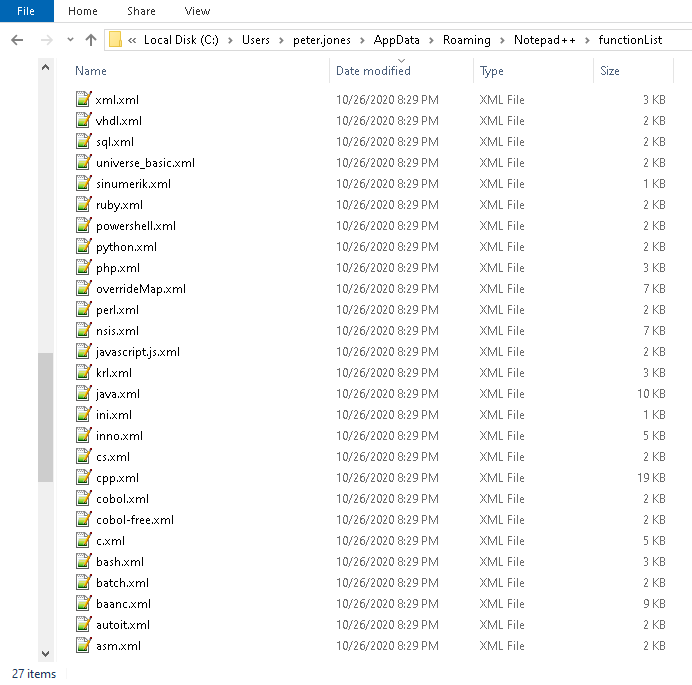
If you still don’t understand which files I am talking about, open up your Windows Explorer, go to
c:\program files\Notepad++, and do a Alt+Printscreen of that directory; paste it in your reply. Then do a Alt+Printscreen of your%AppData%\Notepad++folder, and paste it in your reply. This will give us a common baseline for communication. -
There is no folder named functionList in Program Files. All the xml files are in the same folder as the exe.
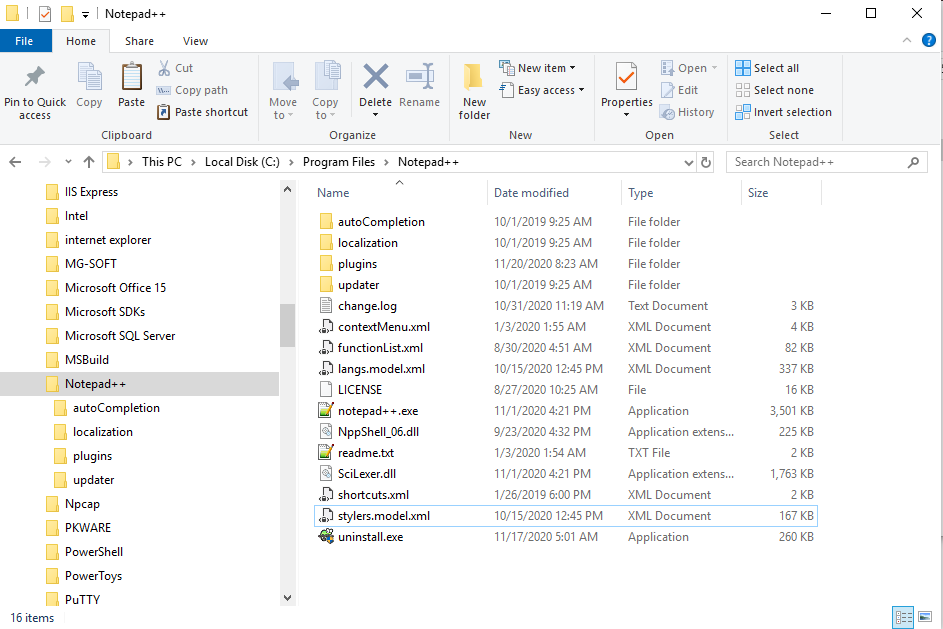
-
@Steve-T ,
So you’re saying that when you upgraded to Notepad++ v7.9.1, it didn’t even put the functionList folder in the executable directory, let alone in the
%AppData%\Notepad++\functionList? It’s worse than I thought.Please download v7.9.1 portable zip, open the zipfile, and copy the
functionListfolder (including all its contents) intoc:\program files\notepad++, so that there will be afunctionListsubfolder in theprogram files\notepad++folder. Then copy that folder (and all its contents) into%AppData%\Notepad++\functionListLooks like when I get home tonight, I am going to have to explore what happens when I upgrade my v7.9 to v7.9.1 installation (since my daytime computer just uses portable, and I don’t then see what the installer does). If I can replicate your installation/upgrade’s poor behavior, I will put in the bug report myself.
-
That worked. Thank you.
-
@Steve-T ,
Glad it worked.
Future Interested Readers,
I ran the experiment on an older computer: it previously had v7.7 installed, and I upgraded to v7.9.1.
- I am doing the installation as user “Kids”, which is a member of the Admins group (though the kids don’t know it), so it allowed me to do the installation
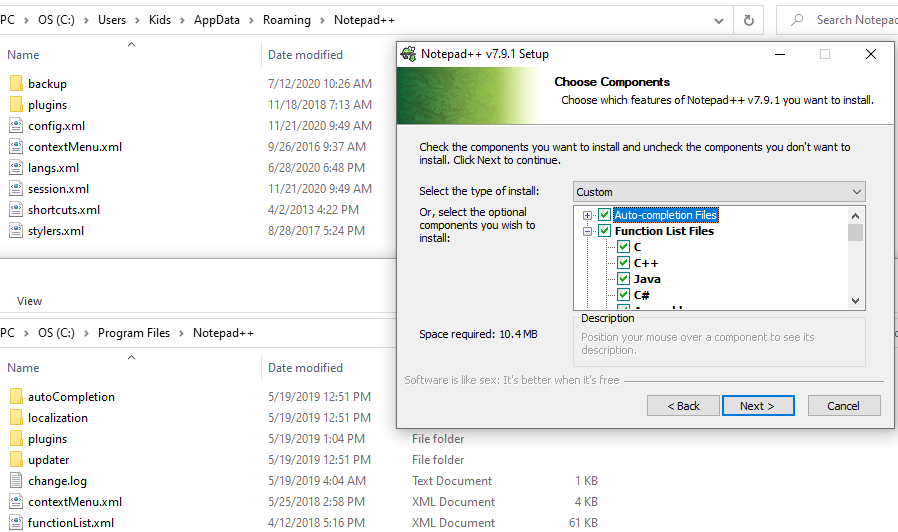
- During the upgrade install, it had a checkbox (default on) to install the Function List Files. This needs to be on. You can see behind the install window that neither my AppData nor my Program Files Notepad++ folder has a functionList subfolder yet.
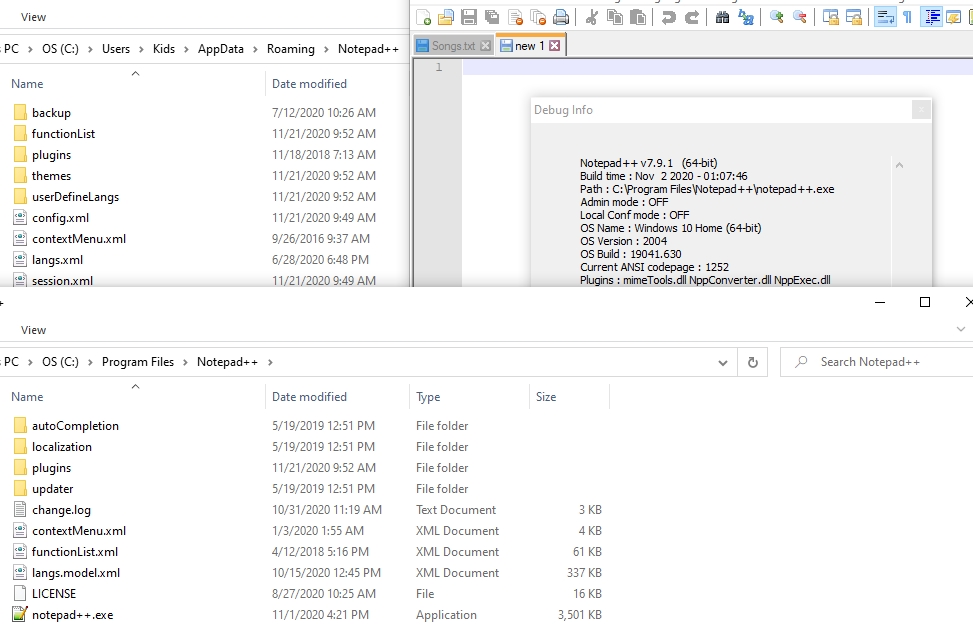
- After I complete the installation, you can see that the AppData does have the functionList folder, but the Program Files does not.
- When I pick a functioned language (Perl), the function list works.
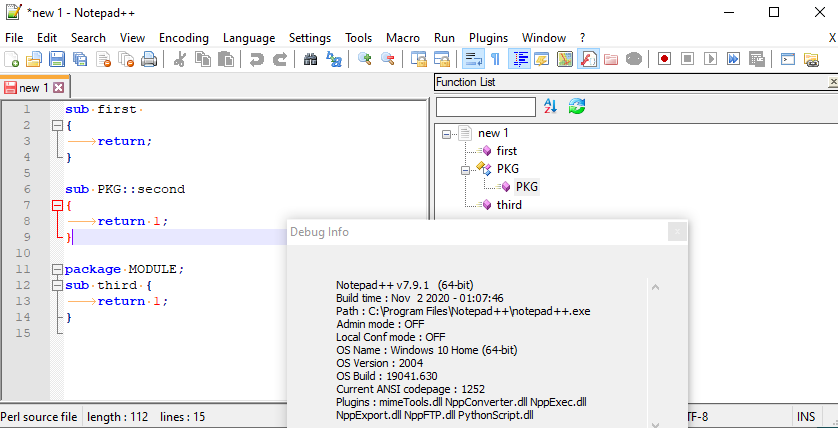
- I then swapped to my “Peter” account
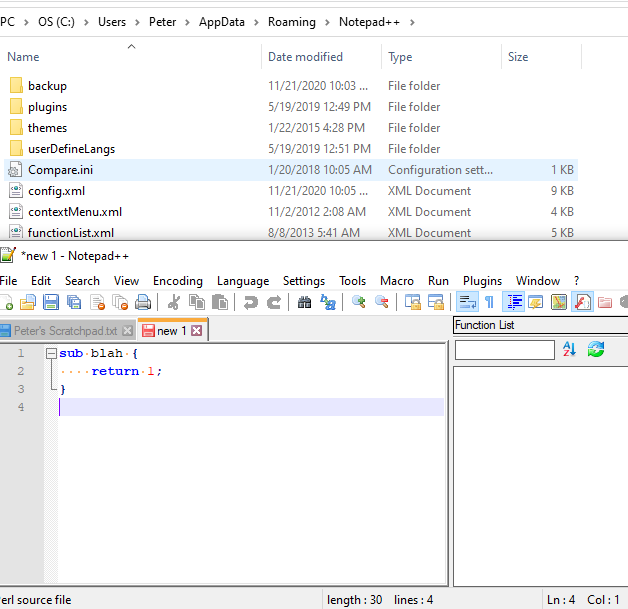 – when I run Notepad++ then open the AppData folder, it does not create or populate the functionList subfolder, and the function list feature does not work.
So, now that I see how it actually works, I have enough that I will put in a bug report. I will paste a link to the report after it’s created.
-
@PeterJones said in Function List no longer works:
I have enough that I will put in a bug report. I will paste a link to the report after it’s created.
Actually, someone else already described that behavior = issue#9134
-
Hello, I can confirm the problem.
While doing the upgrade I can’t remember to be asked (Checkbox) for installing “function list files” - I think that would have been noticed, because the “function list feature” is a well known and often used function for me. -> Result: No “functionList”-folder in the installation directory after update (c:\Progs\Notepad++ in my case), also nothing in “AppData\Roaming\Notepad++” where it has to be (I know now).
I have a Win10 Pro 64bit (v20H2) Workstation here and the domain user I’m logged in has almost 100% admin right’s on that machine.
(P.S.: But it’s the 32bit-Version of Notepad++ -> can there be any correlation?)
Thanks for the good explanation - for the moment this bugfix helped me! ;-) -





Hello! It looks like you're interested in this conversation, but you don't have an account yet.
Getting fed up of having to scroll through the same posts each visit? When you register for an account, you'll always come back to exactly where you were before, and choose to be notified of new replies (either via email, or push notification). You'll also be able to save bookmarks and upvote posts to show your appreciation to other community members.
With your input, this post could be even better 💗
Register Login