Trying to avoid reload prompt
-
So I have a Pythonscript that creates an output text file from some other data. When the script completes, if the output text file isn’t a tab in N++ it should be opened into one. If it IS a tab in N++, that tab should be switched to. The file isn’t ever edited by the N++ user (me!), just viewed, so changes to this file can never be “lost”.
My goal is to not have the user (me!) get prompted to reload a changed file for this file. So far I’m semi-successful.
I have my settings set thusly:
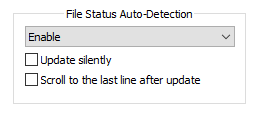
And my script looks like this:
# -*- coding: utf-8 -*-

from Npp import notepad

our_file = r'd:\test.txt'

with open(our_file, 'w') as f: f.write('dedodododedadada' + '\n')

file_already_open = False

for (filename, bufferID, index, view) in notepad.getFiles():
    if filename == our_file:
        file_already_open = True
        break

if file_already_open:

    notepad.reloadFile(our_file, False)  # do not alert user
    notepad.activateFile(our_file)

else:

    notepad.open(our_file)
All goes well, and I’m not prompted for a reload…until I switch tabs and switch back to the tab of the output file. THEN I get a reload prompt.
I’m soliciting ideas on how to avoid this prompt, or perhaps someone pointing out a critical flaw in the design/flow of what I’m wanting to do.
I suppose I could close the file if it is open, before acting on it. :-)
But…I’ll let the question stand. -
Npp uses ReadDirectoryChangesW to get notified when a file has been modified. I don’t think you can catch this message.
Reopening might be the only solution I guess.


Hello! It looks like you're interested in this conversation, but you don't have an account yet.
Getting fed up of having to scroll through the same posts each visit? When you register for an account, you'll always come back to exactly where you were before, and choose to be notified of new replies (either via email, or push notification). You'll also be able to save bookmarks and upvote posts to show your appreciation to other community members.
With your input, this post could be even better 💗
Register Login