Paste every "say 37th line" apx..
-
Hello, @carolina-number-1 and All,
If I understand you properly, you would like to insert the line
sound = "sound" ; sound folderright after each lineisuserselectable = 0 ; flag off for non selectable planesof the current file !I assume, too, that the desired replacement is the string
sound = "sound" ; sound folderand NOT the stringsound = “sound” ; sound folderIn this case, I suppose that this regex S/R should work nice :
SEARCH
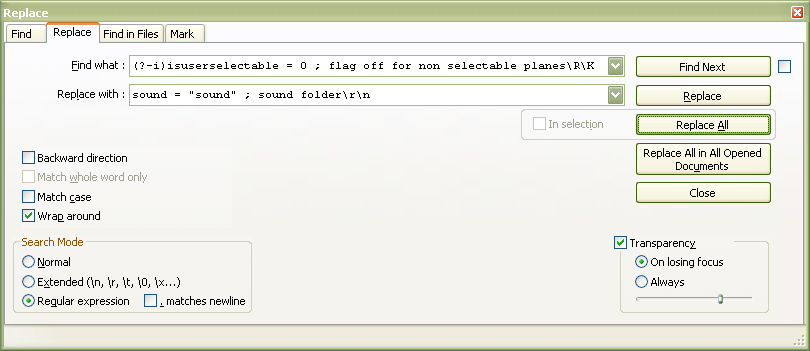
(?-i)isuserselectable = 0 ; flag off for non selectable planes\R\KREPLACE
sound = "sound" ; sound folder\r\n( ORsound = "sound" ; sound folder\nif UNIX files )Notes :
-
Tick the
Wrap aroundoption -
Use the
Regular expressionsearch mode -
Click, exclusively on the
Replace Allbutton -
After searching for the line
isuserselectable = 0 ; flag off for non selectable planes, respecting the case(?-i)and its line-ending characters\R, the\Kfeature resets the search and simply matches the zero-length location, right after this line -
Then, the replacement string
sound = "sound" ; sound folderis just added with its line-ending characters\r\n
Best Regards,
guy038
-
-
OMG…Fantastic…reading this and figuring how to do this…
Bestest!!BobM.
-
The key part seems to be needing to know the way to insert a line-break.
I’m not much for Extended search mode, but I think you could use it here to do what you want… you would use\r\nin your replacement string where you wanted a line-break.
It’s a little bit simpler to figure out than regular expressions, so that’s why I’m mentioning it. -
In the “Replace All”…don’t see a “exclusively”,
Thanks so far, BobM.
-
total newbie here
-
@Carolina-Number-1 said in Paste every "say 37th line" apx..:
In the “Replace All”…don’t see a “exclusively”,
LOL. Guy is French so sometimes his wording is “interesting”. :-)
(In general though, his English is very good, indeed)Click, exclusively on the Replace All button
What is meant here is that you can’t use the Replace button for this action; you have to use Replace All to perform the replacement.
-
ok…so just click on Replace All…there is no tick for exclusively, right lol
-
@Carolina-Number-1 said in Paste every "say 37th line" apx..:
total newbie here
:-) Welcome.
If you have questions about what advice we give, certainly ask. :-)
-
ok so search for isuserselectable = 0 ; flag off for non selectable planes…so far so good lol
-
not sure about what of this goes in the search line?
After searching for the line isuserselectable = 0 ; flag off for non selectable planes, respecting the case (?-i) and its line-ending characters \R, the \K feature resets the search and simply matches the zero-length location, right after this line -
not sure about what of this goes in the search line?
After searching for the line isuserselectable = 0 ; flag off for non selectable planes, respecting the case (?-i) and its line-ending characters \R, the \K feature resets the search and simply matches the zero-length location, right after this lineonce i get the hang of this…then i have maybe 100 more airplanes …lol
-
So, when @guy038 said:
SEARCH (?-i)isuserselectable = 0 ; flag off for non selectable planes\R\K
REPLACE sound = “sound” ; sound folder\r\n ( OR sound = “sound” ; sound folder\n if UNIX files )
He meant for “SEARCH” that you would put this in the box labeled Find what:
And correspondingly, “REPLACE” means look for the Replace with box.
Does that help?
-
yeah…I think I lost my “isuserselectable = 0 ; flag off for non selectable planes” because it replaced it with the sound stuff…lol but it added sound i think 736 times…so rather than replace that line…insert the sound line below it…this was on a trial cfg not the real one yet till i get this down.
-
But, because you’re an admitted noob, why not do a simpler-to-understand Extended mode replacement, like this:
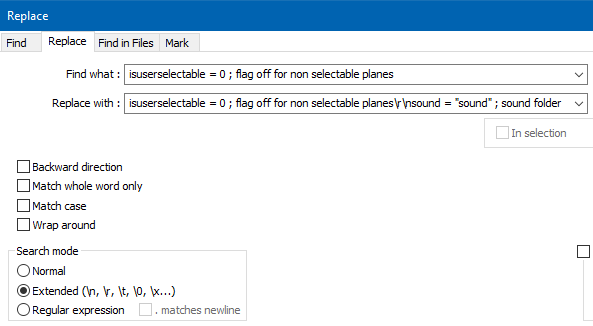
Notice:
-
the Search mode has been set to Extended – this allows you to do fancy things (over and above what a Normal search allows) like specify multiple lines in your data (here you are replacing one-line with two (the original plus a new one).
-
the
\r\nin the Replace with data is what creates a second line in your data; it is the “dividing point” between two lines
Is this easier to see/understand?
-
-
-
-
@guy038
t seems now its just stopped replacing…say no occurences were replaced …etcThank you,
Bob M. -
If I need to change this: isuserselectable = 0 ; flag off for non selectable planes to this:
isUserSelectable = 0 ; (on the end of search line after 0 ; \R\K
and still replace with:
sound = “sound” ; sound folder (sound = “sound” ; sound folder\r\n)
-
Your last post isn’t quite clear but I guess you would like to add the line
sound = "sound" ; sound folderright after each line beginning withisuserselectable = 0, whatever the contents of a possible comment area, coming next the colon characterIf so, change the search regex, only, as :
SEARCH
(?-si)isuserselectable = 0.*\R\K-
The
(?-s)part means that anydotmeta-character matches a single standard character -
The
.*syntax, before the\R, represents the area, possibly empty, of standard character(s), after the string= 0and before the EOL chars
I advice you to get documentation on the regex world, in this FAQ
Best regards,
guy038
-
-
Hey Thank you…You are awesome…thanks for all your help!! Defeinitely check out the faq…
BobM.



Hello! It looks like you're interested in this conversation, but you don't have an account yet.
Getting fed up of having to scroll through the same posts each visit? When you register for an account, you'll always come back to exactly where you were before, and choose to be notified of new replies (either via email, or push notification). You'll also be able to save bookmarks and upvote posts to show your appreciation to other community members.
With your input, this post could be even better 💗
Register Login