Community
    • Login

    Paste every "say 37th line" apx..

    Scheduled Pinned Locked Moved Help wanted · · · – – – · · ·
    30 Posts 3 Posters 4.9k Views 1 Watching
    Loading More Posts
    • Oldest to Newest
    • Newest to Oldest
    • Most Votes
    Reply
    • Reply as topic
    Log in to reply
    This topic has been deleted. Only users with topic management privileges can see it.
    • Carolina Number 1C Offline
      Carolina Number 1 @Alan Kilborn
      last edited by

      @Alan-Kilborn

      total newbie here

      Alan KilbornA 1 Reply Last reply Reply Quote 1
      • Alan KilbornA Offline
        Alan Kilborn @Carolina Number 1
        last edited by Alan Kilborn

        @Carolina-Number-1 said in Paste every "say 37th line" apx..:

        In the “Replace All”…don’t see a “exclusively”,

        LOL. Guy is French so sometimes his wording is “interesting”. :-)
        (In general though, his English is very good, indeed)

        Click, exclusively on the Replace All button

        What is meant here is that you can’t use the Replace button for this action; you have to use Replace All to perform the replacement.

        1 Reply Last reply Reply Quote 1
        • Carolina Number 1C Offline
          Carolina Number 1
          last edited by

          ok…so just click on Replace All…there is no tick for exclusively, right lol

          1 Reply Last reply Reply Quote 1
          • Alan KilbornA Offline
            Alan Kilborn @Carolina Number 1
            last edited by

            @Carolina-Number-1 said in Paste every "say 37th line" apx..:

            total newbie here

            :-) Welcome.

            If you have questions about what advice we give, certainly ask. :-)

            Carolina Number 1C 1 Reply Last reply Reply Quote 0
            • Carolina Number 1C Offline
              Carolina Number 1
              last edited by

              ok so search for isuserselectable = 0 ; flag off for non selectable planes…so far so good lol

              Carolina Number 1C 1 Reply Last reply Reply Quote 0
              • Carolina Number 1C Offline
                Carolina Number 1 @Carolina Number 1
                last edited by

                @Carolina-Number-1

                not sure about what of this goes in the search line?
                After searching for the line isuserselectable = 0 ; flag off for non selectable planes, respecting the case (?-i) and its line-ending characters \R, the \K feature resets the search and simply matches the zero-length location, right after this line

                1 Reply Last reply Reply Quote 0
                • Carolina Number 1C Offline
                  Carolina Number 1 @Alan Kilborn
                  last edited by Carolina Number 1

                  @Alan-Kilborn

                  not sure about what of this goes in the search line?
                  After searching for the line isuserselectable = 0 ; flag off for non selectable planes, respecting the case (?-i) and its line-ending characters \R, the \K feature resets the search and simply matches the zero-length location, right after this line

                  once i get the hang of this…then i have maybe 100 more airplanes …lol

                  Alan KilbornA 2 Replies Last reply Reply Quote 0
                  • Alan KilbornA Offline
                    Alan Kilborn @Carolina Number 1
                    last edited by

                    @Carolina-Number-1

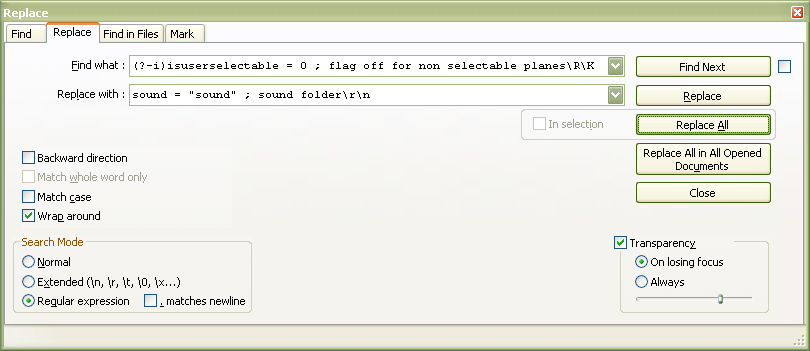
                    So, when @guy038 said:

                    SEARCH (?-i)isuserselectable = 0 ; flag off for non selectable planes\R\K

                    REPLACE sound = “sound” ; sound folder\r\n ( OR sound = “sound” ; sound folder\n if UNIX files )

                    He meant for “SEARCH” that you would put this in the box labeled Find what:

                    And correspondingly, “REPLACE” means look for the Replace with box.

                    Does that help?

                    Carolina Number 1C 1 Reply Last reply Reply Quote 2
                    • Carolina Number 1C Offline
                      Carolina Number 1 @Alan Kilborn
                      last edited by

                      @Alan-Kilborn

                      yeah…I think I lost my “isuserselectable = 0 ; flag off for non selectable planes” because it replaced it with the sound stuff…lol but it added sound i think 736 times…so rather than replace that line…insert the sound line below it…this was on a trial cfg not the real one yet till i get this down.

                      1 Reply Last reply Reply Quote 0
                      • Alan KilbornA Offline
                        Alan Kilborn @Carolina Number 1
                        last edited by Alan Kilborn

                        @Carolina-Number-1

                        But, because you’re an admitted noob, why not do a simpler-to-understand Extended mode replacement, like this:
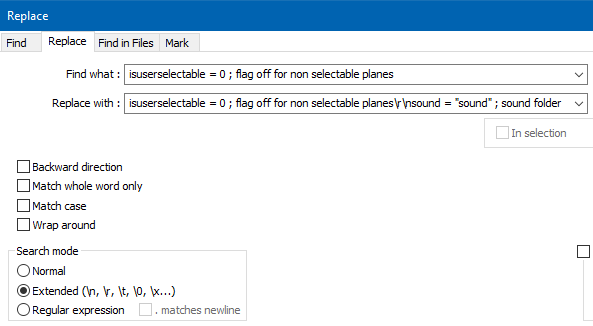
                        58fdc235-dae6-4e51-beba-5e5351f3f61f-image.png

                        Notice:

                        • the Search mode has been set to Extended – this allows you to do fancy things (over and above what a Normal search allows) like specify multiple lines in your data (here you are replacing one-line with two (the original plus a new one).

                        • the \r\n in the Replace with data is what creates a second line in your data; it is the “dividing point” between two lines

                        Is this easier to see/understand?

                        1 Reply Last reply Reply Quote 2
                        • guy038G Offline
                          guy038
                          last edited by

                          Hi, @carolina-number-1

                          eeb17561-1990-459b-a59d-9676327f3b76-image.png

                          BR

                          guy038

                          Carolina Number 1C 2 Replies Last reply Reply Quote 0
                          • Carolina Number 1C Offline
                            Carolina Number 1 @guy038
                            last edited by

                            @guy038

                            Hey Thanks All!!!

                            You are great!!!

                            I am 70 and a tad slow but getting it, i think lol

                            1 Reply Last reply Reply Quote 1
                            • Carolina Number 1C Offline
                              Carolina Number 1 @guy038
                              last edited by

                              @guy038
                              t seems now its just stopped replacing…say no occurences were replaced …etc

                              Thank you,
                              Bob M.

                              1 Reply Last reply Reply Quote 0
                              • Carolina Number 1C Offline
                                Carolina Number 1
                                last edited by

                                If I need to change this: isuserselectable = 0 ; flag off for non selectable planes to this:

                                isUserSelectable = 0 ; (on the end of search line after 0 ; \R\K

                                and still replace with:

                                sound = “sound” ; sound folder (sound = “sound” ; sound folder\r\n)

                                1 Reply Last reply Reply Quote 0
                                • guy038G Offline
                                  guy038
                                  last edited by guy038

                                  @carolina-number-1,

                                  Your last post isn’t quite clear but I guess you would like to add the line sound = "sound" ; sound folder right after each line beginning with isuserselectable = 0, whatever the contents of a possible comment area, coming next the colon character

                                  If so, change the search regex, only, as :

                                  SEARCH (?-si)isuserselectable = 0.*\R\K

                                  • The (?-s) part means that any dot meta-character matches a single standard character

                                  • The .* syntax, before the \R , represents the area, possibly empty, of standard character(s), after the string = 0 and before the EOL chars

                                  I advice you to get documentation on the regex world, in this FAQ

                                  Best regards,

                                  guy038

                                  Carolina Number 1C 1 Reply Last reply Reply Quote 0
                                  • Carolina Number 1C Offline
                                    Carolina Number 1 @guy038
                                    last edited by

                                    @guy038

                                    Hey Thank you…You are awesome…thanks for all your help!! Defeinitely check out the faq…

                                    BobM.

                                    Carolina Number 1C 1 Reply Last reply Reply Quote 0
                                    • Carolina Number 1C Offline
                                      Carolina Number 1 @Carolina Number 1
                                      last edited by

                                      @guy038

                                      Just curious and maybe it can’t be done… but lets say I have 100 Fltsims and I want to be apostrophe’s at the beginning and end of the title line only…can that be done…here’s a sample:

                                      [fltsim.1]
                                      title=“JFAI_737_300_AirChina”
                                      sim=TrafficGlobal
                                      model=
                                      panel=x
                                      sound=
                                      texture=AirChina
                                      atc_id=B737
                                      atc_flight_number=
                                      atc_airline=AIR CHINA
                                      atc_parking_codes=CCA
                                      atc_parking_types=GATE,RAMP
                                      ui_manufacturer=Boeing
                                      ui_type=B733
                                      ui_variation=Air China
                                      description=AI
                                      ui_typerole=Traffic Global AI
                                      ui_createdby=Just Flight

                                      [fltsim.2]
                                      title=“JFAI_737_300_AllNippon”
                                      sim=TrafficGlobal
                                      model=
                                      panel=x
                                      sound=
                                      texture=AllNippon
                                      atc_id=B737
                                      atc_flight_number=
                                      atc_airline=ALL NIPPON
                                      atc_parking_codes=ANA
                                      atc_parking_types=GATE,RAMP
                                      ui_manufacturer=Boeing
                                      ui_type=B733
                                      ui_variation=All Nippon
                                      description=AI
                                      ui_typerole=Traffic Global AI
                                      ui_createdby=Just Flight

                                      So in other words…I would open the document in Notepad++ and want to put the apostrophe at the beginning and end of just the “Title line” for each fltsim section…1,2,3, etc… Might have to do a couple thousand of these…lol

                                      i learned so much yesterday on the little I did that now I am dangerous!!!

                                      BobM.

                                      Alan KilbornA 1 Reply Last reply Reply Quote 0
                                      • Alan KilbornA Offline
                                        Alan Kilborn @Carolina Number 1
                                        last edited by Alan Kilborn

                                        @Carolina-Number-1 said in Paste every "say 37th line" apx..:

                                        So, presuming you have:

                                        title=JFAI_737_300_AirChina

                                        and you want that to be changed into:

                                        title="JFAI_737_300_AirChina"

                                        and that is the only thing you have on the line…

                                        Then you could do:

                                        find: (?-s)^title=(.+)
                                        repl: title="${1}"
                                        mode: Regular expression

                                        There are of course some other ways, but this is probably the simplest, and I don’t think it is really worth showing a total noob some of the other ways at this point, because the confusion factor would just skyrocket.

                                        Carolina Number 1C 2 Replies Last reply Reply Quote 1
                                        • Carolina Number 1C Offline
                                          Carolina Number 1 @Alan Kilborn
                                          last edited by Carolina Number 1

                                          @Alan-Kilborn

                                          Hey Thanks!! Never been called a a total noob before… I am so honored…lol

                                          Warmest Greets…Stay Safe!!

                                          BobM.

                                          1 Reply Last reply Reply Quote 0
                                          • Carolina Number 1C Offline
                                            Carolina Number 1 @Alan Kilborn
                                            last edited by

                                            @Alan-Kilborn worked like a charm…zowie :)

                                            BobM.

                                            1 Reply Last reply Reply Quote 0

                                            Hello! It looks like you're interested in this conversation, but you don't have an account yet.

                                            Getting fed up of having to scroll through the same posts each visit? When you register for an account, you'll always come back to exactly where you were before, and choose to be notified of new replies (either via email, or push notification). You'll also be able to save bookmarks and upvote posts to show your appreciation to other community members.

                                            With your input, this post could be even better 💗

                                            Register Login
                                            • First post
                                              Last post
                                            The Community of users of the Notepad++ text editor.
                                            Powered by NodeBB | Contributors