How Notepad++ selects autocomplete?
-
@gusztavj said in How Notepad++ selects autocomplete?:
Can you find any discrepancies here?
Sorry, everything looks right.
Did you re-start Notepad++ after putting the UDL and autoCompletion XML files in the right folders?
Could you screenshot your Settings > Preferences > Auto-completion settings?
Could you copy/paste your ?-menu’s Debug Info?
-
@PeterJones said in How Notepad++ selects autocomplete?:
Did you re-start Notepad++ after putting the UDL and autoCompletion XML files in the right folders?
Sorry, I re-read and saw you’d already answered that one.
The more I thought about this not working for you, the more confused I got. I don’t see why it wouldn’t be working… if you’re in a version of Notepad++ new enough that it comes with the
autoCompletion\folder (it used to be named something else), then all the syntax shown should work.I decided to bundle up a zipfile of my working portable version. So for the next week or so, the URL
URL REDACTEDautoCompletion\weirdAl.xmlanduserDefineLangs\weirdAl-udl.xml. When I unzip these to a known writeable location, then run the portable notepad++.exe from the unzipped folder, if I useCtrl+Shift+Spaceinside thegrapefruitDiet()parentheses, it pops up the parameter-hint auto-completion, and if I start typing thet,i, orgthat start the three function keywords, the function-name auto-completion pops up. Since the portable zip contains all the config files including sessions, etc, you should be in a state to immediately test this working copy after unzipping.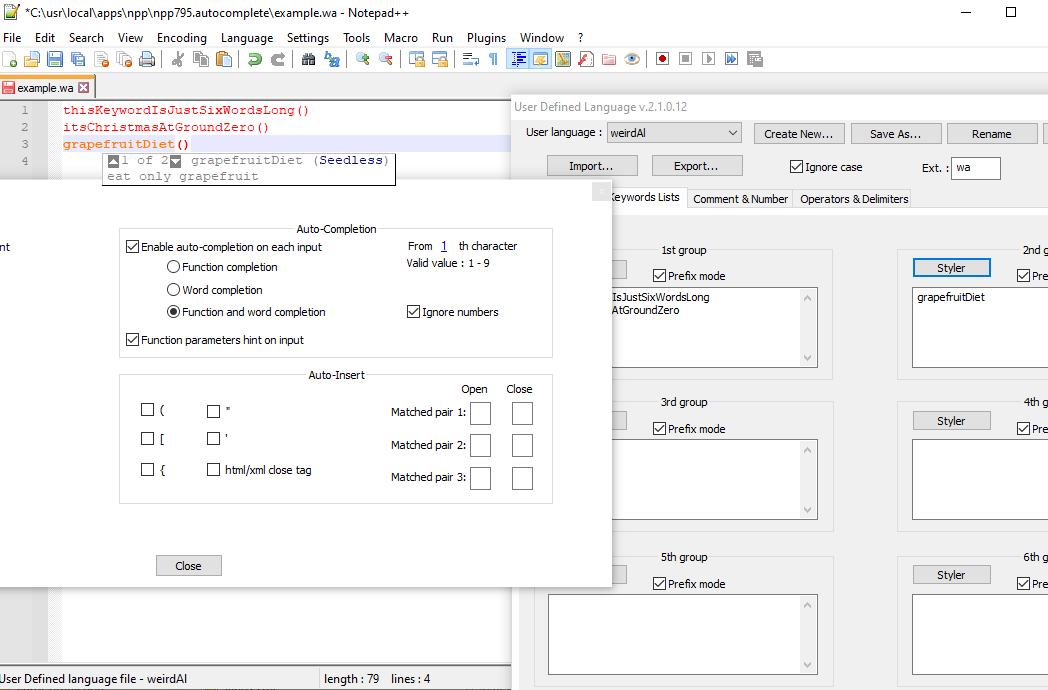
caveat
It’s always dangerous to download files from unknown sources. I am claiming that I haven’t done anything malicious in this zipfile, but you need to use download wisdom. It is my recommendation to at the very least run a virus checker on the zipfile and the unzipped contents.
Future Readers: The download will go away in the near future, so you will likely get 404-not-found.
-
Thanks for the response again. I have NP++ 7.9.5, and here are my autocomplete settings, seemingly the same as yours:
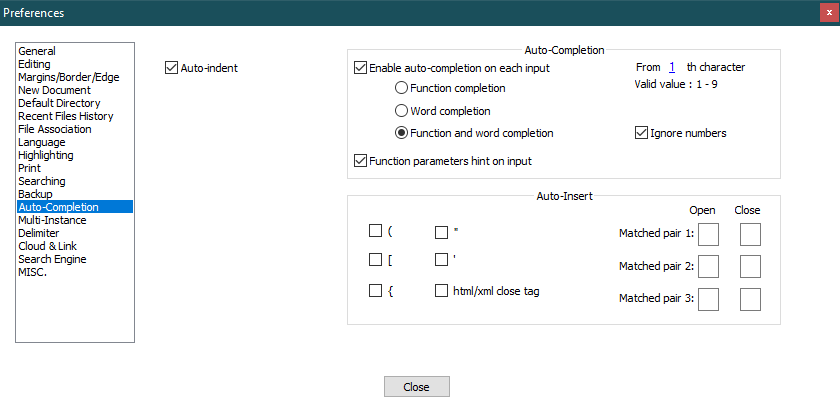
The portable version just works fine. I’ll try to add my files to the portable instance and see if it works, and let you know about it.
Cheers,
Gus -
@PeterJones, this is what I found: autocomplete does not work if the language, as defined in the UDL file, contains keywords with a hyphen in it. The actually weird language for what I wanted to create an autocomplete file includes lot of keywords of this kind, such as “category-keyword”. For these, no autocomplete tip will pop up. Even worse, the values of these so-called tags are followed by a space, so a line of the file looks like this:
category-keyword “value”
or
position 0, 1, 0Now it would be okay to type a ( character after a tag name to display the hint, but the hyphen makes this language incompatible with the auto-complete logic. :(
Anyway, thanks a lot for your efforts in explaining this whole situation.
-
@gusztavj said in How Notepad++ selects autocomplete?:
autocomplete does not work if the language, as defined in the UDL file, contains keywords with a hyphen in it.
That should be an easy fix. In the
autoCompletion\weirdAl.xmlfile, add theadditionalWordChars="-"parameter like so:<?xml version="1.0" encoding="UTF-8" ?> <NotepadPlus> <AutoComplete language="weirdAl"> <Environment ignoreCase="no" ..... additionalWordChars="-"/> <KeyWord name=" ...I have an autoCompletion file for Powerwhell and most Powershell commands are Verb-Thing (e.g.,
Write-Host,Get-Item) so I include theadditionalWordChars="-"and it works for me.Cheers.
-
@Michael-Vincent said in How Notepad++ selects autocomplete?:
That should be an easy fix.
I wish it were! :) First, thanks for mentioning this attribute. I took a look at the source code, but did not recognized it. But unfortunately it still does not work for me. Here is my piece of code, the AC file:
<?xml version="1.0" encoding="UTF-8" ?>
<NotepadPlus>
    <AutoComplete language="weirdAl">
        <Environment ignoreCase="yes" startFunc="(" stopFunc=")" paramSeparator="," terminal=";" additionalWordChars="-"/>
	<KeyWord name="grapefruit-diet" func="yes">
          <Overload retVal="" descr="drink grapefruit juice only">
            <Param name="SeedlessStuff" />
          </Overload>
          <Overload retVal="" descr="drink grapefruit only">
	    <Param name="Shapes" />
	    <Param name="Seasons" />
          </Overload>
	</KeyWord>
	<KeyWord name="position" func="yes">
          <Overload retVal="" descr="elements's position">
            <Param name="on x axis" />
            <Param name="on y axis" />
            <Param name="on z axis" />
          </Overload>
	</KeyWord>
	<KeyWord name="grapefruitDiet" func="yes">
	  <Overload retVal="" descr="eat grapefruit only">
	    <Param name="Seedless" />
	  </Overload>
	  <Overload retVal="" descr="eat grapefruit only">
	    <Param name="Shape" />
	    <Param name="Season" />
	  </Overload>
	</KeyWord>
    </AutoComplete>
</NotepadPlus>
It works for
grapefruitDietandposition, but doesn’t offer anything forgrapefruit-diet.Am I overlooking something?
Cheers.
Gus -
A small clarification: it offers the name
grapefruit-diet, but does not show the overloads, so nothing appears after typing the bracket, pressing CTRL+SPACE or CTRL+SHIFT+SPACE. -
@gusztavj said in How Notepad++ selects autocomplete?:
Am I overlooking something?
Looks good, but I thought keywords needed to be in alphabetical order?
Cheers.
-
@Michael-Vincent , tried to move them around, to place
grapefruitDietbeforegrapefruit-dietand the other way around, but with no effect.grapefruitDietis always recognized, the other is never recognized. :( Became clueless again. Yet, thanks for your help and tips. -
And finally… I did not find the documentation page at https://npp-user-manual.org/docs/auto-completion/, only a link to a non-existing page. Now that I know the AC file needs to be named after the language name, life is much happier… :D
Thanks for all your great help!
-
@gusztavj said in How Notepad++ selects autocomplete?:
And finally… I did not find the documentation page at https://npp-user-manual.org/docs/auto-completion/, only a link to a non-existing page.
That page exists (I even just checked using your exact link). Maybe you encountered a brief time when there was a server problem…
-
@PeterJones Yes, it works, but beforehand I found a different link that was not working. :)
-
@PeterJones and @Michael-Vincent, would you mind if I summon you to see a new post of mine to see if you have an idea for another autocomplete issue? It’s different from this one and I did not want to mess up this thread with a different issue.


Hello! It looks like you're interested in this conversation, but you don't have an account yet.
Getting fed up of having to scroll through the same posts each visit? When you register for an account, you'll always come back to exactly where you were before, and choose to be notified of new replies (either via email, or push notification). You'll also be able to save bookmarks and upvote posts to show your appreciation to other community members.
With your input, this post could be even better 💗
Register Login