Everything showing in one column
-
Is there anyway I can have things show up in one column without manually changing everything?
For example, here is a file I’m editing.

Now how would I make them all show up like this automatically?

-
@ryano said in Everything showing in one column:
Is there anyway I can have things show up in one column without manually changing everything?
There is a plugin called “Code Alignment” that can be installed from the Plugins => Plugin Admin menu that will do exactly this - not automatically, you’ll need to highlight the selection and tell it to align code by what character you want - in this case, the
=.Cheers.
-
On a one time basis, you could do this.
Take some data (since, pet peeve, you didn’t provide anything textually) that I made up:
aaaaaaaaaaa=bbbbbbbbbbbbbbbb
aaaaaaaaaaaaaaaa=bbbbbbbbb
aaaa=bbbbbbbb
aaaaaaaaaaaaaaaa=bbbbbbb
a=b
Replace
=with=plus a “good quantity” of spaces to get:aaaaaaaaaaa= bbbbbbbbbbbbbbbb aaaaaaaaaaaaaaaa= bbbbbbbbb aaaa= bbbbbbbb aaaaaaaaaaaaaaaa= bbbbbbb a= bMake a column selection (using Ctrl+Shift+arrows) like this:
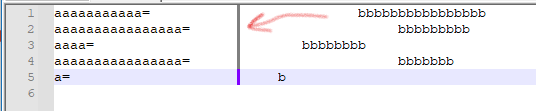
Press Ctrl+Delete to obtain:
aaaaaaaaaaa=                          bbbbbbbbbbbbbbbb
aaaaaaaaaaaaaaaa=                          bbbbbbbbb
aaaa=                          bbbbbbbb
aaaaaaaaaaaaaaaa=                          bbbbbbb
a=                          b



Hello! It looks like you're interested in this conversation, but you don't have an account yet.
Getting fed up of having to scroll through the same posts each visit? When you register for an account, you'll always come back to exactly where you were before, and choose to be notified of new replies (either via email, or push notification). You'll also be able to save bookmarks and upvote posts to show your appreciation to other community members.
With your input, this post could be even better 💗
Register Login