NppCrypt Plugin Not Installing
-
-
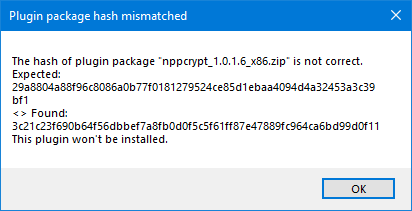
The “Expected” hash value is the 32-bit hash, as seen here; the 64bit is different than any shown in your dialog, so it’s not that you downloaded the wrong one. Thus, my guess is something got corrupted when the zipfile was downloaded.
This recent discussion (about a different plugin) showed that there can be a problem if the temporary directory that’s used when the plugin installer is downloaded is stored in a Teams / OneDrive / Cloud folder.
You may want to download nppcrypt’s zipfile directly, and unzip the DLL into
c:\program files\notepad++\plugins\NppCrypt\nppcrypt.dll, then restart Notepad++ -
This continues to be a problem

https://ci.appveyor.com/project/donho/npppluginlist-yy2vy/builds/42768803/job/a37y0gs447gccfqb
-
Looks like NppCrypt’s author generated the hash on a Linux box.
Both Powershell and N++'s builtin SHA-256 generator are in agreement:
PS C:\Users\Rob\Downloads> $(Get-FileHash nppcrypt_1.0.1.6_x86.zip -Algorithm SHA256).Hash

9B4F481419F7D65789E10E7D7C549F910A7C492C3855C62450E0F0AB385015D7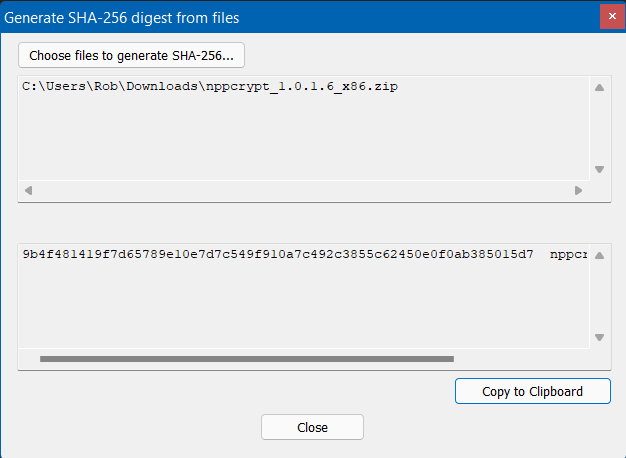
Using the
sha256sumutility included with the GNU coreutils, we instead get the “expected” hash:$ sha256sum nppcrypt_1.0.1.6_x86.zip 29a8804a88f96c8086a0b77f0181279524ce85d1ebaa4094d4a32453a3c39bf1 nppcrypt_1.0.1.6_x86.zip -
@rdipardo Just downloaded the x86 plugin version and on windows with N++ tool I get 29a8804a88f96c8086a0b77f0181279524ce85d1ebaa4094d4a32453a3c39bf1 on Win10. Also the check on appveyor is running on windows + python script. Current appveyor checks show no issue there. So I guess something is broken by the download or strange with the local vs. cloud storage.
-
x hi, I tried to download the files from github as mentioned in the post of feb 22
https://github.com/jeanpaulrichter/nppcrypt/releases/download/1.0.1.6/nppcrypt_1.0.1.6_x86.zip
however it seems the repo has disappeared (404) or made private.
Maybe nppcrypt is retired? Then it should not be proposed in the plugin admin menu I suppose
Too bad, I encrypted a lot of text and after resetting my laptop I have no access any more to it :-( -
@pierrecoach
Hi pierrecoach:
I did some checking on Github for this project and found this information: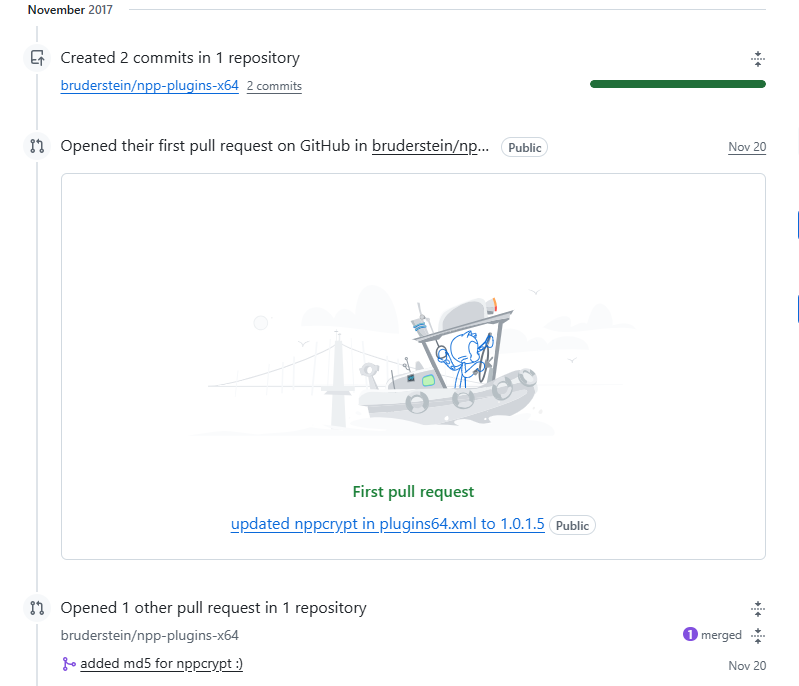
I found no further activity for this project.
Two possibilities come to mind:- check Github for "bruderstein/npp-plugins-x64
If you follow that link it will lead you here:
https://github.com/bruderstein/npp-plugins-x64
which describes, in detail, how to add, modify, remove, etc, newly created plugins.- it seems plausible that the author of this plugin has decided not maintain or further develop it,
However, if that is the case, it appears that the author chose not to “remove” it,
The link posted in point #1 shows how the author could have done this.
All in all, I think that you are dealing with an unsupported plugin, suggest that you look elsewhere for another plugin that would suit your purposes.
-
The links you pointed to were to the old 2017 pre-Notepad++-7.6 “Plugin Manager” plugin’s plugin-list. (There used to be a plugin which handled installing/uninstalling plugins in Notepad++. In v7.6, that was integrated into the core Notepad++ code, so that Don could make sure that the Plugins Admin always stayed compatible with Notepad++, rather than relying on a third party for such an important feature.) For nearly a decade, https://github.com/notepad-plus-plus/nppPluginList/ has been the home of the official list of plugins that gets shown in Plugins Admin.
More on the disappearance of NppCrypt and its repo can be found in this NppPluginList issue. I won’t re-iterate the details, since you can read them there if you are curiuos. But I will say that it looks like @chcg is going to try to resurrect the plugin from archives of the original source code; but it might take him some time. Until then, I’m not sure that any of the links given have any compiled DLL available. Hopefully, you don’t have any critical data that was encrypted on some other machine, that you need to decrypt with the plugin on this new setup. If you do, let us know… (Actually, if you do: do you also have access to the old machine? If so, you can copy the
...\notepad++\plugins\NppCryptdirectory from the installation on that machine, and put it on your new machine.)





Hello! It looks like you're interested in this conversation, but you don't have an account yet.
Getting fed up of having to scroll through the same posts each visit? When you register for an account, you'll always come back to exactly where you were before, and choose to be notified of new replies (either via email, or push notification). You'll also be able to save bookmarks and upvote posts to show your appreciation to other community members.
With your input, this post could be even better 💗
Register Login