Can't save the file after change the Encoding from "Characters Sets" to UTF-8
-
hello. I want to change the html file to UTF-8.
So, I change the encodind of a file to UTF-8 by going to:
Menu -> Encoding -> Utf-8 -> SAVEAfter saving the file, I close it an open it. So, I discover the same “Character Sets” as the default Encoding. why hasn’t it changed if i saved as uft-8?
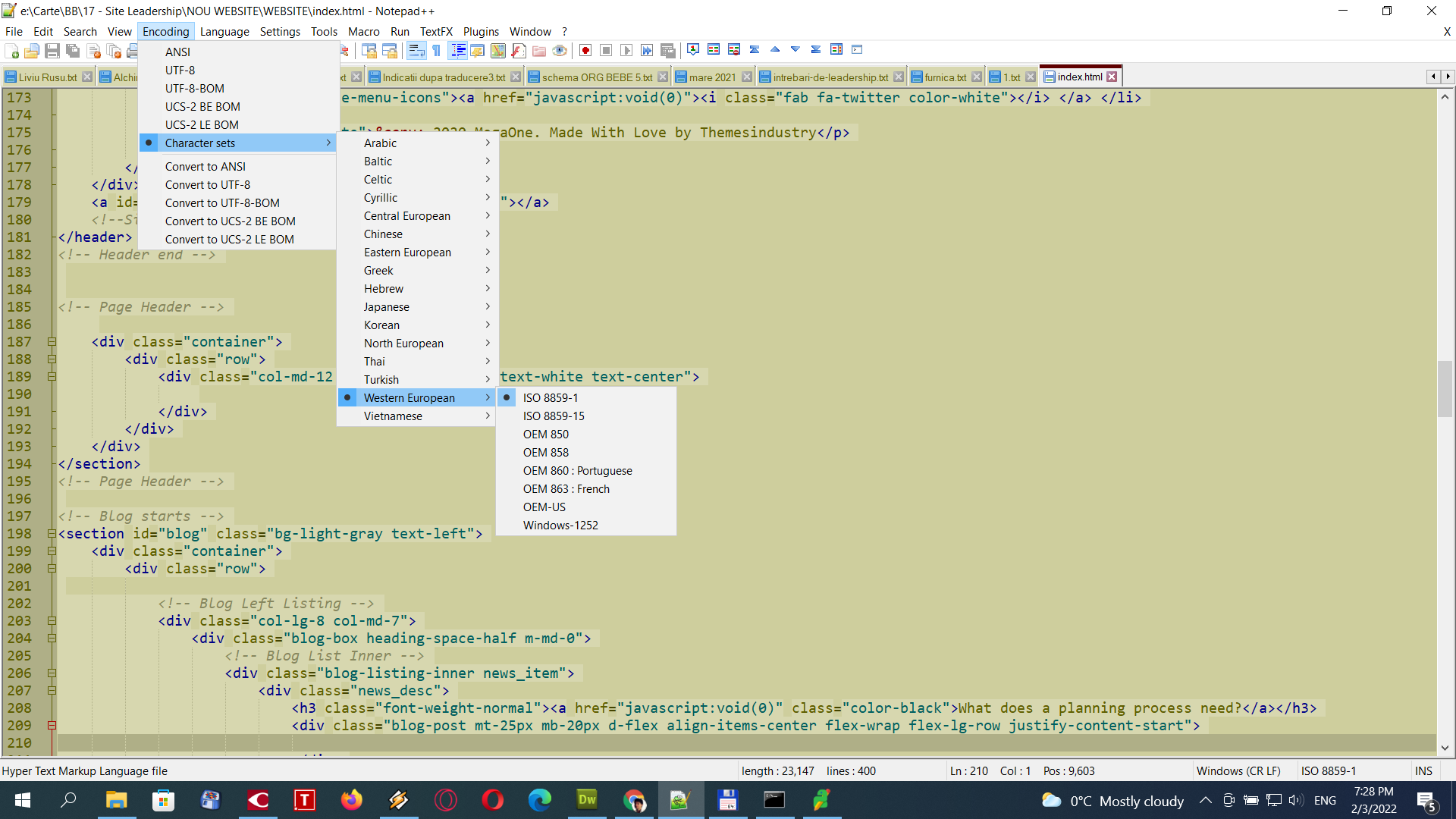
-
I also disable that feature ( Settings > Preferences… > MISC > Autodetect character encoding ).
I still have the same problem…
-
If you don’t have any characters that are outside of standard ASCII (I cannot see any in your screenshot), then Notepad++ sees only bytes from 0-127, so it’s perfectly happy picking 8859-1, which is ASCII-compatible. Even with auto-detect off, it has to make some decision regarding what encoding is actually used. You might disagree with that decision.
In that case, if you look in Settings > Preferences > New Document, you will find that you can set the default encoding to UTF8 as well as tell Notepad++ to apply that to ANSI files (so if it sees only 0-127, it recognizes it as ANSI, and then when you open it, Notepad++ will automatically treat that 0-127-only file as UTF8 instead).
-
PS: I know some here disagree with me, but that’s why I like UTF-8-with-BOM: it disambiguates the file, and allows editors and tools to know that you really meant that file to be UTF-8, and not some other 8-bit character set. With a BOM in your file, Notepad++ will correctly treat your file as UTF-8 every time.
I understand the argument that “BOM” literally means “Byte Order Mark”, and UTF-8 doesn’t have a variable byte order, so it is not needed. But I think they should have defined UTF-8 with an identifier sequence of some sort (at least an optional one) when they defined UTF-8, and think it’s a good thing that the unnecessary BOM has been dual-purposed to signify unambiguously a UTF-8 file in modern usage, even if it wasn’t part of the original purpose for the BOM.
-
PS: I know some here disagree with me
As the chairman of the “hinted some”. I have no objection to BOM, I objected to someone who said “UTF8 without BOM is stupid”. It is not!
And still the right solution is for Notepad++ to rework its Encoding selection and let the user have more control. The default should be something like “always assume a file is UTF8 unless it violates UTF8 rules, only then autodetect”.
-
@gstavi said in Can't save the file after change the Encoding from "Characters Sets" to UTF-8:
I objected to someone who said “UTF8 without BOM is stupid”. It is not!
I had either misremembered or misread that original anecdote. Sorry for misrepresenting what had been said previously.
And still the right solution is for Notepad++ to rework its Encoding selection and let the user have more control. The default should be something like “always assume a file is UTF8 unless it violates UTF8 rules, only then autodetect”.
👍💯👏


Hello! It looks like you're interested in this conversation, but you don't have an account yet.
Getting fed up of having to scroll through the same posts each visit? When you register for an account, you'll always come back to exactly where you were before, and choose to be notified of new replies (either via email, or push notification). You'll also be able to save bookmarks and upvote posts to show your appreciation to other community members.
With your input, this post could be even better 💗
Register Login