NppExec: npp command resulting in error message in scripts
-
If I run “NPP_SAVE” in a script, an error message is generated (file is saved, anyway). “NPP_SAVE” directly typed in the console is working correctly.
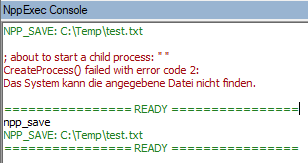
Does anyone know, how to resolve this? (maybe a missing setting or sth. else?)
I’m running NPP v. 7.8.9 64-bit on Windows 10.
-
I assume something after NPP_SAVE is the cause.
I would insert echo statements to see where exactly it is failing.
It must have something to do with the" ". -
While processing commands, NppExec removes the leading and trailing spaces ( ’ ’ also known as ‘\x20’ ) and tabs ( ‘\t’ also known as ‘\x09’ ).
In this situation, the next line after NPP_SAVE most likely contains some whitespace-like character that looks like a space but has a character code different from 0x20 and 0x09. -
This can be investigated locally by adding
npe_debug local 1right above the line withNPP_SAVE. It will print all the details of how NppExec executes the given commands and it will be possible to see the command item responsible for the “empty” command. -
@vitalii-dovgan Yes, that was the issue, a whitespace-like character in the next line.
Thank you!



Hello! It looks like you're interested in this conversation, but you don't have an account yet.
Getting fed up of having to scroll through the same posts each visit? When you register for an account, you'll always come back to exactly where you were before, and choose to be notified of new replies (either via email, or push notification). You'll also be able to save bookmarks and upvote posts to show your appreciation to other community members.
With your input, this post could be even better 💗
Register Login