Community
    • Login

    Notepad ++ not responding when saving XML file

    Scheduled Pinned Locked Moved Help wanted · · · – – – · · ·
    18 Posts 11 Posters 8.1k Views 1 Watching
    Loading More Posts
    • Oldest to Newest
    • Newest to Oldest
    • Most Votes
    Reply
    • Reply as topic
    Log in to reply
    This topic has been deleted. Only users with topic management privileges can see it.
    • Luc VerhoevenL Offline
      Luc Verhoeven
      last edited by

      I have the same problem. Only with “savie as” XSLT files.
      Some additional information. The problem seems to occur if NP++ has been unused (but open) for a longer time (> 1 hour)

      My debug info:
      Notepad++ v8.3.3 (64-bit)
      Build time : Mar 13 2022 - 17:20:02
      Path : C:\Program Files\Notepad++\notepad++.exe
      Command Line :
      Admin mode : OFF
      Local Conf mode : OFF
      Cloud Config : OFF
      OS Name : Windows 11 (64-bit)
      OS Version : 2009
      OS Build : 22000.556
      Current ANSI codepage : 1252
      Plugins : ComparePlugin.dll mimeTools.dll NppConverter.dll NppExport.dll NppHorizontalRuler.dll SQLinFormNpp64.dll XMLTools.dll

      1 Reply Last reply Reply Quote 0
      • Michael VincentM Offline
        Michael Vincent
        last edited by

        @luc-verhoeven
        @Kelly-Kilowatt
        @SUNNY-SAMANTARA

        I’ve asked but no one has supplied their XML Tools version.

        If there is no issue when running notepad++.exe -noPlugin and there is an issue only when XML Tools is installed, you’ll need to raise an issue at the appropriate place.

        Cheers.

        Luc VerhoevenL 1 Reply Last reply Reply Quote 1
        • Luc VerhoevenL Offline
          Luc Verhoeven @Michael Vincent
          last edited by

          @michael-vincent
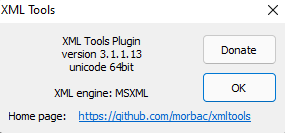
          7008fbba-6068-4f0f-905a-cf9375cca3b1-image.png

          Michael VincentM 1 Reply Last reply Reply Quote 3
          • Michael VincentM Offline
            Michael Vincent @Luc Verhoeven
            last edited by

            @luc-verhoeven

            Thank you! It appears you’re on the latest XML Tools version (as of this thread) and the latest Notepad++ from your debug info above (thanks for that). I would open an issue on the XML Tools issue page if indeed the slow to save only happens when XML Tools is installed.

            If Notepad++ has no issues saving XML / XLST without XML Tools installed, then it is most likely an XML Tools issue that should be resolved in that plugin’s code.

            Cheers.

            Luc VerhoevenL 1 Reply Last reply Reply Quote 3
            • Luc VerhoevenL Offline
              Luc Verhoeven @Michael Vincent
              last edited by

              @michael-vincent
              Yes, I can confirm that it is the XML-tools lugin that causes the problem. When I remove it, it will save in seconds (it is a very big XSLT file), if I reinstall the plugin (via de plugin admin) the behaviour is back. Saving the same XSLT (under a new name) makes notepad++ “not responding”

              What I now notice as well, is that when I crash the not responding notepad++ and restart it, it will save the file without problem, when I do save as again to another filename, it is back to not responding…

              I will submit a bug report on the XML-Tools on github. Thanks.

              Luc VerhoevenL 1 Reply Last reply Reply Quote 3
              • Luc VerhoevenL Offline
                Luc Verhoeven @Luc Verhoeven
                last edited by

                @luc-verhoeven
                https://github.com/morbac/xmltools/issues/154

                Bruce HansenB 1 Reply Last reply Reply Quote 2
                • Bruce HansenB Offline
                  Bruce Hansen @Luc Verhoeven
                  last edited by

                  I’m seeing similar issues when saving a large-ish (651k) XML file.
                  Notepad++ “hangs” for easily a minute or so before finally completing the save.
                  I do have XML Tools enabled, and (re)installed the latest v3.1.1.12 immediately after updating Notepad++.

                  Michael VincentM 1 Reply Last reply Reply Quote 0
                  • Michael VincentM Offline
                    Michael Vincent @Bruce Hansen
                    last edited by Michael Vincent

                    @bruce-hansen said in Notepad ++ not responding when saving XML file:

                    do have XML Tools enabled, and (re)installed the latest v3.1.1.12

                    Then follow the issue that @Luc-Verhoeven linked above. There’s already a potential solution there.

                    Cheers.

                    Luc VerhoevenL 1 Reply Last reply Reply Quote 2
                    • Luc VerhoevenL Offline
                      Luc Verhoeven @Michael Vincent
                      last edited by

                      @michael-vincent and all,

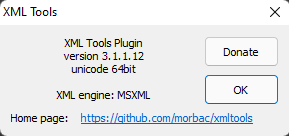
                      Version d5b96276-0d40-4a72-8722-6599d8b04304-image.png is available on github and does solve my problem.

                      I do not know when the new version will be available in the plugin Admin, so I installed the dll manually in the folder plugins\XmlTools\

                      Joel RodriguezJ 1 Reply Last reply Reply Quote 6
                      • Joel RodriguezJ Offline
                        Joel Rodriguez @Luc Verhoeven
                        last edited by

                        @luc-verhoeven Hello, i fixed s
                        disabling these options
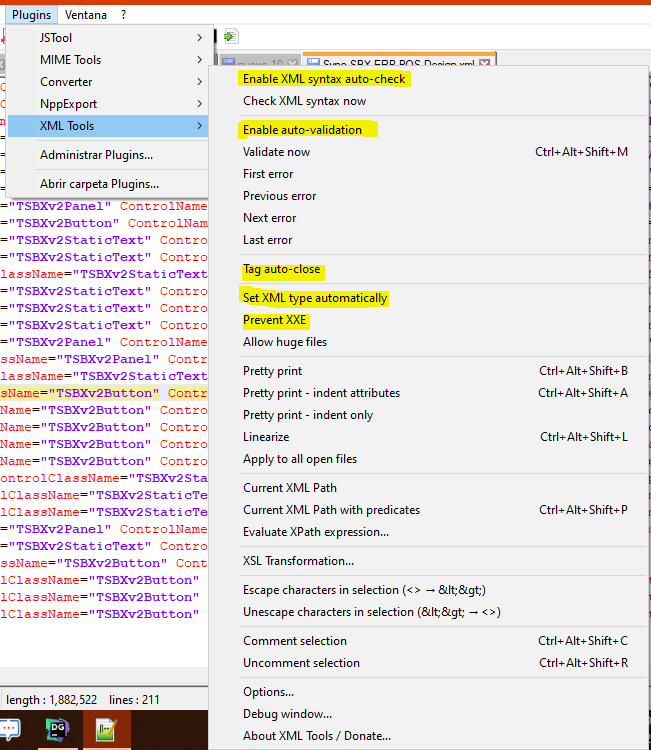
                        8290e5ec-a39d-4fa4-8e83-57527d1ffbdf-imagen.png

                        now i can save all my XML faster i hope this works for you

                        ? NMC1992N 2 Replies Last reply Reply Quote 2
                        • ? Offline
                          A Former User @Joel Rodriguez
                          last edited by

                          @joel-rodriguez Thank you!

                          This is what worked for me

                          1 Reply Last reply Reply Quote 0
                          • NMC1992N Offline
                            NMC1992 @Joel Rodriguez
                            last edited by

                            @joel-rodriguez Thank you so much! I’ve been having this for a while, so a work-around is much appreciated! :)

                            1 Reply Last reply Reply Quote 0
                            • Nicholas JamesN Offline
                              Nicholas James
                              last edited by

                              FYI, I just installed the July 15, 2022 build (v8.4.4) and the bug is back. Following the advice of @joel-rodriguez I was able to save my files without locking up.
                              Thanks,
                              Nick

                              1 Reply Last reply Reply Quote 0
                              • Graham CollinsG Offline
                                Graham Collins
                                last edited by

                                This happened to me on 8.4.7. Disabling the options mentioned by @joel-rodriguez worked for me

                                1 Reply Last reply Reply Quote 0
                                • guy038G guy038 referenced this topic on

                                Hello! It looks like you're interested in this conversation, but you don't have an account yet.

                                Getting fed up of having to scroll through the same posts each visit? When you register for an account, you'll always come back to exactly where you were before, and choose to be notified of new replies (either via email, or push notification). You'll also be able to save bookmarks and upvote posts to show your appreciation to other community members.

                                With your input, this post could be even better 💗

                                Register Login
                                • First post
                                  Last post
                                The Community of users of the Notepad++ text editor.
                                Powered by NodeBB | Contributors