Community
    • Login

    my .txt is in blank

    Scheduled Pinned Locked Moved Help wanted · · · – – – · · ·
    10 Posts 4 Posters 3.1k Views 3 Watching
    Loading More Posts
    • Oldest to Newest
    • Newest to Oldest
    • Most Votes
    Reply
    • Reply as topic
    Log in to reply
    This topic has been deleted. Only users with topic management privileges can see it.
    • Yefrith GilY Offline
      Yefrith Gil
      last edited by

      hi! i need help, first my power off on my pc
      i open again notepad++ and in my .txt say all: “NULL NULL NULL NULL”
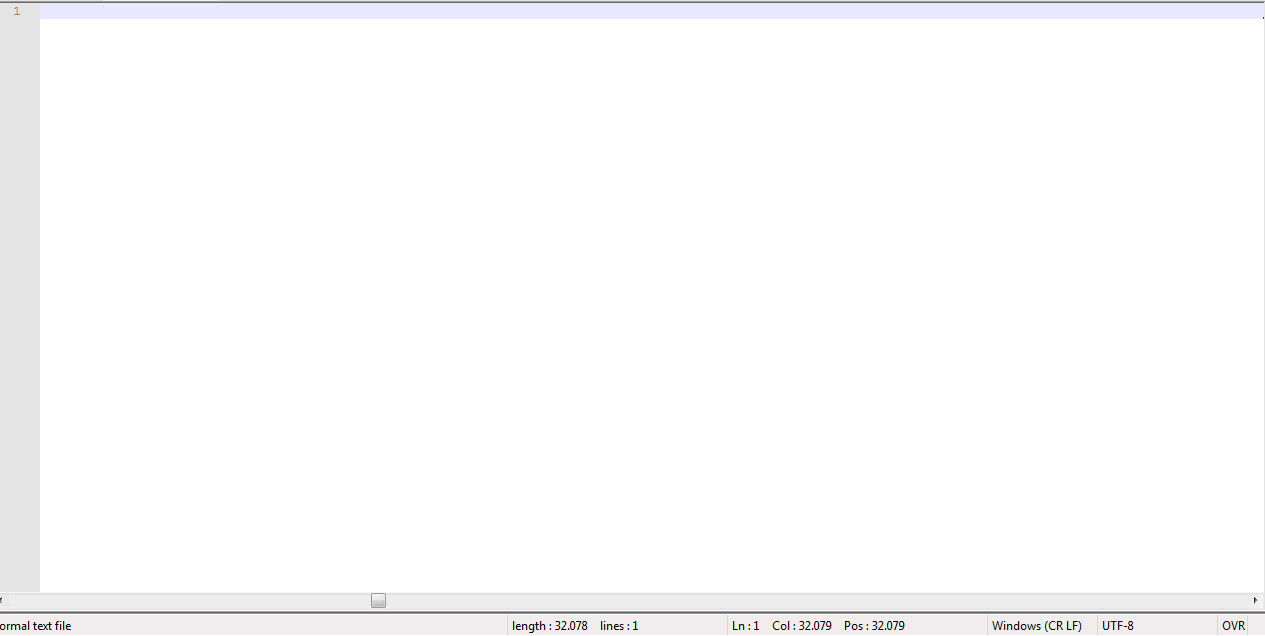
      white.png

      now are in white page
      i need help to recover this .txt

      Alan KilbornA donhoD 2 Replies Last reply Reply Quote 0
      • Alan KilbornA Offline
        Alan Kilborn @Yefrith Gil
        last edited by

        @yefrith-gil

        Please supply your Debug Info.
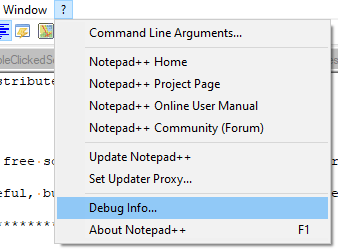
        Click on the ? menu here and choose Debug Info...:

        3685a423-d3c2-419b-8dad-40a048eafdba-image.png

        Then in the window that appears, click Copy debug info...:
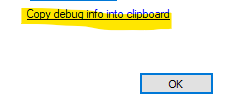
        74d887a1-486f-4ef0-933e-795bc2382f6b-image.png

        Finally, paste that into a posting here.

        Yefrith GilY 2 Replies Last reply Reply Quote 1
        • Yefrith GilY Offline
          Yefrith Gil @Alan Kilborn
          last edited by

          @alan-kilborn

          Notepad++ v8.3.3 (64-bit)
          Build time : Mar 13 2022 - 17:20:02
          Path : C:\Program Files\Notepad++\notepad++.exe
          Command Line :
          Admin mode : OFF
          Local Conf mode : OFF
          Cloud Config : OFF
          OS Name : Windows 7 Ultimate (64-bit)
          OS Build : 7601.0
          Current ANSI codepage : 1252
          Plugins : mimeTools.dll NppConverter.dll NppExport.dll

          1 Reply Last reply Reply Quote 0
          • Yefrith GilY Offline
            Yefrith Gil @Alan Kilborn
            last edited by

            @alan-kilborn for error i press “encoding” i think i press conver to UFF-8 because first says “NULL NULL” In all text

            PeterJonesP Yefrith GilY 2 Replies Last reply Reply Quote 0
            • PeterJonesP Offline
              PeterJones @Yefrith Gil
              last edited by

              @yefrith-gil ,

              Does C:\Program Files\Notepad++\nppLogNulContentCorruptionIssue.xml exist? (It should have been created when you installed v8.3.3, so it should, unless you deleted it.)

              If so, did you get a nppLogNulContentCorruptionIssue.log created in %APPDATA%\Notepad++\ ? (On your machine, that path probably expands to c:\users\_user.name_\AppData\Roaming\Notepad++\nppLogNulContentCorruptionIssue.log)

              If so, please post the contents of that log file here.

              1 Reply Last reply Reply Quote 3
              • Yefrith GilY Offline
                Yefrith Gil @Yefrith Gil
                last edited by

                @yefrith-gil yes i have “nppLogNulContentCorruptionIssue”

                but no have “nppLogNulContentCorruptionIssue.log”

                PeterJonesP 1 Reply Last reply Reply Quote 0
                • PeterJonesP Offline
                  PeterJones @Yefrith Gil
                  last edited by

                  @yefrith-gil ,

                  Hmm. Are you by chance using encryption, like Symmantec Desktop Encryption or similar? If so, this thread may be of interest.

                  Yefrith GilY 1 Reply Last reply Reply Quote 1
                  • Yefrith GilY Offline
                    Yefrith Gil @PeterJones
                    last edited by

                    @peterjones said in my .txt is in blank:

                    Hmm. Are you by chance using encryption, like Symmantec Desktop Encryption or similar? If so, this thread may be of interest.

                    nope

                    PeterJonesP 1 Reply Last reply Reply Quote 0
                    • PeterJonesP PeterJones referenced this topic on
                    • PeterJonesP Offline
                      PeterJones @Yefrith Gil
                      last edited by PeterJones

                      @yefrith-gil ,

                      Thanks for the info. I have pinged the Developer, @donho, in the v8.3.3 announcement and issues discussion so that he’ll know that there has been a NUL issue that wasn’t caught by the logfile that he instituted.

                      1 Reply Last reply Reply Quote 1
                      • PeterJonesP PeterJones referenced this topic on
                      • donhoD donho referenced this topic on
                      • donhoD donho referenced this topic on
                      • donhoD Offline
                        donho @Yefrith Gil
                        last edited by

                        @yefrith-gil said in my .txt is in blank:

                        hi! i need help, first my power off on my pc
                        i open again notepad++ and in my .txt say all: “NULL NULL NULL NULL”

                        Could you describe how was your PC power-off ?

                        1 Reply Last reply Reply Quote 2

                        Hello! It looks like you're interested in this conversation, but you don't have an account yet.

                        Getting fed up of having to scroll through the same posts each visit? When you register for an account, you'll always come back to exactly where you were before, and choose to be notified of new replies (either via email, or push notification). You'll also be able to save bookmarks and upvote posts to show your appreciation to other community members.

                        With your input, this post could be even better 💗

                        Register Login
                        • First post
                          Last post
                        The Community of users of the Notepad++ text editor.
                        Powered by NodeBB | Contributors