Custom XML syntax Highlighting? Custom XML UDL?
-
I’m working with a video game that uses XML sheets as it’s primary scripting and definition source. Here’s what i’d like to be able to do: Basically add keyword highlighting to the XML syntax highlighting. I’d like a XML syntax (or UDL) that behaves exactly like the default built in XML syntax highlighting, but has the ability to override and highlight certain keywords in tags and/or tag attributes. This would make it easier for me to script events, etc. for the game as the tags are read as action commends, etc.
So is there a way to Edit the Default XML highlighting to include keyword highlighting? Or is there a way to make a UDL that acts like the XML highlighting (highlighting tags, collapsing tags, etc.) but also gives me the other range of options a UDL does?
Example (Default):

Example (Desired):

Thanks in advance for any help!
-
@logicsequence said in Custom XML syntax Highlighting? Custom XML UDL?:
is there a way to Edit the Default XML highlighting to include keyword highlighting?
Nope.
Suggest you look into “EnhanceAnyLexer” plugin. It lets a default lexer do its job and then adds to it. See HERE.
-
@alan-kilborn I can’t seem to get that to install, i followed the directions on the page but N++ doesn’t recognize it as an installed plugin.Nevermind stupid mistake on my part.
-
@alan-kilborn BUUUUT… how the hell do i use this? I don’t want to waste your time, but if you could give me like a 10 sec how-to that would be great. If you can’t, no problems, though.
-
@alan-kilborn I’ve got the plugin installed, but i don’t know what it’s asking me to do whatsoever.
-
I had only previously used Eko’s pythonscript-based version. But since you asked so nice (well, actually, because I was curious as to how the interface would be), I downloaded it, and within about 10 minutes was able to get it to:
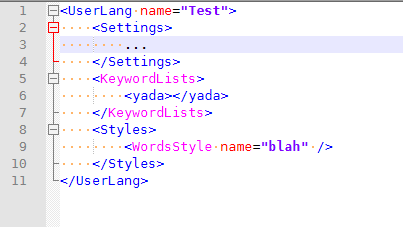
At the end of your EnhanceAnyLexerConfig.ini, add:
[xml]
16711935 = \b(KeywordLists|WordsStyle)\b
Amazingly, the plugin sees that the file has changed, and applies the changes instantly.
In case you were curious as to my figuring-out procedure, I took the example python from that file:
;[python]
;1077960 = \b(cls|self)\b
;excluded_styles = 1,3,4,6,7,12,16,17,18,19
Uncommented (removed the
;) and changed the header to[xml]instead of[python]. I then created some dummy tags in my example file that were<cls>and<self>, and saw they were a mustardy color. So that implies it was actually doing something. Then I addedKeywordListsto the regex, so it said ` \b(cls|self|KeywordLists)\b, and now that tag is also mustard. Eureka!To change the color, I know that colors are usually 0xRRGGBB or 0xBBGGRR (and I knew that Notepad++ used the latter) – it would be nice if @Ekopalypse would add a note about the color values in the example ini. So I saw your color was 0xFF00FF. (which then doesn’t matter which is red and which is blue). I converted that to decimal, which is
16711935, and replaced that. It changed to purply text! WooHoo!I then added
WordsStyleafter a new|and got rid of thecls|self|, yielding the config file section I showed originally.The excluded styles will help you avoid coloring those same terms in unwanted lexer situations, but that’s not critical from the get-go.
So, that’s working. Expanding to more keywords is up to you. For a beta plugin, that was easy enough.
( @Ekopalypse , my other suggestion would be to allow #BBGGRR as the color value as well. But great conversion from the original pythonscript, BTW.)
-
@peterjones You’re amazing and i love you, that’s exactly what i needed to know. The hex to decimal thing threw me off too, but i can just google a converter. Looks like this will do exactly what i want. I am in all your debts. Thank you @alan-kilborn for the recommendation as well!
-
@peterjones Just noticed, btw, that when converting from HEX color values to decimal values you need to invert the red and blue value before putting into a converter to get the color to display properly (i think this is probably a bug?).
So if you want, say, darkish purple, it would be a HEX value of #80 00 ff, but if you convert that value to DEC it won’t show properly. You have to input #ff 00 80 to get it to work. Just FYI for anyone wondering why colors aren’t working as they might have expected.
-
@logicsequence said in Custom XML syntax Highlighting? Custom XML UDL?:
you need to invert the red and blue value before putting into a converter to get the color to display properly (i think this is probably a bug?
No bug, really. It originates with how Windows decided to handle colors, i.e., in the COLORREF definition, see HERE.
-
Sorry I’m late to the party, and thank you for the interest in this plugin. Hex notation of a colour is also supported, I’ll make sure to update the sample configuration to make this clear.
As for the #bbccff notation, I think this should be easy to do, as for me this means I replace # with 0x and the code remains the same.@LogicSequence - can I ask you how I can improve the documentation in the config file to make it easier to understand for starters?
-
A new version v.0.2.0 was created which added the #color notation and made it “interactive”.
Unfortunately, the “#” is a comment character that makes the rest of the line look like it is inactive, which of course it is not.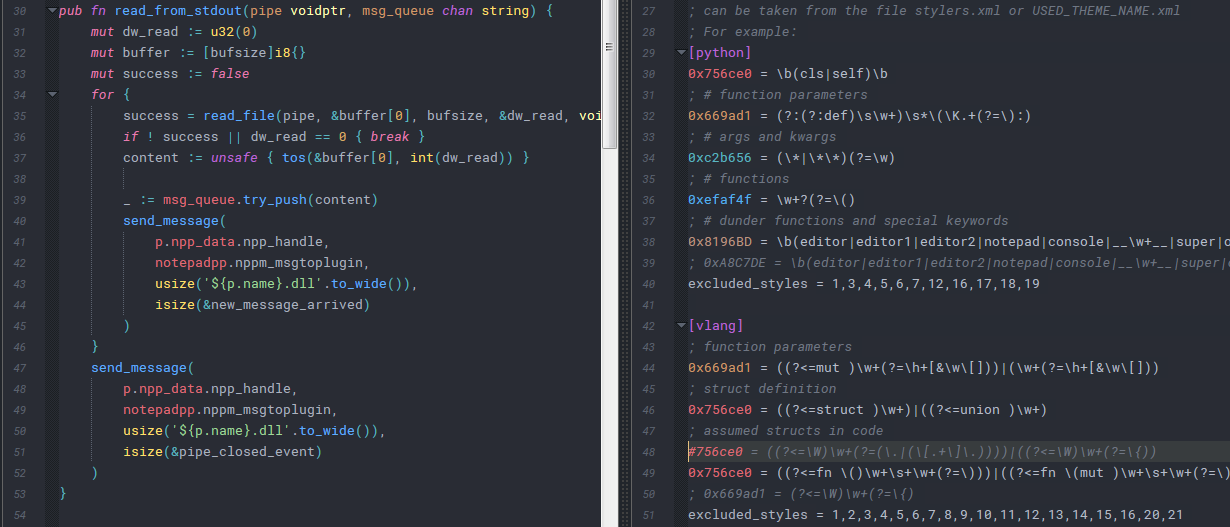
-
Thanks. I don’t know why I didn’t try 0x when # didn’t work.
But yes, having that in the documentation is a definite improvement.
The other thing I would suggest in the comments would be to phrase it:
; A colour is a number in the range 0 - 16777215. ; The notation is either pure digits or a hex notation starting with 0x or #, ; such as 0xff00ff or #ff00ff. ; Please note: ; * red goes in the lowest byte (0x0000FF) ; * green goes in the center byte (0x00FF00) ; * blue goes in the biggest byte (0xFF0000) ; * this BGR order might conflict with your expectation of RGB order. ; * see Microsoft COLORREF documentation https://docs.microsoft.com/en-us/windows/win32/gdi/colorref -
@peterjones
Thank you - the repo is already updated and the next version will include it. -
To borrow an idiom from GitHub: 🚀




Hello! It looks like you're interested in this conversation, but you don't have an account yet.
Getting fed up of having to scroll through the same posts each visit? When you register for an account, you'll always come back to exactly where you were before, and choose to be notified of new replies (either via email, or push notification). You'll also be able to save bookmarks and upvote posts to show your appreciation to other community members.
With your input, this post could be even better 💗
Register Login