Custom Styling
-
Hey, folks. My name is Youssef. I’m new to using Notepad+
How’s it going? I’m writing here to ask you for advice on how to automate a process. I want Notepad++ to count character lengths per line for me, and notify me when they’re over a certain number. Thanks a bunch! And take care! -
You could do a Find All to find lines greater than or equal to a certain length, e.g. 100:
Find:
(?-s)^.{100]
Search mode: Regular expression -
@alan-kilborn Hey, Alan! Thanks for responding! Am I doing this right?
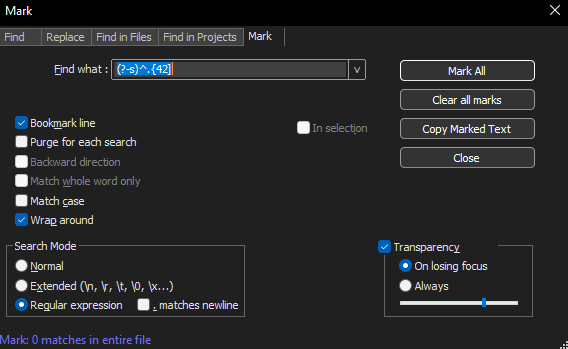
Also, where can I learn more about customizing Notepad++? Thanks!
-
@alan-kilborn said in Custom Styling:
Find: (?-s)^.{100]
What the heck did I type??
I meant
(?-s)^.{100,}Actually, in a Find All or a Mark All, this will work as well:
(?-s)^.{100}Note, no comma. Which was what I originally meant, although I lost the Shift key at the end and got
]instead of}.Also, where can I learn more about customizing Notepad++?
I suppose the user manual?
https://npp-user-manual.org/
Or by reading postings here on this current site. -
@alan-kilborn Perfect! Thanks so much.


Hello! It looks like you're interested in this conversation, but you don't have an account yet.
Getting fed up of having to scroll through the same posts each visit? When you register for an account, you'll always come back to exactly where you were before, and choose to be notified of new replies (either via email, or push notification). You'll also be able to save bookmarks and upvote posts to show your appreciation to other community members.
With your input, this post could be even better 💗
Register Login