I'm getting a debug window when starting 8.4.2 on Windows 10
-
I’m not sure if this is a bug or if I inadvertently enabled some debug mode through a keystroke or something, as I just started seeing this today. At some point, a debug window opened containing the following information:
Reading configuration…
Building plugin menu entries…
done.
Initialization finished.Now, whenever I start Notepad++, that window pops up with that info in it.
The debug info from the ? menu is:
Notepad++ v8.4.2 (64-bit)
Build time : May 29 2022 - 16:47:30
Path : C:\Program Files\Notepad++\notepad++.exe
Command Line : $COMMAND_LINE_PLACEHOLDER$
Admin mode : OFF
Local Conf mode : OFF
Cloud Config : OFF
OS Name : Windows 10 Enterprise (64-bit)
OS Version : 20H2
OS Build : 19042.1826
Current ANSI codepage : 1252
Plugins :
mimeTools (2.8)
NppConverter (4.4)
NppExport (0.4)
XMLTools (3.1.1.12)At seemingly random times (including sometimes when I start Notepad++), a couple of extra windows appear inside the main window in addition to the work area. (See screen shot.) I can close those windows, but they keep coming back at seemingly random times.
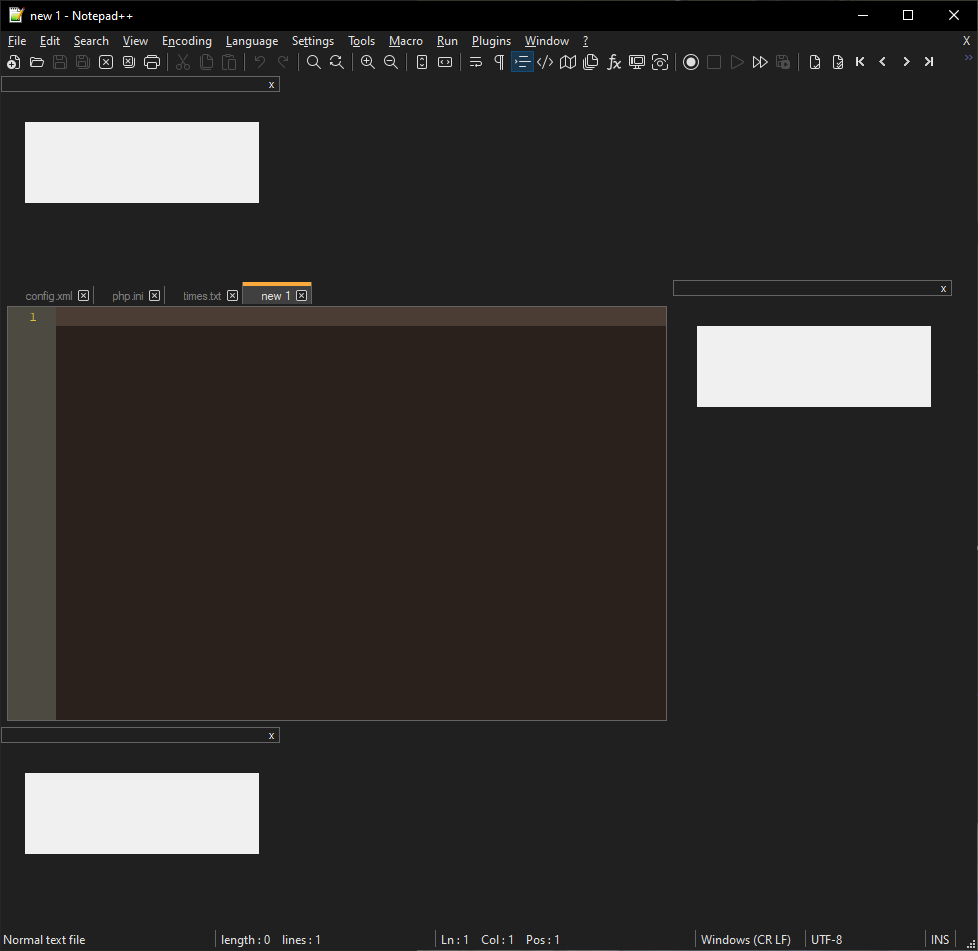
-
this screenshot reminds me of this issue with software like Slack, could this be your problem as well?


Hello! It looks like you're interested in this conversation, but you don't have an account yet.
Getting fed up of having to scroll through the same posts each visit? When you register for an account, you'll always come back to exactly where you were before, and choose to be notified of new replies (either via email, or push notification). You'll also be able to save bookmarks and upvote posts to show your appreciation to other community members.
With your input, this post could be even better 💗
Register Login