Change color of text after the echo in batch
-
I know I can use REM or :: to comment but comments are not visible during batch execution. I want to use echo for commenting as well as printing. Is there a way to specify a custom color for a line that starts with echo?
-
I had some luck using the EnhanceAnyLexer plugin.
Have a batch file be the active file in Notepad++ and then invoke the plugin’s menu option Enhance Current Language. An .ini file for the plugin will be opened in Notepad++ and some options specific to a batch file will be added to it. You can then configure it like this:
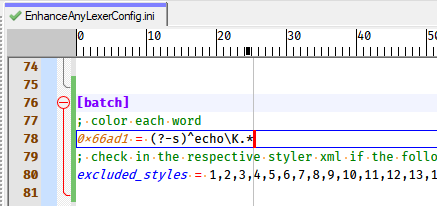
Note that I didn’t show the entire “excluded_styles” line because I didn’t change that line anyway.
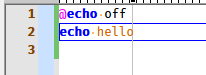
Here was the effect in a batch file:
-
@Alan-Kilborn After installing the EnhanceAnyLexer plugin, npp won’t open. Is there a another way to do it?
-
There’s often more than one way to do things. But EnhanceAnyLexer is arguably the easiest solution to your problem.
If I were you, I’d attack the “npp won’t open” problem.
Without more info from you about that, though, we can’t offer up much help. -
@Alan-Kilborn I don’t know more because it doesn’t give me any error
-
Suggest: Remove the plugin by renaming its DLL file to a new name (any name will suffice). Attempt starting of Notepad++. Does it start?
-
@Alan-Kilborn yes
-
I tried an old version of it (version 0.1.0 first beta) and then it worked
-
OK, well that certainly points to a definite problem. In my experience the plugin works fine. Perhaps the plugin’s author @Ekopalypse who is active here, can assist.
-
I noticed that the last two versions of it don’t work for me, but the v.0.5.0 beta and previous versions work.
Npp 8.4.2.0 x64 -
@amymor said in Change color of text after the echo in batch:
Npp 8.4.2.0 x64
Ah, OK, v1.01 of EnhanceAnyLexer also causes N++ 8.4.2 to not start up when I tried it as a test. N++ 8.4.3 and 8.4.4 start up fine with it.
The reason for the problems may be changes with the interface. Obviously N++ and plugins have to cooperate, and if N++ undergoes a change in core logic that make plugins incompatible, plugins have to evolve.
I suppose your options are to continue with the EAL 0.5.0 beta or update your N++ and use the newer EAL, if you want to continue with this.
-
@Alan-Kilborn Thanks for your response, I will update the npp.
-
I suppose that I have found the cause of the problem
It looks like calling NPPM_GETLANGUAGENAME with a value of -1 can cause npp to crash. I assume this also applies to NPPM_GETLANGUAGEDESC, as I suspect the problem manifests itself when getLangDesc is called.Thread 1 received signal SIGSEGV, Segmentation fault. 0x00007ff6413bc493 in notepad++!GetNameSpace () (gdb) bt #0 0x00007ff6413bc493 in notepad++!GetNameSpace () #1 0x00007ff6413d8f2d in notepad++!GetNameSpace () #2 0x00007ff6413dab12 in notepad++!GetNameSpace () #3 0x00007ff6413d4ce1 in notepad++!GetNameSpace () #4 0x00007ffd14c0e858 in USER32!CallWindowProcW () from C:\WINDOWS\System32\user32.dll #5 0x00007ffd14c0e3dc in USER32!DispatchMessageW () from C:\WINDOWS\System32\user32.dll #6 0x00007ffd14c20bc3 in USER32!SendMessageTimeoutW () from C:\WINDOWS\System32\user32.dll #7 0x00007ffd16ed0d74 in ntdll!KiUserCallbackDispatcher () from C:\WINDOWS\SYSTEM32\ntdll.dll #8 0x00007ffd14251124 in win32u!NtUserMessageCall () from C:\WINDOWS\System32\win32u.dll #9 0x00007ffd14c0df02 in USER32!SendMessageW () from C:\WINDOWS\System32\user32.dll #10 0x00007ffd14c0d68a in USER32!SendMessageW () from C:\WINDOWS\System32\user32.dll #11 0x00007ffce3751888 in notepadpp__Npp_call (n=..., msg=2107, wparam=18446744073709551615, lparam=0)I add a check in EnhanceAnyLexer to prevent calling it in this case
pub fn(n Npp) get_language_name(buffer_id usize) string {
	lang_type := n.call(nppm_getbufferlangtype, buffer_id, isize(0))
	if lang_type == -1 {
		return 'UNKNOWN_ERROR'
	}
	mut buffer_size := int(n.call(nppm_getlanguagename, usize(lang_type), isize(0))) + 1
	mut buffer := alloc_wide(buffer_size)

	n.call(nppm_getlanguagename, usize(lang_type), isize(buffer))
	lang_name := unsafe { string_from_wide(buffer) }
	return lang_name.to_lower().replace('udf - ', '')
}
An issue has been opened.



Hello! It looks like you're interested in this conversation, but you don't have an account yet.
Getting fed up of having to scroll through the same posts each visit? When you register for an account, you'll always come back to exactly where you were before, and choose to be notified of new replies (either via email, or push notification). You'll also be able to save bookmarks and upvote posts to show your appreciation to other community members.
With your input, this post could be even better 💗
Register Login