Set line width from pull down menu
-
I want (and wanted to, but forgot how) to set the line width to 48 characters.
I import the text results into a newsletter that has a fixed width and want avoid all my current problems, like wordwapping, left over lines with one word etc.
I did this last month successfully but forgot how to set the line width.
I did this from a pull down menu but the heading alludes me.Help!
-
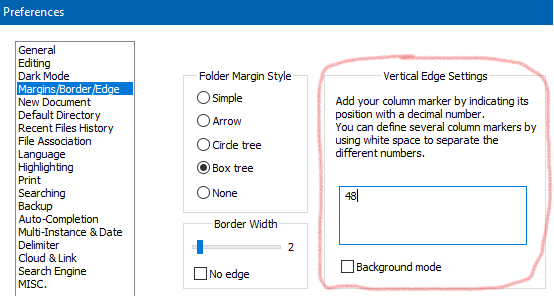
Notepad++ has a vertical edge setting in Settings > Preferences > Margins/Border/Edge . If you set it to 48, then Notepad++ will draw a vertical edge at column 48
If you have that set, and have a paragraph that goes beyond 48 characters, the
Ctrl+I(Edit > Line Operations > Split Lines) will split the line at the 48 character edge. -
Sorry, I seem to need more instruction. I went to the Margin/Border/Edge area but found nothing about a vertical edge setting. Could you please direct me on what selections I should be making.
There’s lots of combinations there and I can’t discover which combinations to chose? -
-
Think I’m finally getting there. Thank you Peter and, for now, over and out.



Hello! It looks like you're interested in this conversation, but you don't have an account yet.
Getting fed up of having to scroll through the same posts each visit? When you register for an account, you'll always come back to exactly where you were before, and choose to be notified of new replies (either via email, or push notification). You'll also be able to save bookmarks and upvote posts to show your appreciation to other community members.
With your input, this post could be even better 💗
Register Login