Refresh issue when document is modified outside
-
I’ve noticed that when I have a file open and I’ve scrolled down to the bottom, I get the pop up that file has been modified and asks if i want to reload. That’s all well and good, but the file scrolls all the way back to the top before I’ve even had a chance to answer the question. I feel like this is a bug that its changing the current place in the file when the file has been modified outside. Can anyone please confirm? Thanks.
-
Before we can begin to confirm, we have to understand your circumstances:
- What is your ?-menu’s Debug Info?
- Are you in View > Monitoring Mode or not?
- What are your Settings > Preferences > MISC > File Status Auto-detection settings?
- Please note that the third setting in that menu is a highly-likely culprit
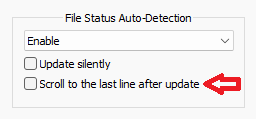
(though I would have expected slightly different behavior, as I would have expected it would scroll to the end, not to the beginning. But there might be some weird combination when you have both that and file-monitoring mode enabled simultaneously)
- Please note that the third setting in that menu is a highly-likely culprit


Hello! It looks like you're interested in this conversation, but you don't have an account yet.
Getting fed up of having to scroll through the same posts each visit? When you register for an account, you'll always come back to exactly where you were before, and choose to be notified of new replies (either via email, or push notification). You'll also be able to save bookmarks and upvote posts to show your appreciation to other community members.
With your input, this post could be even better 💗
Register Login