accented characters as hex
-
When opening an xml file in Notepad++ , it converts character É to xC9.
Opening the same file in Notepad the character É is displayed.
How can I view the correct character É in Notepad++? -
Your encoding is wrong. You have a byte 0xC9 (which is the Windows-1252 and similar encoding for the É) character, but Notepad++ has interpreted the file as UTF-8, and UTF-8 doesn’t have a character that is encoded solely with 0xC9, which is why Notepad++ displays that character as an error.
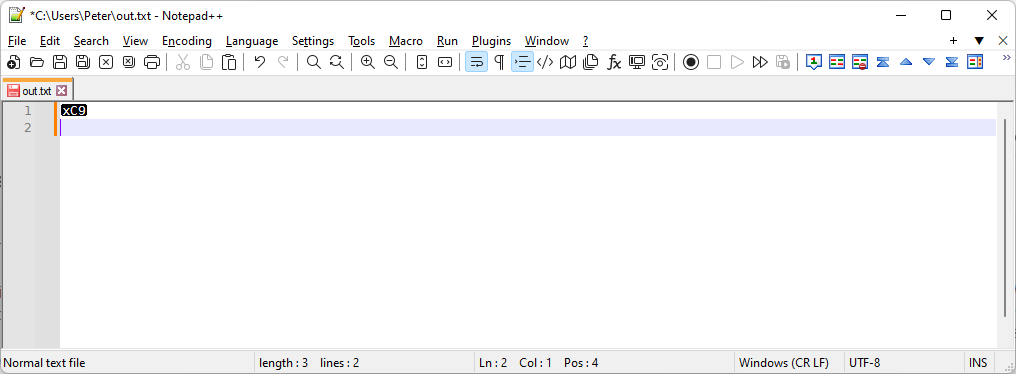
Notice the lower right says UTF-8.
So the real question is, what is your real encoding right now, and what do you want the encoding to be?
If you don’t have a mix of Windows-1252 and UTF-8 in the same file, the easiest fix is to go to the Encoding menu and click on ANSI, so that Notepad++ will re-interpret the file as a correct Windows-1252 ANSI encoding.
Now the lower right says ANSI.
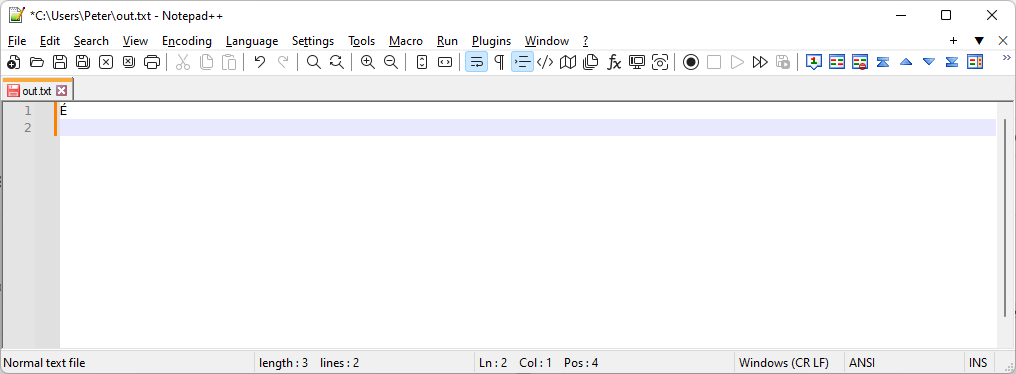
If you want to convert the file to UTF-8 at this point, use the Encoding menu again, but this time go all the way down to “Convert to UTF-8” (not the “UTF-8” near the top)
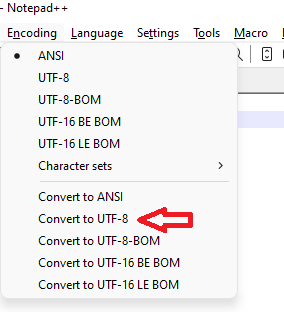
This will then change the underlying bytes of the file to correctly use UTF-8, but will still properly show the É. And next time you load it in Notepad++, it should be correct when you load, without this extra effort.If you’ve got a mix of character encodings in the same file, it will be harder to help you. We’d have to show you a fancy regex, but to do that, we’d need a better idea of what the mix of properly-encoded and wrongly-encoded characters was.
-
your xml file should have an XML-Prolog in the first line which states the encoding to use:
<?xml version="1.0" encoding="Windows-1252"?>
If this line is missing, UTF-8 will be assumed since that is the default for XML files. If the prolog is set, the XML-lexer will set the document encoding accordingly.


Hello! It looks like you're interested in this conversation, but you don't have an account yet.
Getting fed up of having to scroll through the same posts each visit? When you register for an account, you'll always come back to exactly where you were before, and choose to be notified of new replies (either via email, or push notification). You'll also be able to save bookmarks and upvote posts to show your appreciation to other community members.
With your input, this post could be even better 💗
Register Login