renumbering/incremental
-
@Alan-Kilborn This looks great and I will be doing some testing on it today. First thing I noticed was I needed to change this line: renumbering = [ 1, 1 ] to renumbering = [ 10, 1 ], as it has to start at 10 (or more, but I figured 10 was a good # to use, as if you remember from my other post, I need to edit some lines. So I really appreciate you making it easy, as that was very simple to find and edit. The next part I need to figure out is, where to have it do this (or do I justdo it separately. Its only 2 operations if I need to do separately and it will change 10k files so its worth it either way. The other post I had done we came up with
replace: \A(?-s).\R.\R.\R.\R.\R.\R.*\R
with : O0001 ;N01 ;N02 ;N03 ;N04 G94 G53 G56 T0000 ;N05 G92 X0.6820 Z2.1505 ;N06 G59 ;So right now, If I run your script, followed by that search/replace it seems it does all I need to do. Just wondering if that is something python allows.
This is all amazing, and even with you being modest, you still put a good deal of effort into this and it is much appreciated
-
@Alan-Kilborn Sorry for breaking this into two messages: I also see where you have the self.search_regex and def retuen_replacement_text_func(m) I would be l;looking to make any future code modifications, so I can probably try adding that \A(?-s).\R.\R.\R.\R.\R.\R.*\R into the first part and the replacement into the second I just dont want to screw up the code. I will be back at the factory in a few hours to see.
Thanks again -
@Scott-Raskin said in renumbering/incremental:
First thing I noticed was I needed to change this line: renumbering = [ 1, 1 ] to renumbering = [ 10, 1 ], as it has to start at 10
You could change it the way you state, but I’d suggest this as cleaner:
renumbering[CURRENT] = 10inserted above this line in the script:
renumbering[INCREMENT] = 10The “current” value is the starting value, and also the “running” value as the replacement moves along (that’s why I didn’t want to call it “starting”). Expressing one’s self in code isn’t always straightforward.
The “increment” value is well-named, but the fact that the
INCREMENTtag in the code is 1 and NEVER should be changed, well, this does seem odd (it is used for a different purpose than one might think). Expressing one’s self in code isn’t always straightforward.If you just think in terms of:
-
if I want to change the starting value, I need to set
renumbering[CURRENT] =something -
if I want to change the incrementing value, I need to set
renumbering[INCREMENT] =something
and forget about the rest…for this specific application.
This is all amazing, and even with you being modest, you still put a good deal of effort into this and it is much appreciated
Not a problem. Part of the goal was somewhat of a generic solution (as you’ve probably noticed), so that the next time a question like this comes up (and it will), there is a model of a solution for it.
-
-
@Scott-Raskin said :
…run your script, followed by that search/replace it seems it does all I need to do.
Its only 2 operations if I need to do separately and it will change 10k files so its worth it either way
The script is rather dedicated to its renumbering/incrementing purpose, but it is just code so you could change it to go beyond that.
As the search/replace op you mention is just a normal one (no special math/renumber/increment stuff), you could just include an
editor.rereplace(search,replace)function call right after this line:replacements_made_in_this_file = self.perform_custom_replace_in_one_file(first_time_thru)Note however that this would invalidate the script’s results reporting (at completion, telling you number of replacements made, etc.). Not a big deal if you trust the script, mainly I put that stuff in to be general purpose, and to give a user a sanity check if they know about how many files should be matched via filespec/filter, about how many replaces should have been done, etc.
If I were you, I’d keep it as two separate and distinct operations, running of a script, and then a follow-up Replace in Files op.
-
@Alan-Kilborn tried this
self.print(‘making replacements in’, pathname)
replacements_made_in_this_file = self.perform_custom_replace_in_one_file(first_time_thru)
editor.rereplace(\A(?-s).\R.&\R.\R.\R.\R.\R.\R.*\R,O0001 ;N0001 ;N0002 ;N0003 ;N0005 G94 G53 G56 T0000 ;N0010 G92 X0.6820 Z2.1505 ;
) self.print(‘{} replacements made in current file’.format(replacements_made_in_this_file))and the script wont even run now. Maybe youre right and 2 ops is the best
-
@Alan-Kilborn copy/paste made it look weird for some reason in the post but that search/replace was all one line in the script
-
@Scott-Raskin said in renumbering/incremental:
copy/paste made it look weird for some reason in the post
If you want it to appear verbatim in a posting, you have to format it correctly.
Add lines with 3 backticks at the start and bottom of your “block”:
```
one
two
three
```Do that and it will appear like this:
one two threeAlternatively, select the text to format and press the “code” button in the “toolbar” to get the same effect:
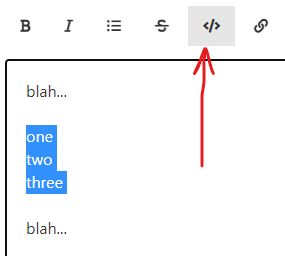
More info on FORMATTING posts is in the FAQ entry concerning it.
-
Concerning:
Maybe youre right and 2 ops is the best
I think so…especially due to your newness to the scripting world. As you’ve found, it is very easy to screw up something to the point where a previously-running script now won’t run. (This is often even easy for scripting veterans to do.)
-
Are you making a “macro” out of your second op, the standard Replace in Files operation?
If so, then it really becomes less painful as a separate operation; you don’t have to fill in all the fields in the UI each time, you just pick the “macro” from the Macro menu to run it.
So your workflow becomes:
- run the script
- run the macro
Downside of a macro: For a Replace in Files macro, the folder is “hardcoded”.
-
@Alan-Kilborn so sorry, we were closed for a bit and Im just getting back. I will try those both this week, thank you so much for all of your help!
-
If you’ve used a script in this thread, you might want to double check your copy of it for a bug I’ve discovered.
Look to previous postings in this topic thread where the script has been changed – find the textmoderator edit (2024-Jan-14).
There’s a link there that describes the bug in more detail, and shows what needs to be changed in an old copy (or you can simply grab a copy of the current version).



Hello! It looks like you're interested in this conversation, but you don't have an account yet.
Getting fed up of having to scroll through the same posts each visit? When you register for an account, you'll always come back to exactly where you were before, and choose to be notified of new replies (either via email, or push notification). You'll also be able to save bookmarks and upvote posts to show your appreciation to other community members.
With your input, this post could be even better 💗
Register Login