Copy all Phone numbers
-
Hello dear notepad++ user,
I have a text file,
and the data is always in this format:Name: xxx
Family name: xxx
Date of birth: xxxxx
Street: xxxxx
No.: xx
City code: xxxxxx
City: xxxxxxxx
Floor: xxxx
Location: xxxxx
Telephone: xxxxxxxx
Email: xxxxxxxxx@xxxxxxxxxxx.xx
IBAN: xxxxxxxxxxxx
xxxxxxxxxI only want to copy the line “Telephone” into another file,
preferably separated by commas,so he should copy the content of the line Telephone: after the colon into a separate file or into the same file somewhere at the end, preferably one after the other. so
12346,123465,123125,12312315,12312315
thanks
-
For the first part, do a Mark operation:
Try:
Press Ctrl+m to invoke Mark
Find what box:(?-is)^Telephone: \K.+
Wrap around checkbox:checkit
Search mode radiobuttons: selectRegular expression
Press Mark All button
Press Copy Marked Text buttonLearn to answer questions of this kind yourself in the future; start reading HERE and also check out the N++ user manual’s searching section HERE.
-
@Alan-Kilborn said in Copy all Phone numbers:
start reading HERE
Since OP doesn’t appear to know how to do some/all of the non-regex tasks:
- Find all in current doc
- In search results pane, Copy Selected Line(s)
- Using normal mode Find and Replace with empty replace field to delete
- Using extended mode Find and Replace to convert line ending to comma
I’m quite certain OP is not ready for the very complex regex documentation article you linked.
-
@Alan-Kilborn
thanks it worked!is it possible to find all double entries?
not 1by1
i mean like “delete all doubly entries” -
@Neil-Schipper said in Copy all Phone numbers:
I’m quite certain OP is not ready for the very complex regex documentation article you linked.
I said …start reading HERE…
:-) -
@Mobil-Meister said in Copy all Phone numbers:
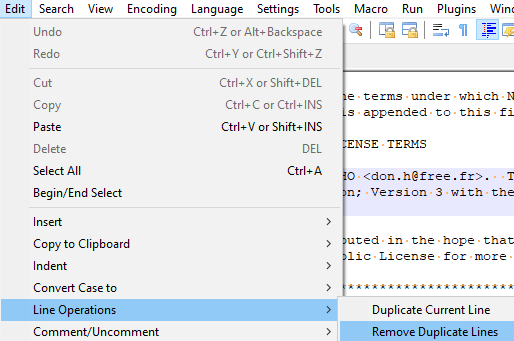
is it possible to find all double entries?
If you have the phone numbers, and only the phone numbers, one per line, then you could use this command:
-
@Alan-Kilborn
thank you,
that work very wellproblem is if I read most of the time I don’t know what they mean, because I’m asking the wrong questions



Hello! It looks like you're interested in this conversation, but you don't have an account yet.
Getting fed up of having to scroll through the same posts each visit? When you register for an account, you'll always come back to exactly where you were before, and choose to be notified of new replies (either via email, or push notification). You'll also be able to save bookmarks and upvote posts to show your appreciation to other community members.
With your input, this post could be even better 💗
Register Login