Is there way to only copy&replace contents next to the timeline on the left?
-
 image url)
I’d like to ignore? timeline on the left and only copy the contents on the right.
and replace the right side with translated contents that I have copied.
of course I can copy&paste over and over but that would take so long…
copy the whole thing and runing the translator with it made timeline broken. -
@1NGAN
In the future please paste in raw text surrounded in three rows of triple backticks like this
```
raw text here
```
and it will look likeraw text hereIn any case, what you want is to use the find/replace form, turn regular expressions on, find
(?-s)^[\d\d:\d\d\.\d\d](.*)and replace with\1. This will temporarily delete the timestamps, you can select the entire document, copy to clipboard, and then Ctrl+Z to undo the find/replace.Explanation: the regular expression looks for lines starting with (
^) an open square bracket and two digits, then a colon, then two more digits, then a period, then two more digits[\d\d:\d\d\.\d\d], then captures everything after that on the same line(.*). The(?-s)at the beginning just ensures that(.*)only matches the rest of the line, not the rest of the file. -
@Mark-Olson ,
Are you sure he isn’t just asking how to do a column select/copy? Perhaps, to translate all lines at one time?
The OP’s description and lack of proper formatting and presentation of example material is not very conducive to a real answer, if either of our scenarios is the one they are trying to describe.OP needs to first read the FAQs starting with this one:
FormattingAnd this one:
Search and Replace -
@Lycan-Thrope Yes, I think he only wants
Edit - Column Mode...which leads to the “Column Mode Tip”
Please use "ALT+Mouse Selection" or "Alt+Shift+Arrow key" to switch to column mode. -
@datatraveller1 This is the feature that I wanted to find!!!
thank you and others tried to help me. -
Actually if you use N++ 8.5 or later, going where @datatraveller1 suggests will show you this:
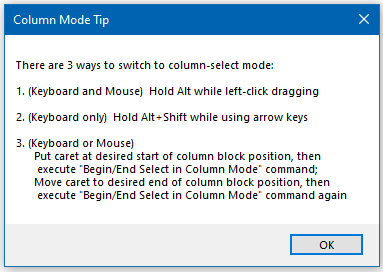
Number 3 is a new command to Notepad++ 8.5; see the Edit menu:
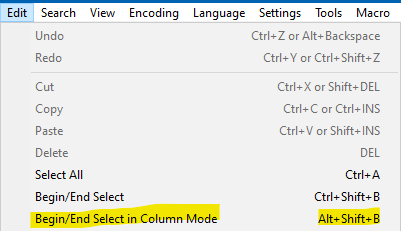
Personal note: I actually added this to N++ 8.5 – my FIRST contribution to Notepad++ code! :-)





Hello! It looks like you're interested in this conversation, but you don't have an account yet.
Getting fed up of having to scroll through the same posts each visit? When you register for an account, you'll always come back to exactly where you were before, and choose to be notified of new replies (either via email, or push notification). You'll also be able to save bookmarks and upvote posts to show your appreciation to other community members.
With your input, this post could be even better 💗
Register Login