colors seem washed out
-
I’m new to notepad++. I have a new work laptop and it has notepadd++ already installed and I can’t install sublime that I used to use. I was trying to get my color scheme from sublime similar but it looks like notepad++'s colors are washed out. I got the RGB value from my sublime settings but they look different in notepad++
Here’s what sublime looks like:
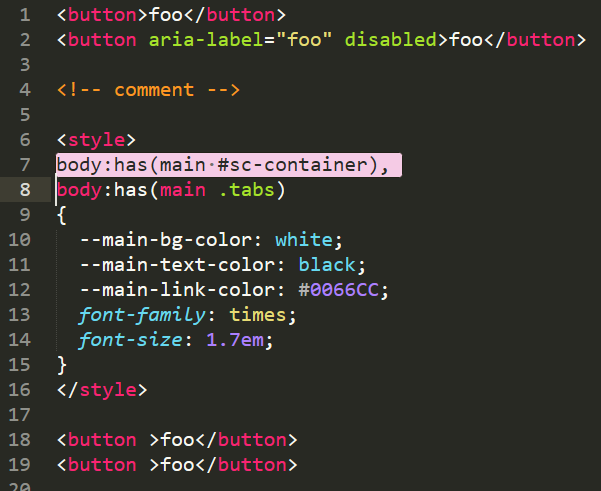
And here’s what notepadd++ looks like with the same RGB values for all the elements:
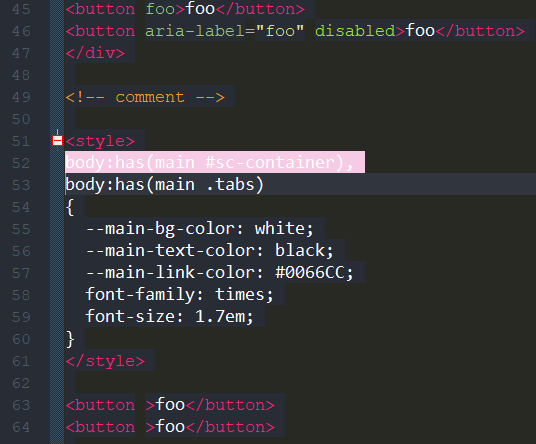
I don’t think it’s my eyes. Notepad++ looks different.
- The HTML tags should be a brighter pinkish color.
- The orange comment should be brighter
- HTML attributes should be a brighter green and the values a brighter yellow
- My selection background color seems to be used but the selection foreground color (which I have set to black) is not used. It’s using white text.
I verified I have the right RGB values in the Style Configurator. Am I missing something obvious?
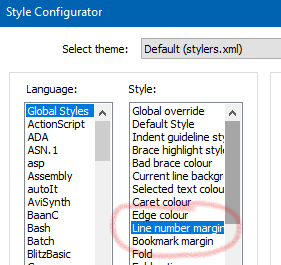
Also, is there a way to set the line number color?
-
@Glen-Walker said in colors seem washed out:
My selection background color seems to be used but the selection foreground color (which I have set to black) is not used. It’s using white text.
See
enableSelectFgColor.xmlinfo HERE. -
-
@Glen-Walker said in colors seem washed out:
I don’t think it’s my eyes. Notepad++ looks different.
It’s using a different font and/or font size. That changes the shading.
I verified I have the right RGB values in the Style Configurator.
And I grabbed your two screenshot images, and found that the pink background color is exactly the same RGB triple – so if those screenshots look like a different pink to you, then it is your eyes. (Did you see a blue dress or pink dress? It’s the exact same thing here. Color context matters, and that black-foreground vs white-foreground on top of the pink background changes the way your brain interprets the color.)
For the HTML tags, when I found a similar spot in the center of the downstroke for the
bof<button>, I got the same RGB in both images.But your screenshots say that Notepad++ is presenting the same colors that Sublime was for those two.
And on the green, I wonder if you happen to have “bold” on Sublime and “not-bold” on Notepad++, because they are very similar shades of green, but not identical.
-
I get the impression from some quick reading that Sublime Text may use hardware acceleration. I know that VSCode does, and VSCode seems to have sharper colors than Notepad++. Might hardware acceleration vs. lack thereof account for this sort of thing, at least in part?
-
@Alan-Kilborn Thanks, I never would have found that. I’m not able to copy files to C:\Program Files\Notepad++ so I’ll have to see if I can get my IT to do it.
-
@Alan-Kilborn You know, I saw that in the configurator but for some reason I thought it was the divider between the numbers and the actual text. I think because I had seen “Folder Margin Style” in the preferences just before looking for the color. Thanks again.
-
@Glen-Walker said in colors seem washed out:
@Alan-Kilborn You know, I saw that in the configurator but for some reason I thought it was the divider between the numbers and the actual text. I think because I had seen “Folder Margin Style” in the preferences just before looking for the color. Thanks again.
Yes That’s right.





Hello! It looks like you're interested in this conversation, but you don't have an account yet.
Getting fed up of having to scroll through the same posts each visit? When you register for an account, you'll always come back to exactly where you were before, and choose to be notified of new replies (either via email, or push notification). You'll also be able to save bookmarks and upvote posts to show your appreciation to other community members.
With your input, this post could be even better 💗
Register Login