strings starting with ";" ignored when given in codeblock start/end string definition
-
@PeterJones Thank you for your reply! :)
yes it is a user defined language, here is a screenshot, this works:
![alt text]![c09934be-f413-4f69-b6ae-2de1431ef2fa-image.png]
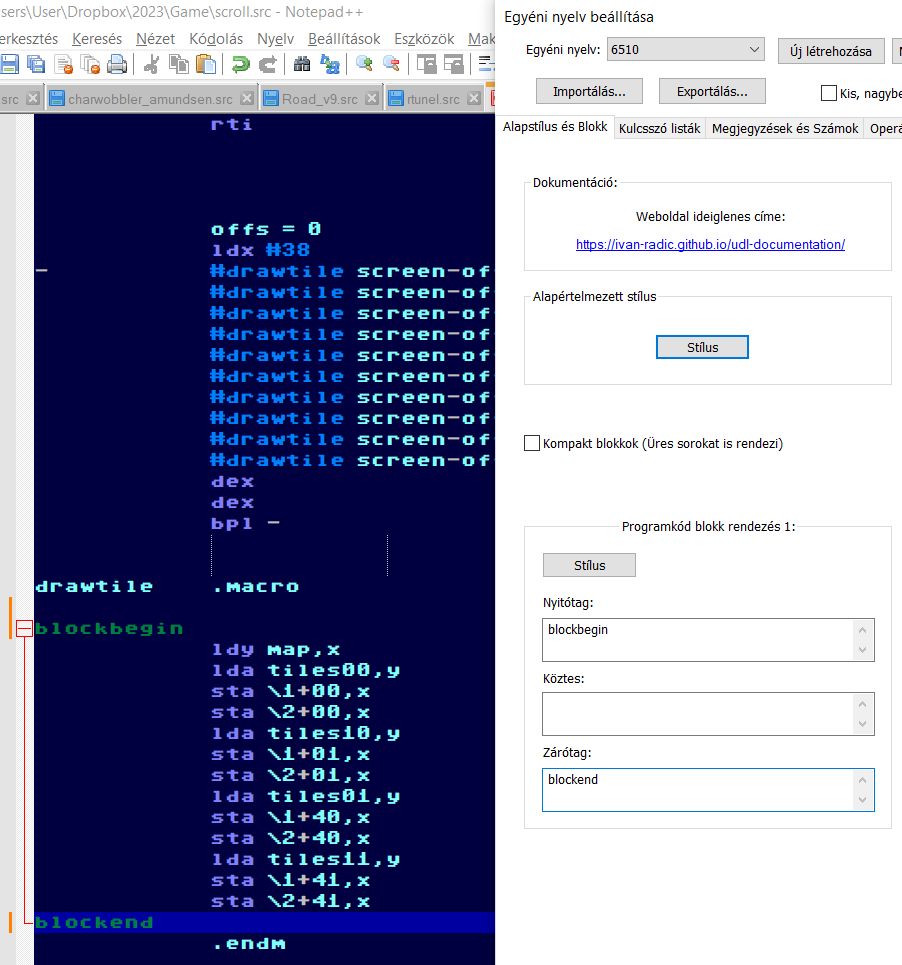 (/assets/uploads/files/1684522990486-c09934be-f413-4f69-b6ae-2de1431ef2fa-image.png) (image url)
and this doesnt work because of the “;”
![alt text]
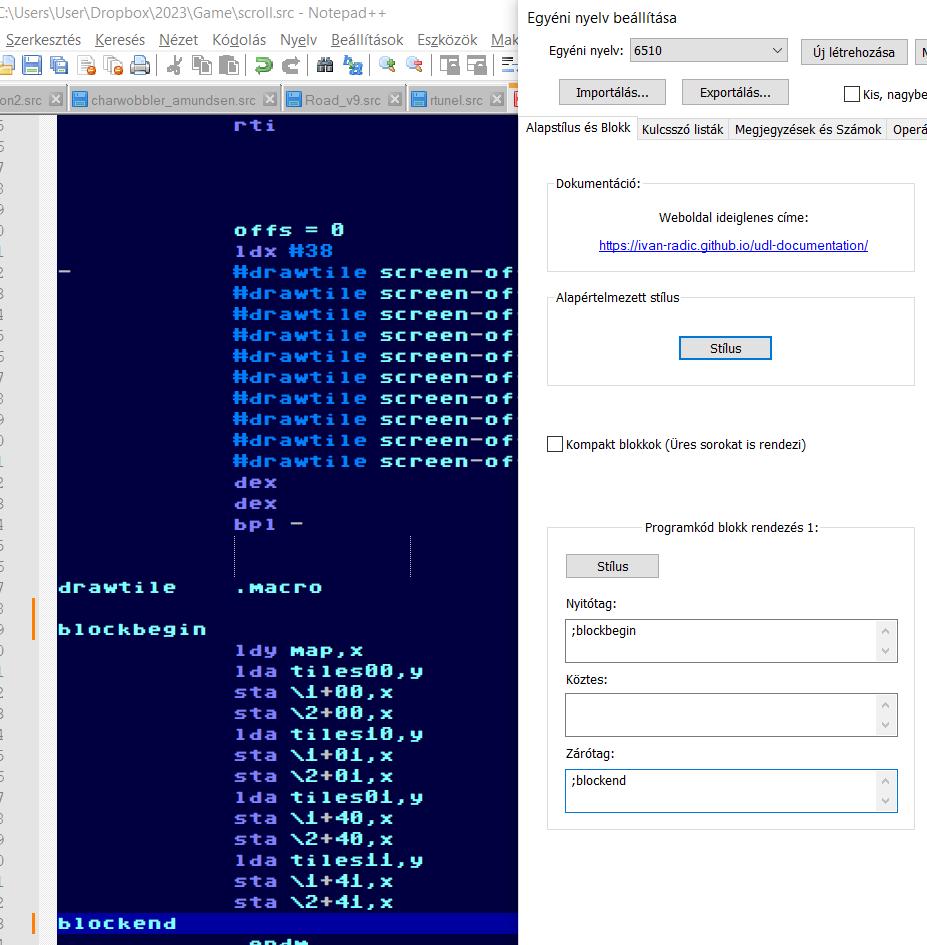 (image url)
 -
@waskoma said in strings starting with “;” ignored when given in codeblock start/end string definition:
this doesnt work because of the “;”
Right. If you have a semicolon in the UDL Open/Close boxes, then you have to have a semicolon in your source code, otherwise it won’t match. Why would you expect the syntax highlighter to see
;blockbeginin the UDL definition and somehow match that to justblockbeginin the source code text file? It looks for the whole term from the UDL box when searching in your text, and if the whole term isn’t in your text file, it won’t highlight anything.My example below shows it working if both the UDL and the source code have the semicolon:
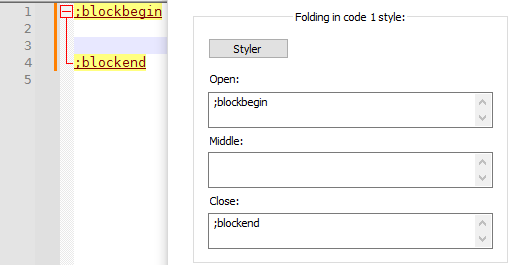
Here’s an example that lets it match either with or without the semicolon, which is maybe what you want:
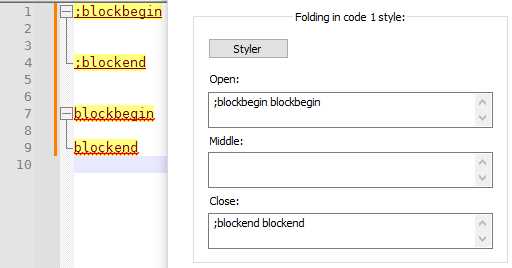
-
@waskoma said in strings starting with “;” ignored when given in codeblock start/end string definition:
compiler which uses ; for comments
I hadn’t remembered that you said it was in comments. You can have a separate definition for comment-based folding compared to code-based folding.
WIth example text
;blockbegin between comment blocks ;blockend outside blockbegin between code blocks blockend ; normal comment, no folding text- Folding in Code 1 Style:
- Styler = deep red foreground, pale yellow background; underline
- Open =
blockbegin - Close =
blockend
- Folding in Comment Style:
- Styler = green foreground, bold, underline
- Open =
blockbegin - Close =
blockend
- Comment & Number tab > Comment line style:
- Styler = green
- Open =
;
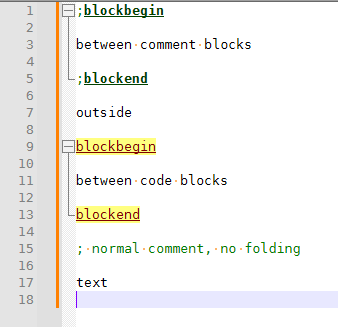
- Folding in Code 1 Style:
-
@PeterJones Thank you Peter for your help !
previously I have made a mistake with the screenshot, just to show you it really doesnt work:
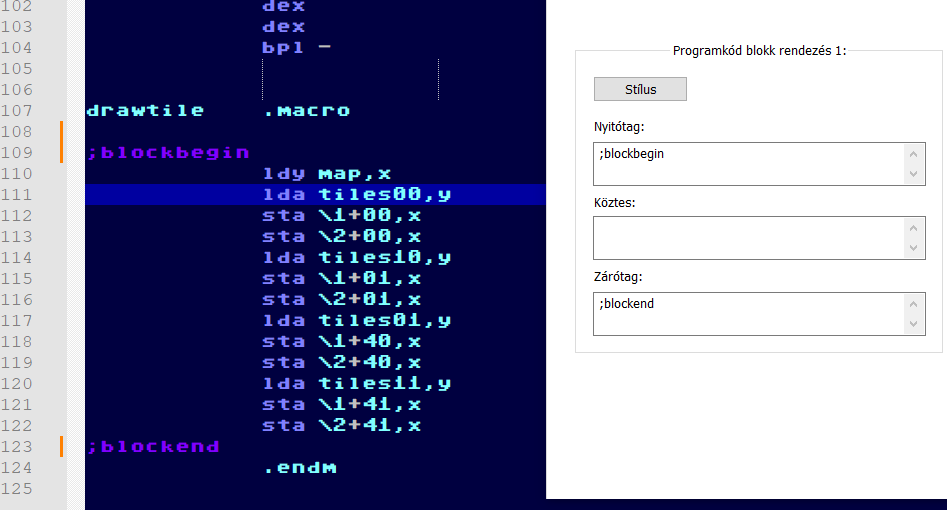
Secondly, I have realised what is the problem: Notepad++ decided to ignore “;” for codeblock string because I have defined it as comment. But that is just stupid, “;” is comment for the compiler and NOT for Notepad++ :D :(
anyway now if I can live without styling my comments, I can FINALLY use codeblocks again, which makes me extremely happy, as when coding, often a huge chunk of time goes by navigating the code, with folding this is a non issue.
Thanks again! :)
-
@waskoma said in strings starting with “;” ignored when given in codeblock start/end string definition:
But that is just stupid, “;” is comment for the compiler and NOT for Notepad++ :D
As my followon post suggested, I think that what you really want is “folding in comment”, not “folding in code 1”. That would allow you to syntax-highlight a normal comment and allow the blockbegin/blockend inside your comment to cause folding… the best of both worlds.
-
@PeterJones oh sorry, now I understand. can you send me a screenshot on how you achieved that:? I am unable to replicate it
-
@PeterJones ok sorry, and thank you for your patience, you have explained exactly what to do, and I’ve failed to understand, I’ve got the flu and my brain doesnt operate normally :D
so I have managed to achieve it and am REALLY happy. Gave up solving this a long long time ago (have already asked here and got answer it can not be done)
not related to this topic but can I ask more? I have hexadecimal numbers with prefixes $ or #$ and these numbers have abcdef letters in them, they are not recognised as numbers the moment it finds a non numeric character, is there a way to solve that ?
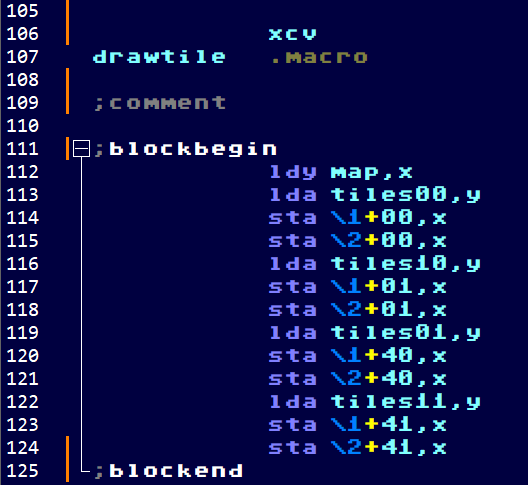
also what causes these orange vertical lines show up ? and how to style the codeblock opener closer + and line ? a million thanks :)
-
found the turn off display change history (orange vertical bars) :)
-
@waskoma said in strings starting with “;” ignored when given in codeblock start/end string definition:
so I have managed to achieve it and am REALLY happy. Gave up solving this a long long time ago (have already asked here and got answer it can not be done)
in 2016, it looks like you both forgot to come back and follow up on the conversation, so it was never resolved; that’s not quite the same as being told it cannot be done. Under this username, you have no other posts.
not related to this topic but can I ask more? I have hexadecimal numbers with prefixes $ or #$ and these numbers have abcdef letters in them, they are not recognised as numbers the moment it finds a non numeric character, is there a way to solve that ?
Prefix 2 is where you put the prefix you want before hex numbers – in your case,
$ #$will allow either $ or #$ as the prefix. Extras 1 is where you put the extra characters that can be a part of a hex number – in your caseA B C D E F a b c d e f(the comparison in UDL for that is case sensitive, so if you want it to match upper and lower case for hex digits, you have to include both upper and lower case)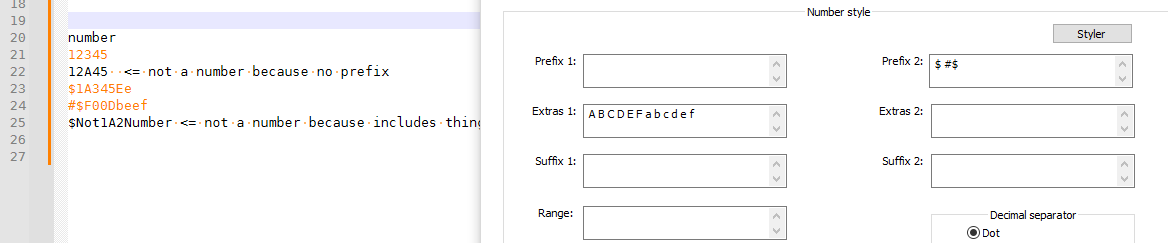
BTW: That’s in the UDL docs at https://ivan-radic.github.io/udl-documentation/ – which are linked from the UDL dialog – specifically, on the Numbers page. They give the example of how to make
0xABCwork, and from there, you really should have been able to generalize that to make$ABCor#$ABCwork.also what causes these orange vertical lines show up ? and how to style the codeblock opener closer + and line ? a million thanks :)
As you discovered, that’s the new Change History feature (v8.4.6), as described in our FAQ.
-
P PeterJones referenced this topic on
-
@waskoma said in Cant change cursor color, and latest version shortcut to start batch file claims it cant find it:
while we’re at it, some years ago probably it was you helping me to get code folding working I want to use:
;blockbegin
;blockendbut that doesnt work again, looking at it at 8.9.2 it seems to recognize it only when there are like above right in the next row to eachother.
allow folding of comments is checked. comment line is set to “,”
line comment position is allow preceding white space
I am quoting and replying to this here, because this is where it belongs:
It still works for me in v8.9.2, using the same color descriptions as I used three years ago:
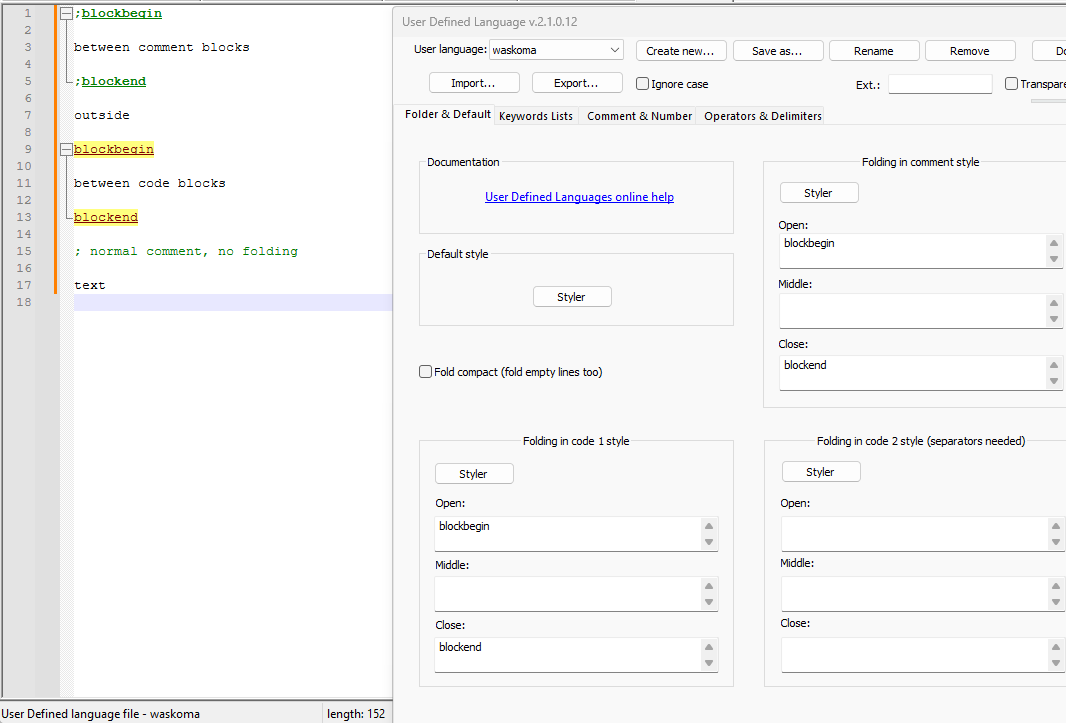
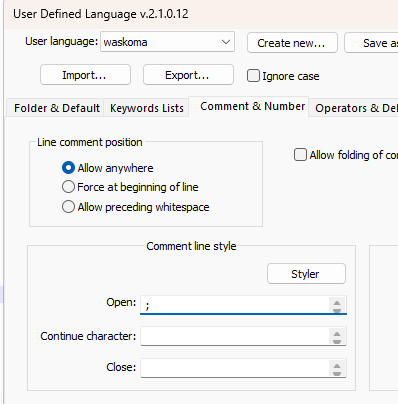
If you think you have text that doesn’t work with that, click the
</>button in the forum, and paste that text between the ``` lines
update: note that 8.9.2 actually has some bugs with regards to entering keywords: it would crash on long keywords. And, if my experiences just now were any indication, it also doesn’t necessarily save the edits to other fields, like the open/close for the folding or comment-line fields. But when I tried the bugfix build for my #17520 issue report, it allowed me to enter those other fields, and save them. So if you’re editing UDL, I actually recommend v8.9.1, not v8.9.2 (until the v8.9.3 is released with a fix)

Hello! It looks like you're interested in this conversation, but you don't have an account yet.
Getting fed up of having to scroll through the same posts each visit? When you register for an account, you'll always come back to exactly where you were before, and choose to be notified of new replies (either via email, or push notification). You'll also be able to save bookmarks and upvote posts to show your appreciation to other community members.
With your input, this post could be even better 💗
Register Login