Hindi Font Issue
-
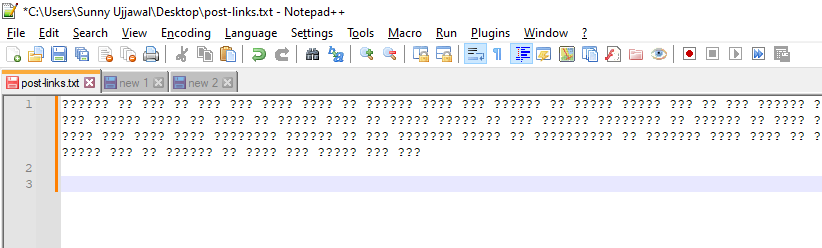
when i try to paste some Hindi content, only some question marks are displayed. How to fix it?
-
I don’t have an answer but there have been some relevant questions like yours which I will provide links to, Japanese font issue and font linking which may contain some ideas to try.
Terry
-
A few points to check:
- Make sure your file is set to a Unicode-capable encoding (UTF-8 or UTF-16)
- Check whether the font you are using has the glyphs to display your text
- Check if the Application you are copying from is capable of providing UNICODETEXT to the clipboard by pasting to Notepad (some older Apps may not)
-
@Sunny ,
I just used google translate to generate some Hindi text:
फुर्तीली भूरी लोमड़ी आलसी कुत्ते के उपर से कूद गई. I pasted that text in Notepad++, which I have set to default to UTF-8 for new documents.
It didn’t matter whether I had the Settings > Preferences > Misc > Use DirectWrite checkmarked or not, it still displayed properly. (My default font is DejaVu Sans Mono – but that font doesn’t have anything in the Devanagari section, so I think this is the font linking which @Terry-R mentioned)
-
It seems like an encoding issue rather than a font issue. Font issues tend to result in result in
▯being displayed.If my current npp tab is encoded as ANSI and I try to copy/paste UTF-8 content into that tab I often will get
?instead of the intended character(s). -
@mkupper said in Hindi Font Issue:
It seems like an encoding issue
Yes, I think you’re right. A fresh, default installation has Settings > Preferences > New Document set to UTF-8, and even “Apply to opened ANSI files” checkmarked. But if they have a config file that’s been upgraded many times, it might still use ANSI without them having set it; or if they have ever intentionally set that option to ANSI or to one of the pulldown character sets, then it will not be defaulting to UTF-8 for new files. And even if it’s on UTF-8, if they don’t have the “Apply to opened ANSI files” checkmarked or if they have Settings > Preferences > MISC > Auto-detect character encoding set to true, then when they open an existing file (which
post-links.txtmay have already been a file), it might not be opened as UTF-8.If @Sunny had included the status bar in the screenshot, it would have clarified a lot. As it is, @Sunny will have to answer whether the lower-right of the status bar says UTF-8 or something different:

If it says something different, then @Sunny can do Encoding > UTF-8 (if there aren’t any other characters than the
?that was shown) or Encoding > Convert to UTF-8 (if there are other characters), and then re-paste the text.


Hello! It looks like you're interested in this conversation, but you don't have an account yet.
Getting fed up of having to scroll through the same posts each visit? When you register for an account, you'll always come back to exactly where you were before, and choose to be notified of new replies (either via email, or push notification). You'll also be able to save bookmarks and upvote posts to show your appreciation to other community members.
With your input, this post could be even better 💗
Register Login