Saving a file saves the first new file instead of the unsaved file in the active window
-
Hi,
I seem to have an a problem, which might be settings related.
Whenever I save a new document or file while another new file is open, it saves the first new file instead of the one I have active.
Steps to reproduce:
- ctrl+n
- ctrl+n
- Save file
- Note how it saves new 1 and not new 2
Is there anyway to resolve this?
Debug info
Notepad++ v8.4.6 (32-bit)
Build time : Sep 25 2022 - 19:55:26
Path : C:\Program Files (x86)\Notepad++\notepad++.exe
Command Line : “C:\Users\jzant\Dropbox (GamePoint B.V.)\Uptown Bingo\03 - Game Design\Economy Balance\Configs (Server)\0.50.0 Rebirth\FTUE\ftueData.json”
Admin mode : OFF
Local Conf mode : OFF
Cloud Config : OFF
OS Name : Windows 11 (64-bit)
OS Version : 21H2
OS Build : 22000.1696
Current ANSI codepage : 1252
Plugins :
ComparePlugin (2.0.1)
mimeTools (2.8)
NppConverter (4.4)
NppExport (0.4)
NPPJSONViewer (1.40) -
Unless there’s more to the story, I can’t reproduce this on N++ 8.5.4 (current version as of this writing).
“More to the story” might be an elaboration on “save file” and beyond – your reproduction steps become vague at this point.
-
Thank you for taking the time to reproduce.
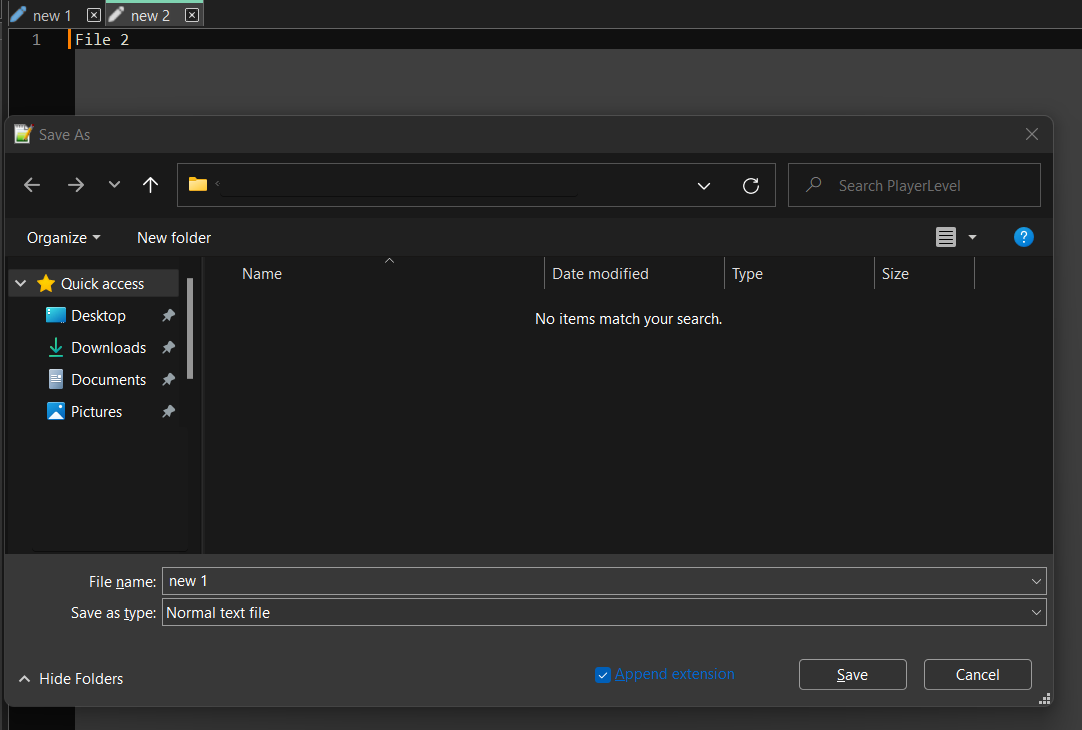
I think it specifically happens when I do ‘Save As’. Instead of saving ‘new 2’ which is the active window, it first saves ‘new 1’ and then ‘new 2’. I am starting to think this is a feature, but its an unexpected one. Or am I missing something?
-
From the new information it sounds to me like you are doing “Save All”, not “Save As”.
“Save All” would behave as you describe.
-
Oh wow, you are right, I feel silly right now. Thanks for clearing that up. I guess I have to get used to that shortcut.
-
@Justin-Zant said in Saving a file saves the first new file instead of the unsaved file in the active window:
I guess I have to get used to that shortcut.
Or change it.


Hello! It looks like you're interested in this conversation, but you don't have an account yet.
Getting fed up of having to scroll through the same posts each visit? When you register for an account, you'll always come back to exactly where you were before, and choose to be notified of new replies (either via email, or push notification). You'll also be able to save bookmarks and upvote posts to show your appreciation to other community members.
With your input, this post could be even better 💗
Register Login