Open Notepad++ in Different Workspace Without Switching
-
I’m using Windows 11 and have two workspaces, A and B. I have Notepad++ open in workspace A with multiple tabs for different files. When I switch to workspace B and right-click a file to select ‘Edit with Notepad++’, it opens the file in a new tab in the existing Notepad++ window in workspace A, causing the workspace to switch back to A.
What I want is for a new Notepad++ window to open in workspace B when I select ‘Edit with Notepad++’ on a file, while still keeping the existing Notepad++ window with its tabs in workspace A. Is there a way to achieve this behavior?
PS: Here’s my Notepad++ debug info, in case it’s useful:
Notepad++ v8.5.3 (64-bit) Build time : May 15 2023 - 06:09:36 Path : C:\Program Files\Notepad++\notepad++.exe Command Line : Admin mode : OFF Local Conf mode : OFF Cloud Config : OFF OS Name : Windows 11 Pro (64-bit) OS Version : 22H2 OS Build : 22621.1848 Current ANSI codepage : 1252 Plugins : Explorer (1.9.5) mimeTools (2.9) NppConverter (4.5) NppExport (0.4) -
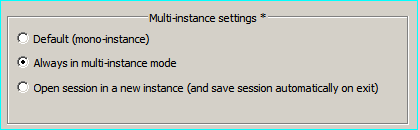
Probably you need to play a bit with
Menu Settings > Preferences > Multi-Instance & Date > Multi-instance settings
and see the option that best fits your needs.Screenshot follows:


Hello! It looks like you're interested in this conversation, but you don't have an account yet.
Getting fed up of having to scroll through the same posts each visit? When you register for an account, you'll always come back to exactly where you were before, and choose to be notified of new replies (either via email, or push notification). You'll also be able to save bookmarks and upvote posts to show your appreciation to other community members.
With your input, this post could be even better 💗
Register Login