Selecting text after =
-
Hey,
I’d like to copy text in my file that is after = each line.
How can I do that?Example :
errorTitle=An error has occurred
confirmTitle=Confirmcontext.cut=Cut
context.copy=Copy
context.paste=Paste
context.delete=Delete
context.selectAll=Select allThanks.
-
- Open find/replace form, go to
Marktab (or use Ctrl+M, assuming that shortcut is not already overridden). - Enter
(?-s)(?<==).+, use theMark allcommand. - All text on each line after the first
=character will be marked. - Use the
copy marked textcommand, and paste the copied text in a new file.
If you want to select everything after the first
=in a line, that requires a scripting solution discussed here. - Open find/replace form, go to
-
@Mark-Olson said in Selecting text after =:
If you want to SELECT everything after the first = in a line
And, if that’s what’s wanted, please (OP) state WHY that is valuable to do…
-
It didn’t work, I don’t know why.
It’s a huge .properties document where I’d like to translate each text after the = in another language.
There’s also things like that :errors.openUrlError=Failed to open URL: {0}
errors.openDirError=Unable to open ‘’{0}‘’. Maybe it doesn’'t exist?
errors.reportErrorPreface=To report this error, please provide:\n\n -
@drkkk-whrrr said in Selecting text after =:
It didn’t work, I don’t know why.
It works:
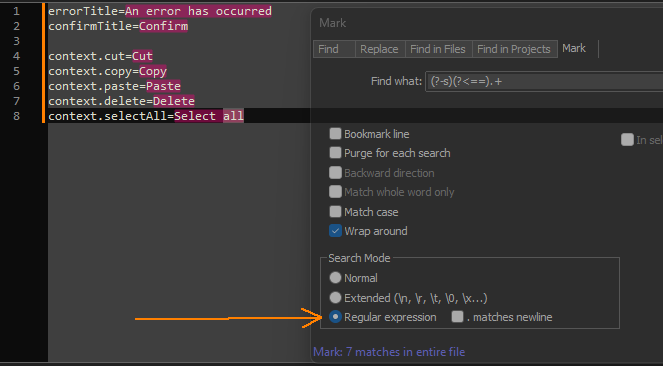
Probably reference the orange arrow.
-
@Alan-Kilborn Thank you!



Hello! It looks like you're interested in this conversation, but you don't have an account yet.
Getting fed up of having to scroll through the same posts each visit? When you register for an account, you'll always come back to exactly where you were before, and choose to be notified of new replies (either via email, or push notification). You'll also be able to save bookmarks and upvote posts to show your appreciation to other community members.
With your input, this post could be even better 💗
Register Login