Multi-edit
-
Sorry if I missed how to use this functionality.
For instance (using the example), if I double-click “obj” they get highlighted but what I do next? Say if I wanted to add “ject” to change to “object”?
It didn’t seem obvious looking at the GIF how to multi-carat edit. In the version I downloaded I cannot see the option in the Settings > Preferences > Editing > ☑ Enable Multi-Editing (Ctrl+Mouse click/selection) checkbox.
-
@Alan-Chan said in Multi-edit:
It didn’t seem obvious looking at the GIF how to multi-carat edit.
That’s because is isn’t obvious.
There probably needs to be a tutorial; the GIF alone isn’t worth much without telling people how it is done.In the version I downloaded I cannot see the option in the Settings > Preferences > Editing > ☑ Enable Multi-Editing (Ctrl+Mouse click/selection) checkbox.
That checkbox has disappeared because multi-editing is enabled always as of N++ 8.6.
-
@Alan-Kilborn
Thanks for confirming that it’s always enabled.
Now, where do I find how to use it? (in particular the 2nd example) rather than the column edit which I figured out. -
@Alan-Chan said in Multi-edit:
Now, where do I find how to use it?
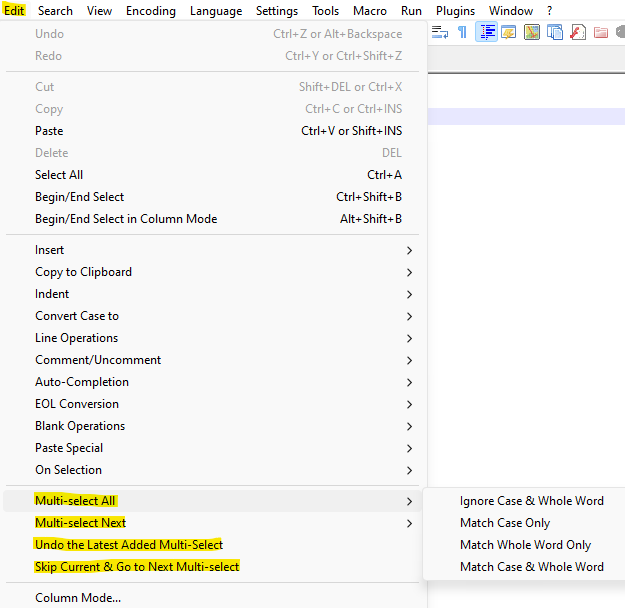
Barring someone creating a tutorial (which I’m not going to do because I’m not much interested in the multi-editing stuff), you might have a look at the supported new commands involving it, and experimenting with them:
-
@Alan-Chan said in Multi-edit:
I double-click “obj” they get highlighted but what I do next? Say if I wanted to add “ject” to change to “object”?
For the specific circumstance you described, without creating a whole tutorial
- Double-click a whole word instance of
obj - Use the Edit > Multi-Select All submenu as @Alan-Kilborn suggested
- Match Whole Word Only would match any instance of
objorObj, but notsubobjorobjuice - Match Case & Whole Word would match any instance of
obj, but notObjorsubobjorobjuice - this will fully select all the matches
- Match Whole Word Only would match any instance of
- At this point, you could “type over” by just typing
object, and all the selected instances will be changed.
The User Manual will soon have brief descriptions of those new Edit-menu submenus, but that’s usually not triggered until “auto-update” is triggered – my guess is that will be happening in the near future.
- Double-click a whole word instance of
-
BTW, the real-world way to use these menu commands is to tie keyboard shortcuts to the ones you’ll use with regularity. No one would actually use these commands from the menus.
-
@Alan-Kilborn said in Multi-edit:
the real-world way to use these menu commands is to tie keyboard shortcuts to the ones you’ll use with regularity
@Alan-Chan
For example, I use:Multi-select ALL => Match Case & Whole Word :
Ctrl+Shift+.
Multi-select Next => Match Case & Whole Word :Ctrl+.
Undo the Latest Added Multi-Select :Ctrl+,
Skip Current & Go to Next Multi-select :Ctrl+Alt+.The
,and.because those keys also have the<and>respectively soCtrl+.is like selecting the current word and subsequentCtrl+.keystrokes select the next (forward in the document - as in an “arrow” to the right>) match. TheAltmodifier skips the current one and theShiftmodifier selects all.And of course when doing this, I’m 99% always expecting to match the exact word; hence, “Match Case & Whole Word”.
Cheers.
PS: Should also note that I had these exact keystrokes mapped to the NppExec scripts I had that did this exact functionality before it became “native” to N++, so they are muscle memory at this point as I’ve been multi-editing this way for years now.
-
@Alan-Kilborn said in Multi-edit:
No one would actually use these commands from the menus.
I cannot remember any more keystrokes, so I’m not likely to assign a keyboard shortcut. Instead, if I find myself wanting to use the new features, I’ll probably add them to the contextMenu.xml, so they’re just a local right-click away.
… But yes, if I do end up using them often, it will need to be easier access than having to move my mouse cursor up to the main menu system.




Hello! It looks like you're interested in this conversation, but you don't have an account yet.
Getting fed up of having to scroll through the same posts each visit? When you register for an account, you'll always come back to exactly where you were before, and choose to be notified of new replies (either via email, or push notification). You'll also be able to save bookmarks and upvote posts to show your appreciation to other community members.
With your input, this post could be even better 💗
Register Login