Notepad++ does not change after update
-
Notepad++ does not change after update.
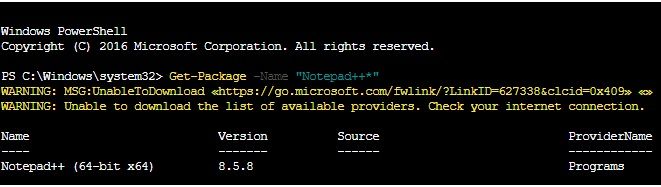
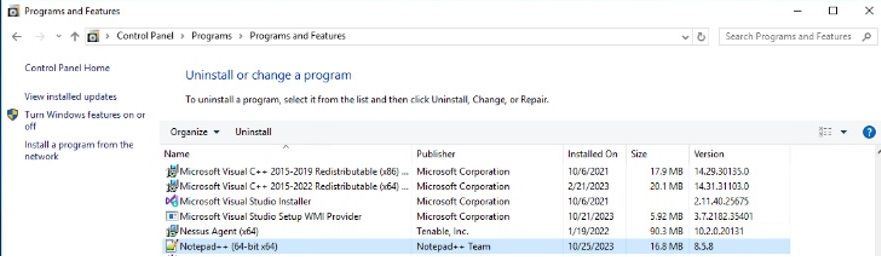
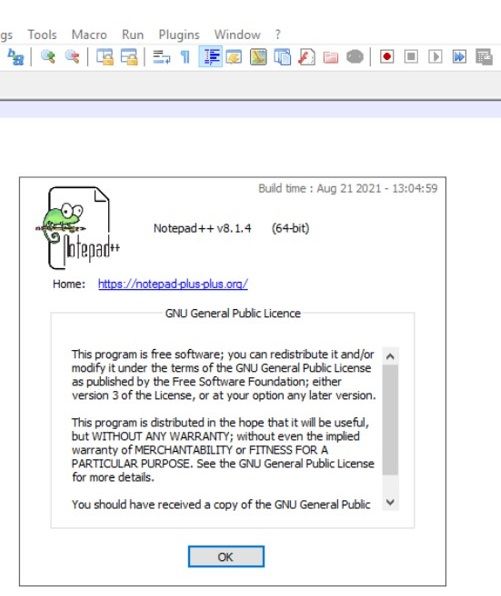
We have updated the notepad++ version to 8.6 from 8.1.4 using below powershell script .We have observed Notepad++ version is not update and it is showing 8.1.4 inside the application.
But inside the control panel it showing 8.6 or 8.5.8.This problem is with all Notepad++ version 8.1.4 or 8.4.5 etc .
Can someone help in this issue and provide us fix .
Powershell code to update notepad++
$notepadInstalled = $(Get-Package -Name "Notepad++*").Version 2>$null if ($notepadInstalled -eq $null) { Write-Host "Notepad++ is not Installed." } elseif( $notepadInstalled -eq '8.6' ) { Write-Host "Notepad++ is already updated to $notepadInstalled." } else { Write-Host "Updating Notepad++ from $notepadInstalled." # Modern websites require TLS 1.2 [Net.ServicePointManager]::SecurityProtocol = [Net.SecurityProtocolType]::Tls12 #requires -RunAsAdministrator # Let's go directly to the website and see what it lists as the current version $BaseUri = "https://notepad-plus-plus.org" $BasePage = Invoke-WebRequest -Uri $BaseUri -UseBasicParsing $ChildPath = $BasePage.Links | Where-Object { $_.outerHTML -like '*Current Version*' } | Select-Object -ExpandProperty href # Now let's go to the latest version's page and find the installer $DownloadPageUri = $BaseUri + $ChildPath $DownloadPage = Invoke-WebRequest -Uri $DownloadPageUri -UseBasicParsing # Determine bit-ness of O/S and download accordingly if ( [System.Environment]::Is64BitOperatingSystem ) { $DownloadUrl = $DownloadPage.Links | Where-Object { $_.outerHTML -like '*npp.*.Installer.x64.exe"*' } | Select-Object -ExpandProperty href -Unique } else { $DownloadUrl = $DownloadPage.Links | Where-Object { $_.outerHTML -like '*npp.*.Installer.exe"*' } | Select-Object -ExpandProperty href -Unique } Write-Host "Downloading the latest Notepad++ to the temp folder" Invoke-WebRequest -Uri $DownloadUrl -OutFile "$env:TEMP\$( Split-Path -Path $DownloadUrl -Leaf )" | Out-Null Write-Host "Installing the latest Notepad++" Start-Process -FilePath "$env:TEMP\$( Split-Path -Path $DownloadUrl -Leaf )" -ArgumentList "/S" -Wait $notepadInstalled = $(Get-Package -Name "Notepad++*").Version 2>$null Write-Host "Notepad++ updated to $notepadInstalled." } -
Hi @AshutoshTiwari2017 ,
It would help if you can share the “Debug Info…” that is available from the ‘?’ menu of Notepad++I´d guess the Notepad++ instance you are opening (8.1.4) was installed in a different path to the one you are installing from the PowerShell script, so probbaly you have 2 different versions of Notepad++ in your system.
-
@AshutoshTiwari2017 said in Notepad++ does not change after update:
Start-Process -FilePath “$env:TEMP$( Split-Path -Path $DownloadUrl -Leaf )” -ArgumentList “/S” -Wait
As you are using the silent N++ installation, it could be connected to:
https://github.com/notepad-plus-plus/notepad-plus-plus/issues/10189v8.6+ installers contain a fix for such partial incomplete installations:
https://github.com/notepad-plus-plus/notepad-plus-plus/commit/5c80be7667eb84f0345ef827cab030724c2e13c6But still - the N++ cannot be silently installed/upgraded when an instance of N++ is running. To allow this a new installer switch “/closeRunningNpp” needs to be implemented for the silent installations.

Hello! It looks like you're interested in this conversation, but you don't have an account yet.
Getting fed up of having to scroll through the same posts each visit? When you register for an account, you'll always come back to exactly where you were before, and choose to be notified of new replies (either via email, or push notification). You'll also be able to save bookmarks and upvote posts to show your appreciation to other community members.
With your input, this post could be even better 💗
Register Login