NppEventExec - can not open specified file or it is empty
-
Hello Friends,
I’m trying to format some text on opened files automatically. This for I created a macro named “fold” (it basically finds some text and presses a shortcut to fold the section). Now I want to use NppEventExec to execute this macro whenever a *.sdol-file was opened. My settings looking like that:
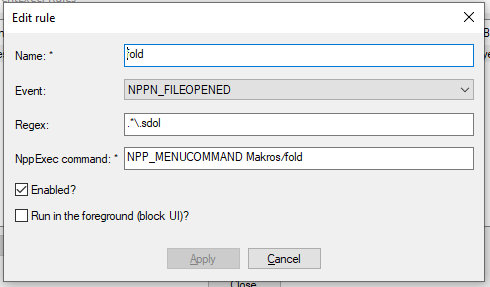
When I opened a sdol-file, I get this message:
NPP_MENUCOMMAND Makros/fold" "2490221703168" "C:\Users\me\Desktop\my_file.sdol"
- can not open specified file or it is empty
================ READY ================
Does somebody know, what that means and how to fix it?
The thing is, the macro itself is working fine as well as th NppExec-Command when I use the NppExec-Plugin… -
You can not execute NppExec script commands from an NppEventExec rule. You have to write a script in NppExec (use the dialog under
(menu) Plugins -> NppExec -> Execute) and save it under a descriptive name from within that dialog. Then you can use that name in the NppExec command input field of the NppEventExec rule dialog. -
@dinkumoil Thanks! That works. Imo, the Expression “NppExec command” is a little misleading…

Hello! It looks like you're interested in this conversation, but you don't have an account yet.
Getting fed up of having to scroll through the same posts each visit? When you register for an account, you'll always come back to exactly where you were before, and choose to be notified of new replies (either via email, or push notification). You'll also be able to save bookmarks and upvote posts to show your appreciation to other community members.
With your input, this post could be even better 💗
Register Login