Get my UDL to be listed in the style configurator
-
I would like to have files opened that have an extension for which I have defined a UDL to open with a different background colour. This an be done for any of the list of supported languages in the “Settings/Style Configurator”, but how do I get my UDL to show up in that list?
Thanks -
This an be done for any of the list of supported languages in the “Settings/Style Configurator”, but how do I get my UDL to show up in that list?
UDL styling (setting of colors) is done in Language > User Defined Language > Define your language. UDL does not use the Style Configurator.
I would like to have files opened that have an extension for which I have defined a UDL to open with a different background colour.
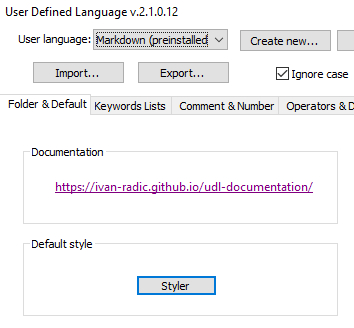
The background for a UDL is defined in Language > User Defined Language > Define your language: switch to Folder & Default tab, and in Default style click the Styler button.
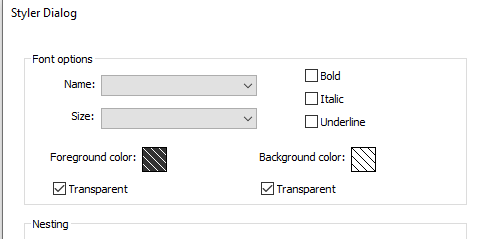
… If you leave it Transparent, it inherits the default background from the active theme. If you uncheckmark Transparent, you can set the Background color as desired. -
@PeterJones
Thanks for the quick response and explanation!

Hello! It looks like you're interested in this conversation, but you don't have an account yet.
Getting fed up of having to scroll through the same posts each visit? When you register for an account, you'll always come back to exactly where you were before, and choose to be notified of new replies (either via email, or push notification). You'll also be able to save bookmarks and upvote posts to show your appreciation to other community members.
With your input, this post could be even better 💗
Register Login