Ctrl+Alt+S Save As... stopped working
-
@markjessensap
I can’t replicate this on my 8.6.4 install.- Does that command work when you select
File->Save As...from the main menu? - Does it matter whether you run Notepad++ without plugins?
- Does that command work when you select
-
Thanks Mark,
Manually using Save As… works fine as always. It’s only the KB shortcut that isn’t working.
Let me look into starting without plugins.
-
OK, starting with “C:\Program Files\Notepad++\notepad++.exe” -noPlugin
disabled all the plugins, but Ctrl+Alt+S still doesn’t work.Manually using File > Save As… works.
Not sure what to try next.
-
@markjessensap said in Ctrl+Alt+S Save As... stopped working:
Not sure what to try next.
You said the shortcut mapper looked right… but does it show just normal, or is it highlighted red (indicating you have a shortcut conflict somewhere)?
Download an official portable zipfile, unzip to a directory, and try running that portable copy. Does it work there?
- If it does, then something in your configuration for your installed version is wrong, and you will need to investigate that more.
- If it does not, then most likely something external to Notepad++ is causing Notepad++ to not receive
Ctrl+Alt+S- I would check for AutoHotKey or other applications that create global keyboard shortcuts, or can hijack keystrokes in other applications
- When I have used Remote Desktop to connect to my computer, the Alt key can be hijacked by the Remote Desktop interface, and won’t pass through to the remote machine, so I cannot use
Altshortcuts in a remote Notepad++ instance; so if you’ve got something like Remote Desktop or VNC or a Virtual Machine or other such wrapper, yourAltmay be hijacked.
If you never find the culprit, you could at least do a workaround for yourself, and just change the keyboard shortcut for Save As… to some memorable-for-you shortcut that’s different than the default
Ctrl+Alt+S. -
@markjessensap said in Ctrl+Alt+S Save As... stopped working:
OK, starting with “C:\Program Files\Notepad++\notepad++.exe” -noPlugin
disabled all the plugins, but Ctrl+Alt+S still doesn’t work.Manually using File > Save As… works.
Not sure what to try next.
To attempt to narrow down the problem, I would try a couple things just as a test.
First — does Ctrl+S work to save? If you open a new tab and type a couple letters, then use Ctrl+S, does the Save As dialog open?
Assuming those things work as expected:
In the shortcut mapper, remove Ctrl+Alt+S from Save As…; then try Ctrl+Alt+S and make sure it doesn’t do anything. Assuming it doesn’t:
Remove Ctrl+S from Save, then set Save to Ctrl+Alt+S. See if Ctrl+Alt+S now saves. Assuming it does:
Set Save As… to Ctrl+S and see if Ctrl+S now opens the Save As… dialog.
I’m not sure what to expect or what various results will mean, but if it were me, that’s what I would do next to try to figure out whether the problem is with the command, the shortcut or something else.
-
Maybe some external app running hijacked that combo. If this is the case, this will help: https://github.com/ITachiLab/hotkey-detective
Just launch the HotkeyDetective.exe with admin-rights (right-click > Run as administrator), press the problematic Ctrl+Alt+S combo and see:
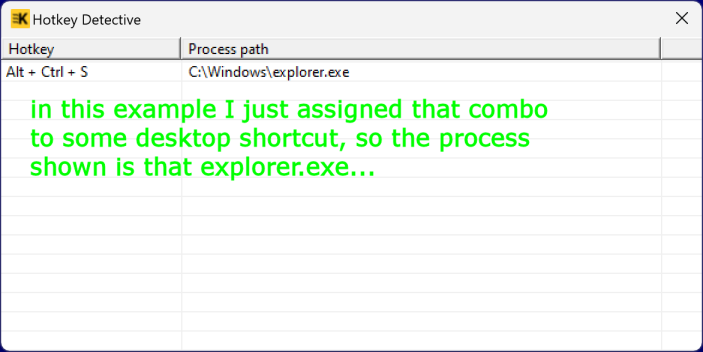
-
@PeterJones The shortcut mapper didn’t show any conflicts. Nothing red, just normal. The portable version works the same way. Ctrl+Alt+S does nothing. I checked the other apps and Windows and nothing else uses Ctrl+Alt+S. Oh, and I don’t use remote desktops.
Thanks!
-
@markjessensap said in Ctrl+Alt+S Save As... stopped working:
checked the other apps and Windows and nothing else uses Ctrl+Alt+S
Time to do the HotkeyDetective thing!
I don’t use remote desktops.
Why are you bringing that into the conversation?
-
@Coises Yes, Ctrl+S does Save As… in a new tab/doc.
I removed Ctrl+Alt+S, restarted Notepad++ and Ctrl+Alt+S still does nothing.
I put Ctrl+Alt+S back as Save As…, restarted Notepad++, and it still does nothing.
I tried to make Save As… Ctrl+S and that showed as a conflict with Save.
I cleared both Save As… and Save. I made Save As… Ctrl+S and it worked as Save As…I unfortunately don’t have the permissions to run hotkey-detective on this system.
Final solution: I cleared Save All and made Save As… Ctrl+Shift+S
-
I unfortunately don’t have the permissions to run hotkey-detective on this system.
I’m just going to settle for using Ctrl+Shift+S for Save As…
Thanks everyone for help!





Hello! It looks like you're interested in this conversation, but you don't have an account yet.
Getting fed up of having to scroll through the same posts each visit? When you register for an account, you'll always come back to exactly where you were before, and choose to be notified of new replies (either via email, or push notification). You'll also be able to save bookmarks and upvote posts to show your appreciation to other community members.
With your input, this post could be even better 💗
Register Login