How to set location of Styles and Config
-
Somehow my Preferences->Backup dialogue shows the Backup path at an unsuitable location, yet the field is not editable. How do I change this to, say, C:\Users\moi\AddData\Roaming\Notepad++\ where I think it should be? This, in order to have control over Styles.xml. Grateful any pointers.
Bernard. -
@Bernard-Boase said in How to set location of Styles and Config:
Preferences->Backup dialogue shows the Backup path at an unsuitable location, …, C:\Users\moi\AddData\Roaming\Notepad++\
Aside from missing the
backup\prefix, that is where it’s normally set to.Can you share a screenshot of that dialog, plus share the ?-menu’s Debug Info – that will help us to help you.
This, in order to have control over Styles.xml
The config files don’t go in the backup directory. See User Manual : Config Files Location for more
-
Thanks.
Here’s a snap of the problem dialogue showing the Backup path, and I confirm that that field is not editable (here and at the moment!).
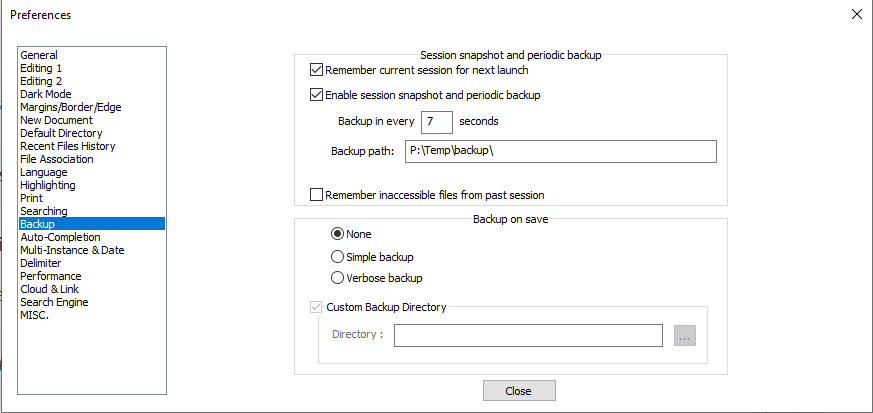 .
.If it’s not editable here, perhaps it can be set elsewhere?
-
… and the Debug info:
Notepad++ v8.6.5 (64-bit)
Build time : Mar 29 2024 - 17:04:43
Path : C:\Program Files\Notepad++\notepad++.exe
Command Line :
Admin mode : OFF
Local Conf mode : OFF
Cloud Config : P:\Temp
Periodic Backup : ON
OS Name : Windows 10 Home (64-bit
OS Version : 22H2
OS Build : 19045.4291
Current ANSI codepage : 1252
Plugins :
mimeTools (3.1)
NppConverter (4.6)
nppcrypt (1.0.1.6)
NppExport (0.4) -
… and to clarify: if I make a change to Settings->Style configurator then Save & Close, both Config.xml and Stylers.xml get put or updated into P:\Temp instead of somewhere specifically associated with NPP and its next invocation.
-
@Bernard-Boase said in How to set location of Styles and Config:
Cloud Config : P:\Temp
You set the Settings > Preferences > Cloud & Link > Cloud Config directory to
P:\Temp, which is literally you telling Notepad++ to store configuration files there instead of in AppData. If you want it to use AppData, remove the Cloud Config setting. -
Found the answer! Preferences->Cloud & Link dialogue had ‘Set cloud location’ pointing to a local cloud mirror (p:\Temp) On correcting this to ‘No cloud’ I think sanity has returned. Thank you for your forbearance.
-
Oops, our replies crossed. Thanks again for your help.


Hello! It looks like you're interested in this conversation, but you don't have an account yet.
Getting fed up of having to scroll through the same posts each visit? When you register for an account, you'll always come back to exactly where you were before, and choose to be notified of new replies (either via email, or push notification). You'll also be able to save bookmarks and upvote posts to show your appreciation to other community members.
With your input, this post could be even better 💗
Register Login