Changing foreground color of strings
-
Long-time NP++ user, first time poster.
In both .HTML and .PY files, and presumably others, strings are displayed in a light grey color that is very hard to read on some displays. I’d like to change to a different color, but I cannot find the correct setting in Settings / Style Configurator. I’ve read the help, and looked everywhere that seems sensible to me, but there is no String type I can find.
I uninstalled NP++ and re-installed it with no change in behavior.
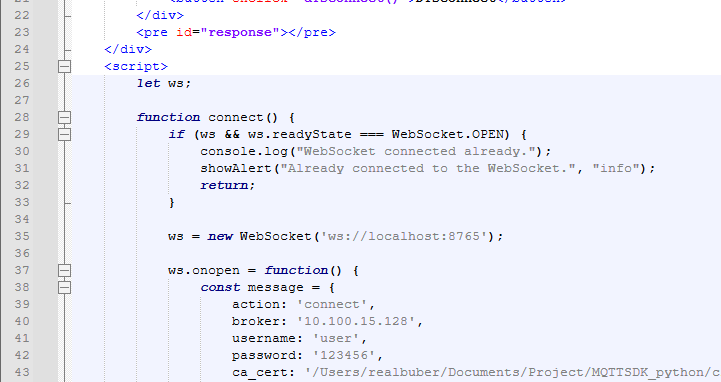
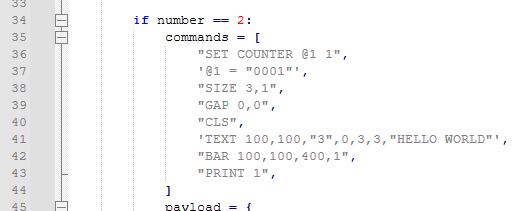
Here are two screengrabs that illustrate.
First, a .HTML file:
Second, a .PY file:
Here is debug info from ? / Debug …
Notepad++ v8.6.9 (64-bit)
Build time : Jul 12 2024 - 05:09:25
Path : C:\Program Files\Notepad++\notepad++.exe
Command Line :
Admin mode : OFF
Local Conf mode : OFF
Cloud Config : OFF
Periodic Backup : ON
OS Name : Windows 11 Pro (64-bit)
OS Version : 23H2
OS Build : 22631.4037
Current ANSI codepage : 1252
Plugins :
mimeTools (3.1)
NppConverter (4.6)
NppExport (0.4)Thanks in advance.
-
@Karl-Perry said in Changing foreground color of strings:
I’ve read the help, and looked everywhere that seems sensible to me, but there is no String type I can find.
Style Configurator > HTML >
DOUBLE STRINGorSINGLE STRINGfor"double"or'single'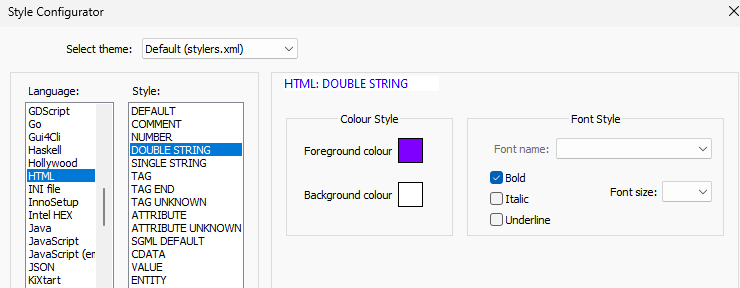
But what you show is actually a javascript string, not an HTML string. That is in the Style Configurator > Javascript (embedded), with
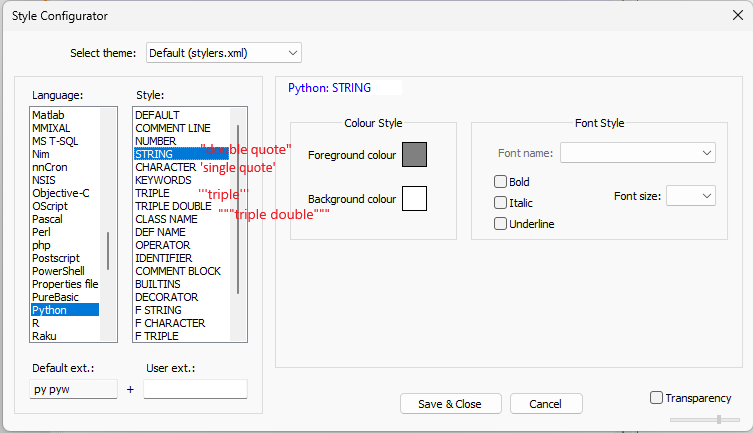
"DOUBLE STRING"or'SINGLE STRING'as the styles you want to change.Style Configurator > Python
"STRING"'CHARACTER''''TRIPLE'''"""TRIPLE DOUBLE"""- and the
F-variants lower down for python3 f-strings
-
@PeterJones Thank you! I’m not a web developer, I’m a software product manager so didn’t know about the embedded JavaScript.
All fixed now.


Hello! It looks like you're interested in this conversation, but you don't have an account yet.
Getting fed up of having to scroll through the same posts each visit? When you register for an account, you'll always come back to exactly where you were before, and choose to be notified of new replies (either via email, or push notification). You'll also be able to save bookmarks and upvote posts to show your appreciation to other community members.
With your input, this post could be even better 💗
Register Login