Same opening character but different closing character in a UDL?
-
I want to style the lines that begin with “-” and end with “;” as yellow, and the lines that begin with “-” but end with “:” as bold and italics.
Somehow that doesn’t seem to work, not even tinkering with the nesting option for both styles:
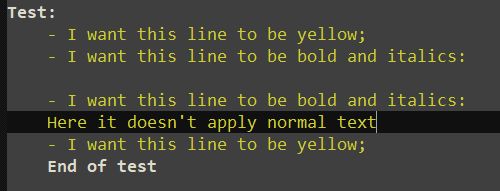
What do I have to do?
-
Somehow that doesn’t seem to work, not even tinkering with the nesting option for both styles:
I believe the underlying logic in the UDL parser for Delimiters goes through the OPEN for each DELIMITER# until it finds a matching one, at which point it switches to that style, whether or not it finds the matching CLOSE (because EndOfFile is always a valid CLOSE for delimiters, in the UDL logic) – it’s not looking for the OPEN/CLOSE pair, but just for the OPEN.
Thus, if Delimiter1 and Delimiter2 both use the same OPEN, it will always choose Delimiter1.
If you could use something like
-;as your opening for the yellow, and-:as your opening for bold+italics, or-:for bold+italics and plain-for yellow, then it would be workable (as long as the longer-:was in the lower Delimiter# if you choose the latter pair)…Here’s an example with Delimiter1 =
-:to:, with Bold+Italic, and Delimiter2 =-to;with Yellow background (which in my light-mode is more visible; you can of course set colors as you want)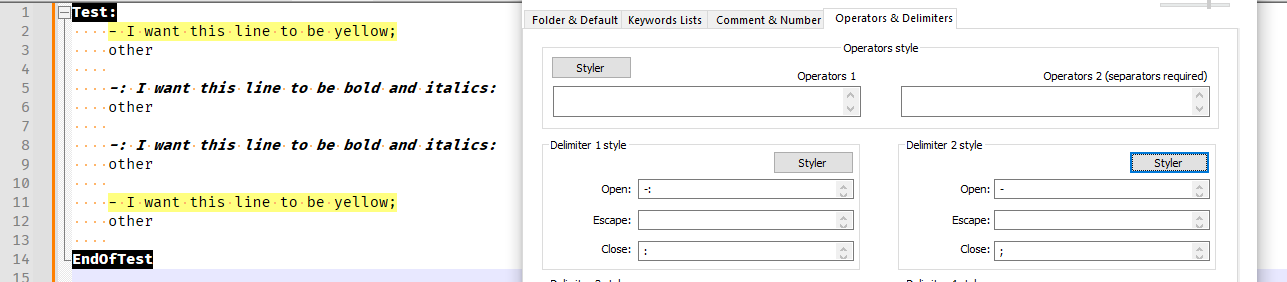
But UDL is not able to do exactly what you described. UDL has a fairly simplistic algorithm for deciding what to color as what; that’s one of the benefits of a full lexer or a Lexer Plugin, because you can do the more complex logic that is beyond the scope of UDL.
But as a compromise between the ease of UDL and the power of a Lexer Plugin, there’s the middle ground of UDL + EnhanceAnyLexer plugin – that plugin allows you to add foreground color (but not bold/italic/underline, yet) to any lexer using regular expressions.
It still won’t be exactly what you claimed, but if you’re willing to have yellow+bold+italic instead of just yellow, then I would suggest Delimiter1 =
-to((EOL))with bold+italics, and then use EnhanceAnyLexer to add the definition0x00CCCC = -.*?;\h*$, which will end up looking like:
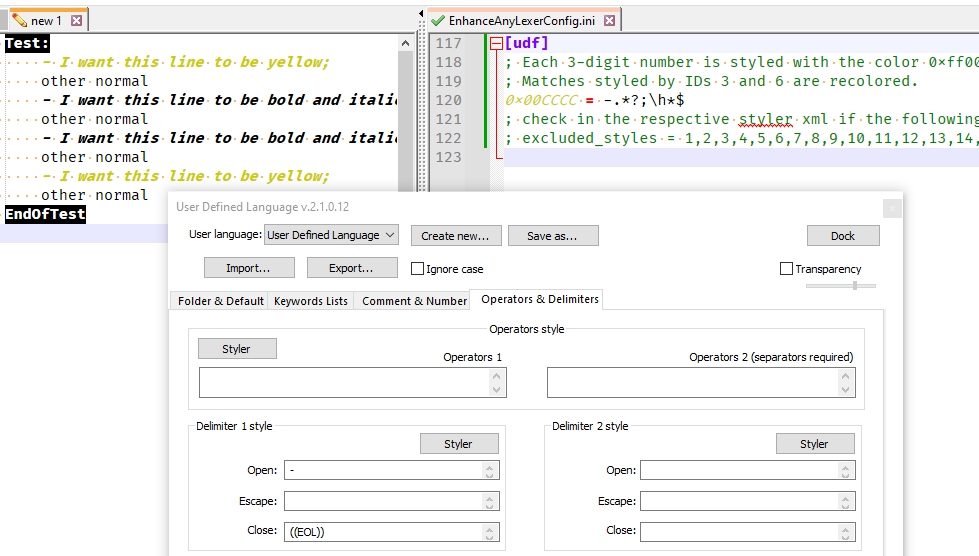
… which might be close enough for your needs.If your UDL is called
FrancescoUdl, then the header that EnhanceAnyLexer will create inEnhanceAnyLexerConfig.iniwill be[FrancescoUdl]instead of[udf]in my example – doing Plugin > EnhanceAnyLexer > Enhance current language will always create or jump to the appropriate[languageHeader]section in the config file; mine was called[udf]because that’s the underlying name if you choose Language ==User-Definedat the end of the Language MenuAnd until you are trying to add extra logic about where EnhanceAnyLexer will or will not apply a given color=regex definition, I recommend always commenting out the
excluded_stylesrow using the;prefix, as shown (it defaults to excluding most styles, which is may be confusing to a new user) -
@PeterJones
Thanks, I have changed the beginning of line character for now, since it seemed the easiest thing to do. I will definitely look into the Lexer plugins, they seem interesting.
I was doing all this to basically create an UDL that automatically styles lists, with some basic options for done/to do/doing options.
Do you think it would be something useful to share with the rest of the community? -
Do you think it would be something useful to share with the rest of the community?
There is a TODO.txt UDL in the User Defined Languages Collection already; and if you have a different angle-of-attack for lists/todo/done choices, it would be reasonable to share it as another UDL in that Collection, to give people more options.


Hello! It looks like you're interested in this conversation, but you don't have an account yet.
Getting fed up of having to scroll through the same posts each visit? When you register for an account, you'll always come back to exactly where you were before, and choose to be notified of new replies (either via email, or push notification). You'll also be able to save bookmarks and upvote posts to show your appreciation to other community members.
With your input, this post could be even better 💗
Register Login