Column mode edit is sticky and needs Esc to leave
-
The column mode as described in the online manual is exactly what I want and is how it used to work. Now when you select a column, if you use the arrow keys the selector moves to what you did not intend to select. I often make a big mess so thank you for undo. If I remember to hit Esc when I am done with column mode all is well. Does anyone else have this problem? What use is this sticky selection? Can you make it optional?
-
-
@Peter-Barnett said in Column mode edit is sticky and needs Esc to leave:
What use is this sticky selection?
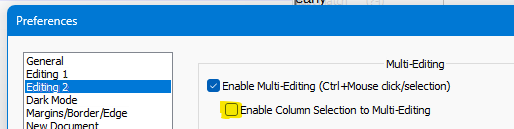
Alan showed you where to switch it off.
The use is for people who use multiple selections; it allows converting a column selection into a multiple selection. It was included when new features for working with multiple selections were added a few versions ago. For those of us who use rectangular selections often and multiple selections almost never, it’s more annoying than helpful. As I recall, the option to turn it off was added pursuant to our complaints.
If you never use multiple selections, unchecking the Enable Multi-Editing box will also restore another behavior that was changed. With Multi-Editing enabled, you cannot hold down the Ctrl key, then click and drag in a selection to copy it. You must begin dragging, then press and hold Ctrl. (Ctrl first is used to remove or replace a selection from a multiple selection.) The familiar behavior, in which you can press and hold Ctrl before or after you begin dragging, works when the box is not checked.



Hello! It looks like you're interested in this conversation, but you don't have an account yet.
Getting fed up of having to scroll through the same posts each visit? When you register for an account, you'll always come back to exactly where you were before, and choose to be notified of new replies (either via email, or push notification). You'll also be able to save bookmarks and upvote posts to show your appreciation to other community members.
With your input, this post could be even better 💗
Register Login