Cannot select bold character in replace in files
-
Hi, so I have hundreds of html files (from epub) where there was
 written by mistake. I want to remove this from all the html files.
I was able to replace the normal unnecessary texts from the documents.
But for some reason, I cannot get any hits when I try to find and replace $1!I have tried all the search mode in Find in Files as well as tried to search <bold>$1!</bold>, but it didn’t work.
in the page source of the html files, it shows: <strong>$1</strong>! for that. but even using this to search in notepad ++ didn’t work.Thank you in advance.
-
Have you opened one of the html files in Notepad++ to look for this text? Not using the find function but visually looking for it.Possibly the actual code is different to what you think it is.
Could you copy a few lines from a file containing this text and paste here?
Terry
-
I had an inkling, and it seems to have paid off.
In HTML, the dollar sign ($) is represented by the character entity $ or the HTML code $.Terry
-
seems like I only removed the text of the hyperlink, but the link is still there. is there a way to remove the link as well?okay, I can select the <a xxxxxxxxxx > the hyperlink and replace it. but still cannot select the $1! -
I just did some testing as I’m not convinced on what you see in the image, especially since you say you had tried that but got no selections.
As a suggestion, select in that file the
<strong>......!string. Copy that to the Find function and click on “Count”. If it does indeed get a number other than 0 (it should get 1 at least) then use that across the rest of the files to remove the entries.Terry
-
@Terry-R
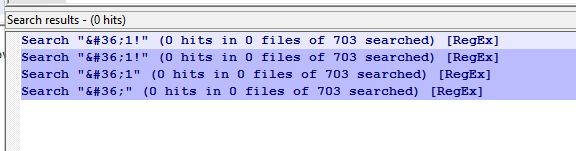 I got this when I searched for it. even just searching $ gave no result.
I solved it. I just selected match case with the <strong>xxx and it finally found it.
Thank you.
-
@Game-Movies said in Cannot select bold character in replace in files:
I just selected match case with the <strong>xxx and it finally found it.
Glad you have solved it. The options “Match Case” “Match whole word Only” and “Wrap Around” are very important. I usually leave them off and make sure the cursor is at the start of the file.
Terry
-
This is indeed what your data looks like:
<strong>$1</strong>!Your search screen capture shows that you are using Regular expression search mode. This isn’t going to allow you to match the
$as that is a special character.You’d want:
<strong>\$1</strong>!
But if you remove that, wouldn’t you also want to remove the line (now empty) that it is on as well? And what about the
<p>and</p>lines that wrap it?I get the sense that you are just kind of hacking at this, and are likely to end up with a mess in the end.



Hello! It looks like you're interested in this conversation, but you don't have an account yet.
Getting fed up of having to scroll through the same posts each visit? When you register for an account, you'll always come back to exactly where you were before, and choose to be notified of new replies (either via email, or push notification). You'll also be able to save bookmarks and upvote posts to show your appreciation to other community members.
With your input, this post could be even better 💗
Register Login