Advice for Backup settings with AutoSave installed
-
TL;DR: Today I installed AutoSave with settings “loses focus” & “All open files”. Question: What do you recommend for Settings » Preferences » Backup? I’m thinking I should deselect everything, but I’m not sure. Thanks!
Note: Today I carefully read the two helpful guides listed below. Why didn’t I do this in the beginning? :^|
https://community.notepad-plus-plus.org/topic/21782/faq-periodic-backup-vs-autosave-plugin
https://npp-user-manual.org/docs/preferences/#backupMy current settings:
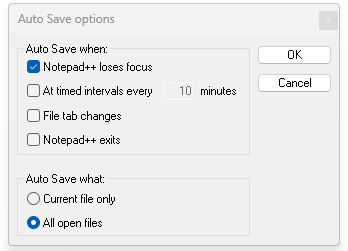
and:
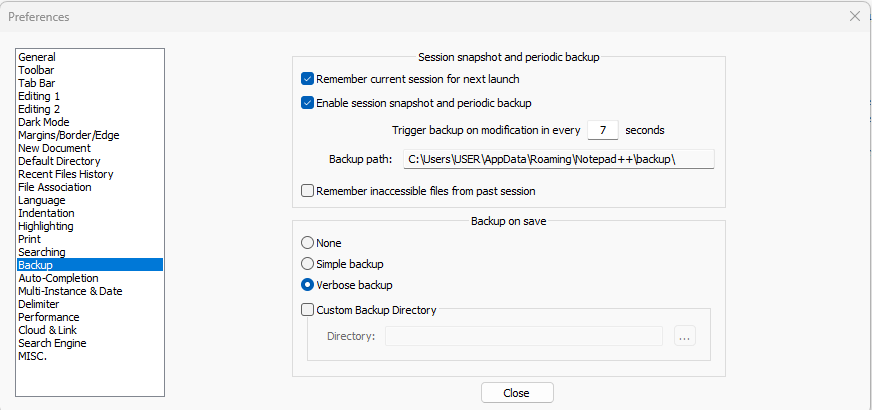
Background
I’m pretty good about regularly saving Notepad++ files, but for those times when I hastily close down my computer, I want to have a backup of not-recently-saved files. I did not read the manual carefully enough in the past, so I did not have things set up very well as I discovered today.
Today I searched for a file and found only a .bak file, which I cannot open, probably because it doesn’t have anything in it (?). It is not in %AppData%\Notepad++\backup\ .
The path is: C:\Users\USER\OneDrive - Mark D Worthen PsyD\Platform\Platform-Patients\Williams, Joe\nppBackup\8 July 2025 - JDW.txt.2025-07-14_125029.bak (I changed a couple of names for confidentiality, but the basic file name structure is unchanged.)
The most recent file in %AppData%\Notepad++\backup\ is from May (three months ago). So, I misunderstood backup and didn’t set things up properly.
-
@Mark-D-Worthen-PsyD said in Advice for Backup settings with AutoSave installed:
Today I searched for a file and found only a .bak file, which I cannot open, probably because it doesn’t have anything in it (?). It is not in %AppData%\Notepad++\backup\ .
Right. Because the
%AppData%\Notepad++\backup\is used for the session snapshot files, which don’t use the .bak extension; the .bak extension is only used for the backup-on-save options. The backup-on-save go in the same directory as the file (or in a subdirectory relative to the file, depending on settings). This is described in both the FAQ and the User Manual.The most recent file in %AppData%\Notepad++\backup\ is from May (three months ago)
That’s because that folder is only for the file tracking unsaved changes in the snapshot/periodic mode. As the FAQ descrbes, the instant you hit SAVE on a file, the snapshot/periodic file is deleted from the backup\ folder. This is described in the Built-in “Enable Session Snapshot and Periodic Backup” Feature of the FAQ, with more details for the particulars in Named Files and Unnamed Files sections just below it.
If you’ve got a file from May still in that directory, then either
- you’ve had snapshot/periodic enabled that whole time, and you’ve had a file with unsaved changes that’s never been saved in the past 3 months (unlikely),
- or (more likely), in May, you had snapshot/periodic enabled, and had unsaved changes in one file; then you turned off snapshot/periodic (which means that Notepad++ stops its auto-save to the backup folder, but doesn’t actually delete any active snapshots currently stored)
- or you reset the session or there was a crash/unexpected-reboot, which left Notepad++ not noticing that it hadn’t closed that file
What do you recommend
It really depends on your needs.
thinking I should deselect everything
I leave
☑ Remember current session for next launchcheckmarked, because that allows Notepad++ to remember which files were open last time – it doesn’t do the “unsaved files” tracking, but I don’t need that; but I like Notepad++ always opening whatever files I happened to last be editing.So I usually use AutoSave plugin with every 10 minutes (plus often one or both of lose-focus and/or change-tabs), set for All Open Files. In the builtin backup preferences, I remember the session, but don’t do the snapshot/periodic or the backup-on-save.
-
@PeterJones Thank you for explaining everything so well. I really appreciate it. All the best - Mark


Hello! It looks like you're interested in this conversation, but you don't have an account yet.
Getting fed up of having to scroll through the same posts each visit? When you register for an account, you'll always come back to exactly where you were before, and choose to be notified of new replies (either via email, or push notification). You'll also be able to save bookmarks and upvote posts to show your appreciation to other community members.
With your input, this post could be even better 💗
Register Login